
Supersonic SC-25
SuperSonic SC-25 2.0 Channel DVD Player with USB Input User Manual
Model: SC-25
Zavedení
Děkuji za nákupasing the SuperSonic SC-25 2.0 Channel DVD Player with USB Input. This manual provides essential information for the safe and efficient operation of your new device. Please read it thoroughly before use and retain it for future reference.
Bezpečnostní opatření
- Nevystavujte jednotku dešti ani vlhkosti, abyste předešli požáru nebo úrazu elektrickým proudem.
- Neotevírejte casing. Veškerý servis svěřte kvalifikovanému personálu.
- Zajistěte řádné větrání kolem jednotky.
- Nepokládejte jednotku na nestabilní povrchy.
- Během bouřek nebo pokud přístroj delší dobu nepoužíváte, odpojte napájecí kabel.
Obsah balení
Before setup, please verify that all items are present:
- 1 SuperSonic SC-25 DVD Player Unit
- 1 Dálkové ovládání
- 1 Uživatelská příručka (tento dokument)
- Napájecí kabel
- Audio/Video (AV) Cable
Pokyny pro nastavení
1. Připojení k televizi
- Ensure both the DVD player and your television are powered off.
- Connect one end of the AV cable (red, white, yellow connectors) to the corresponding output jacks on the back of the DVD player.
- Connect the other end of the AV cable to the corresponding input jacks on your television.
- For optimal video quality, ensure the television input is set to the correct AV channel (e.g., Video 1, AV1). The player supports NTSC video format.
2. Připojení napájení
- Plug the power cable into the AC IN port on the back of the DVD player.
- Zapojte druhý konec napájecího kabelu do standardní elektrické zásuvky.
3. Počáteční zapnutí
- Press the Power button on the front panel of the DVD player or on the remote control.
- Turn on your television and select the correct input source (e.g., AV1, Video 1) to see the DVD player's display.
Návod k obsluze
1. Přehrávání disku
- Stisknutím tlačítka OPEN/CLOSE na předním panelu nebo na dálkovém ovladači otevřete přihrádku na disk.
- Place a compatible disc (DVD, CD, VCD, SVCD, MP3, Picture CD, CD-R, CD-RW) onto the disc tray with the label side facing up.
- Stiskněte tlačítko OPEN/CLOSE znovu pro zavření přihrádky na disk. Přehrávač automaticky začne číst disk.
- Pro ovládání přehrávání použijte tlačítka PLAY, PAUSE, STOP, FAST FORWARD a FAST WIND na dálkovém ovladači.
- The player supports multi-level fast forward and backward scan functionalities.
2. Přehrávání z USB
- Insert a USB flash drive into the USB input port on the front of the DVD player.
- The player should automatically detect the USB device and display its contents. If not, use the SOURCE or USB button on the remote to switch to USB mode.
- Procházejte svým files using the arrow keys and SELECT/ENTER button on the remote.
- Přehrávač podporuje MP3 file format for audio playback.
3. Language and Subtitle Settings
- During DVD playback, press the AUDIO button on the remote to cycle through available audio languages (up to 8 languages supported).
- Press the SUBTITLE button on the remote to cycle through available subtitle languages (up to 32 subtitles supported).
Údržba
1. Čištění jednotky
- Wipe the exterior of the DVD player with a soft, dry cloth.
- Nepoužívejte tekuté čisticí prostředky ani aerosolové spreje, protože by mohly poškodit povrchovou úpravu nebo vnitřní součásti.
2. Cleaning Discs
- Disky držte za okraje, abyste zabránili ulpívání otisků prstů.
- Pokud je disk znečištěný, jemně jej otřete od středu směrem ven měkkým hadříkem, který nepouští vlákna.
- Na disky nepoužívejte abrazivní čisticí prostředky ani rozpouštědla.
3. Skladování
- Store the DVD player in a cool, dry place away from direct sunlight and extreme temperatures.
- When not in use, store discs in their cases to protect them from dust and scratches.
Odstraňování problémů
| Problém | Možná příčina | Řešení |
|---|---|---|
| Žádná síla | Napájecí kabel není připojen; zásuvka není aktivní. | Ujistěte se, že je napájecí kabel bezpečně zapojený. Vyzkoušejte zásuvku s jiným zařízením. |
| Žádný obraz ani zvuk | AV cables incorrectly connected; Incorrect TV input selected. | Check AV cable connections. Select the correct input source on your TV. |
| Disk se nepřehrává | Disc is dirty or scratched; Disc is incompatible; Disc inserted incorrectly. | Clean the disc. Ensure the disc type is supported. Insert disc with label side up. |
| Zařízení USB nebylo rozpoznáno | USB device not properly inserted; Unsupported file format on USB. | Re-insert the USB device. Ensure files jsou ve formátu MP3. |
Specifikace
- Značka: Nadzvukový
- Číslo modelu: SC-25
- Typ média: CD, DVD (Compatible with DVD/CD/VCD/SVCD/MP3/Picture/CD-R/CD-RW)
- Technologie připojení: Powerline (Implies standard AC power connection)
- Barva: Černý
- Hmotnost položky: 1.9 libry
- Kompatibilní zařízení: Televize
- Input Video Compatibility: NTSC
- Počet kanálů: 2
- Formát analogového videa: NTSC
- Typ ovladače: Dálkové ovládání
- File Format (USB): MP3
- UPC: 639131000254
- Výrobce: SUPERSONIC INC.
- Rozměry balení: 7.874 V x 24.13 D x 24.13 W (centimetry)
- Hmotnost balení: 2.160 libry
- Země původu: Čína
Záruka a podpora
This SuperSonic SC-25 DVD Player is covered by a Záruka výrobce. For specific details regarding warranty terms and conditions, please refer to the documentation included with your purchase or contact SuperSonic customer support.
For technical assistance or customer service inquiries, please visit the official SuperSonic website or contact their support channels. Keep your purchase receipt for warranty claims.
Konec produktuview
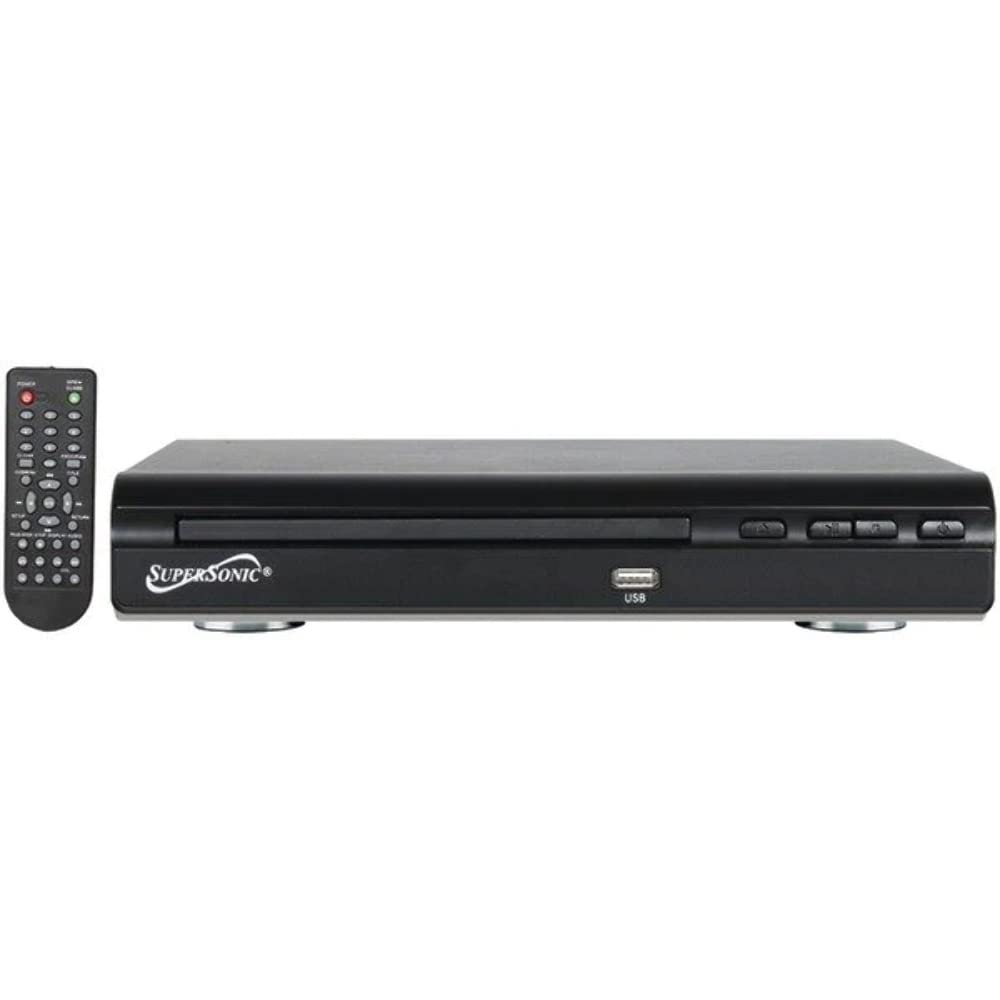
Přední view of the SuperSonic SC-25 DVD player, showing the disc tray, USB port, and control buttons.
Ask a question about this manual
Ask about setup, troubleshooting, compatibility, parts, safety, or missing instructions. Manuals+ will review the question and use this page’s manual context to help answer it.