
Uživatelská příručka k dálkovému ovladači DIRECTV RC71
Model: RC71
Zavedení
The DIRECTV RC71 Remote Control is designed for efficient access to functions for your DIRECTV system. This remote is compatible with various DIRECTV receivers and can also control your television's volume and power functions. It supports both Infrared (IR) and Radio Frequency (RF) communication modes.
In IR mode, the RC71 is compatible with all legacy and current DIRECTV receivers. In RF mode, it is specifically designed to work with the DIRECTV HR44 Genie and Genie clients C41 and C41W. When operating in RF mode, the remote utilizes the RF4CE protocol for enhanced speed and accuracy, confirming each button press to reduce missed inputs. For TV and AV functions, the remote will still use IR communication even when in RF mode for the receiver.
Nastavení
1. Instalace baterie
The RC71 remote control requires two (2) AA alkaline batteries for operation.
- Najděte kryt prostoru pro baterie na zadní straně dálkového ovladače.
- Posuňte kryt dolů a zvedněte jej.
- Vložte dvě baterie typu AA a ujistěte se, že kladný (+) a záporný (-) pól shodují se značkami uvnitř přihrádky.
- Nasaďte kryt přihrádky na baterie tak, že jej zasunete zpět na místo, dokud bezpečně nezacvakne.
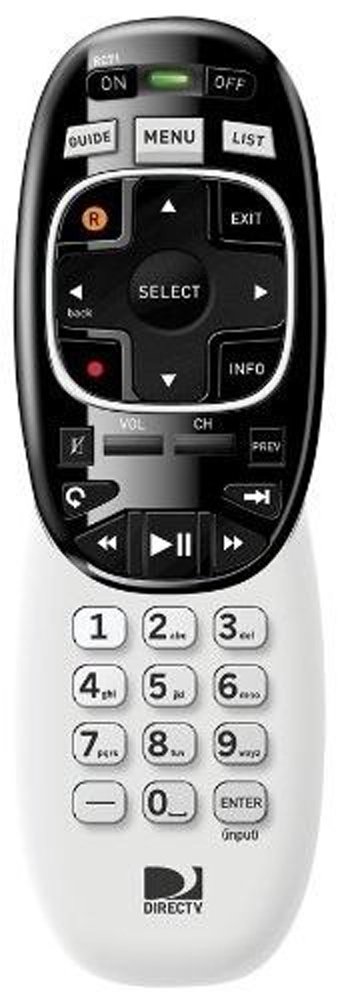
Image: The DIRECTV RC71 Remote Control, showing its ergonomic design and button layout.
2. Pairing with DIRECTV Receiver
The RC71 remote can operate in two modes: Infrared (IR) and Radio Frequency (RF).
IR Mode (for all DIRECTV receivers)
In IR mode, the remote requires a direct line of sight to the receiver. No special pairing is typically required; the remote should function immediately after battery installation.
RF Mode (for HR44 Genie, C41, C41W clients)
For RF mode functionality with compatible receivers, follow these steps:
- Ensure your DIRECTV receiver (HR44 Genie or C41/C41W client) is powered on.
- Point the RC71 remote at the receiver.
- Stiskněte a podržte ZTLUMIT a ENTER buttons simultaneously until the green light at the top of the remote flashes twice.
- Release the buttons. The remote is now attempting to pair in RF mode.
- Follow any on-screen prompts that may appear on your television to confirm the pairing.
3. Programming for TV/AV Functions
To control your television's volume and power, the remote needs to be programmed with your TV's code. This process typically involves using the receiver's on-screen menu.
- Stiskněte tlačítko MENU button on your RC71 remote.
- Přejděte na Settings & Help, pak Nastavenía konečně Dálkové ovládání.
- Vybrat Program na dálku nebo podobnou možnost.
- Follow the on-screen instructions to select your television brand and program the remote.
- Test the volume and power buttons to ensure successful programming.
Obsluha dálkového ovládání
The RC71 remote control features a streamlined button layout for intuitive operation.
- Vypínač: Toggles power for the DIRECTV receiver and, once programmed, for the television.
- Průvodce: Zobrazí programového průvodce.
- Seznam: Přístup k vašim nahraným programům.
- Kanál nahoru/dolů: Mění kanály.
- Zvýšení/Snížení hlasitosti: Adjusts television volume (after programming).
- Ztlumit: Mutes television audio (after programming).
- Directional Pad (Arrows) and SELECT: Prochází menu a vybírá možnosti.
- REW, PLAY, FWD, PAUSE, STOP, RECORD: Controls playback of recorded content.
- Čísla (0-9): Přímé zadávání čísel kanálů.
- INFO: Zobrazuje informace o programu.
- VÝSTUP: Exits menus or returns to live TV.
The ergonomic design of the RC71 is intended for comfortable handling during extended use.
Údržba
Výměna baterie
Replace batteries when the remote's response becomes sluggish or the indicator light fails to flash. Always replace both AA batteries simultaneously with new ones to ensure optimal performance.
Čištění
Chcete-li vyčistit dálkový ovladač, jemně otřete jeho povrch měkkým, suchým hadříkem. V případě odolných nečistot použijte lehceamp cloth can be used, followed by immediate drying. Avoid using harsh chemicals or abrasive cleaners, as these can damage the remote's finish or internal components.
Odstraňování problémů
- Dálkové ovládání nereaguje:
- Zkontrolujte instalaci baterie a v případě potřeby ji vyměňte.
- Ensure a clear line of sight between the remote and the receiver/TV for IR functions.
- If in RF mode, ensure the remote is properly paired with the receiver. Repeat the pairing steps if needed.
- TV/AV functions not working:
- Verify that the remote has been correctly programmed for your television model. Re-program if unsure.
- Ensure the remote is pointed directly at the TV's IR sensor.
- Remote feels sluggish or inconsistent:
- Vyměňte baterie za nové.
- Consider resetting the remote to factory settings (consult your DIRECTV receiver's on-screen help or DIRECTV support for specific instructions, as this process can vary).
Specifikace
| Značka | DIRECTV |
| Název modelu | RC71 |
| Číslo modelu | RC71 |
| Barva | Bílý |
| Technologie připojení | Infračervené, rádiové frekvence |
| Kompatibilní zařízení | DIRECTV Receivers (all in IR, HR44 Genie/C41/C41W in RF), Television |
| Maximální počet podporovaných zařízení | 1 (DIRECTV Receiver) + 1 (Television) |
| Množství tlačítek | 20 |
| Typ ovladače | Ovládání tlačítkem |
| Maximální dosah | 10 Meters (RF) |
| Typ baterie | 2 AA alkalické baterie |
| Hmotnost položky | 3.52 unce |
| Speciální funkce | Ergonomický design |
Informace o záruce
The DIRECTV RC71 Remote Control comes with a manufacturer warranty for 90 days from the date of purchase. Please retain your proof of purchase for warranty claims. For detailed terms and conditions, refer to the warranty documentation provided with your product or contact DIRECTV customer support.
Podpora
For further assistance, technical support, or to inquire about specific programming codes for your television, please contact DIRECTV customer support. You can find contact information on the official DIRECTV website or through your DIRECTV service provider.