
1. Úvod
Thank you for choosing the Fonestar AS-24U Hi-Fi USB/SD/MP3 Ampzáchranář. Tato příručka obsahuje základní informace pro bezpečný a efektivní provoz vašeho zařízení. Před použitím si ji pečlivě přečtěte a uschovejte si ji pro budoucí použití.
2. Bezpečnostní pokyny
- Napájení: Zajistěte amplifier is connected to a power source matching the specified voltage (230 V).
- Větrání: Neblokujte větrací otvory. Ponechte kolem jednotky dostatečný prostor pro správné proudění vzduchu, abyste zabránili přehřátí.
- vlhkost: Udržujte amplifier away from water, moisture, and high humidity environments. Do not expose it to dripping or splashing.
- Zdroje tepla: Neumísťujte jednotku do blízkosti zdrojů tepla, jako jsou radiátory, topná tělesa, kamna nebo jiná zařízení produkující teplo.
- Čištění: Před čištěním odpojte napájecí kabel. Použijte suchý, měkký hadřík. Nepoužívejte tekuté ani aerosolové čisticí prostředky.
- Servis: Nepokoušejte se tento výrobek opravit sami. Veškerý servis svěřte kvalifikovanému servisnímu personálu.
- Vstup předmětu/kapaliny: Nikdy nestrkejte do tohoto výrobku otvory jakéhokoli druhu, protože by se mohly dotknout nebezpečného objemutage body nebo zkratované části, které by mohly způsobit požár nebo úraz elektrickým proudem.
3. Konec produktuview
3.1 Přední panel
The front panel features controls for power, input selection, volume adjustment, and USB/SD media playback. It also includes a display for media information.
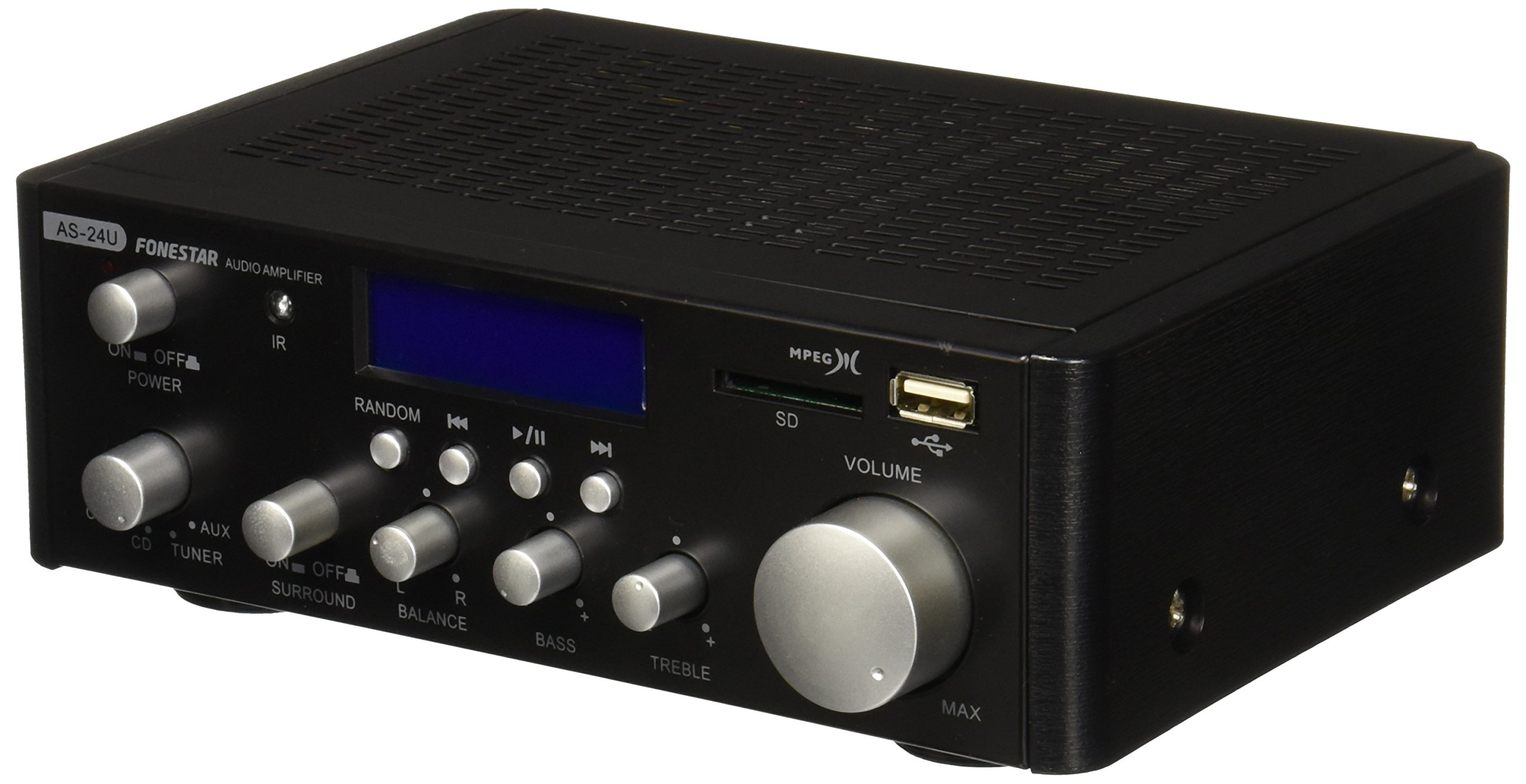
Obrázek 1: Přední strana view of the Fonestar AS-24U amplifier, showing the main controls and display.
3.2 Zadní panel
The rear panel provides all necessary connections for audio input sources, speaker outputs, and power.

Obrázek 2: Zadní strana view of the Fonestar AS-24U amplifier, detailing input/output ports and power connection.
- INPUT (AUX, TUNER, CD): RCA stereo inputs for connecting external audio sources.
- SPEAKER OUT (STEREO): Spring clip terminals for connecting passive speakers (4-8 Ω).
- SPEAKER OUT (SURROUND): Additional spring clip terminals for surround speakers (8 Ω).
- NAPÁJENÍ: AC power input for the main power cable.
- VOLTAGE SELECTOR: Switch for selecting between 115V and 230V power input. Ensure this is set correctly for your region.
3.3 Dálkové ovládání
Součástí dodávky je dálkové ovládání, které umožňuje pohodlné ovládání amplifier's media playback functions.
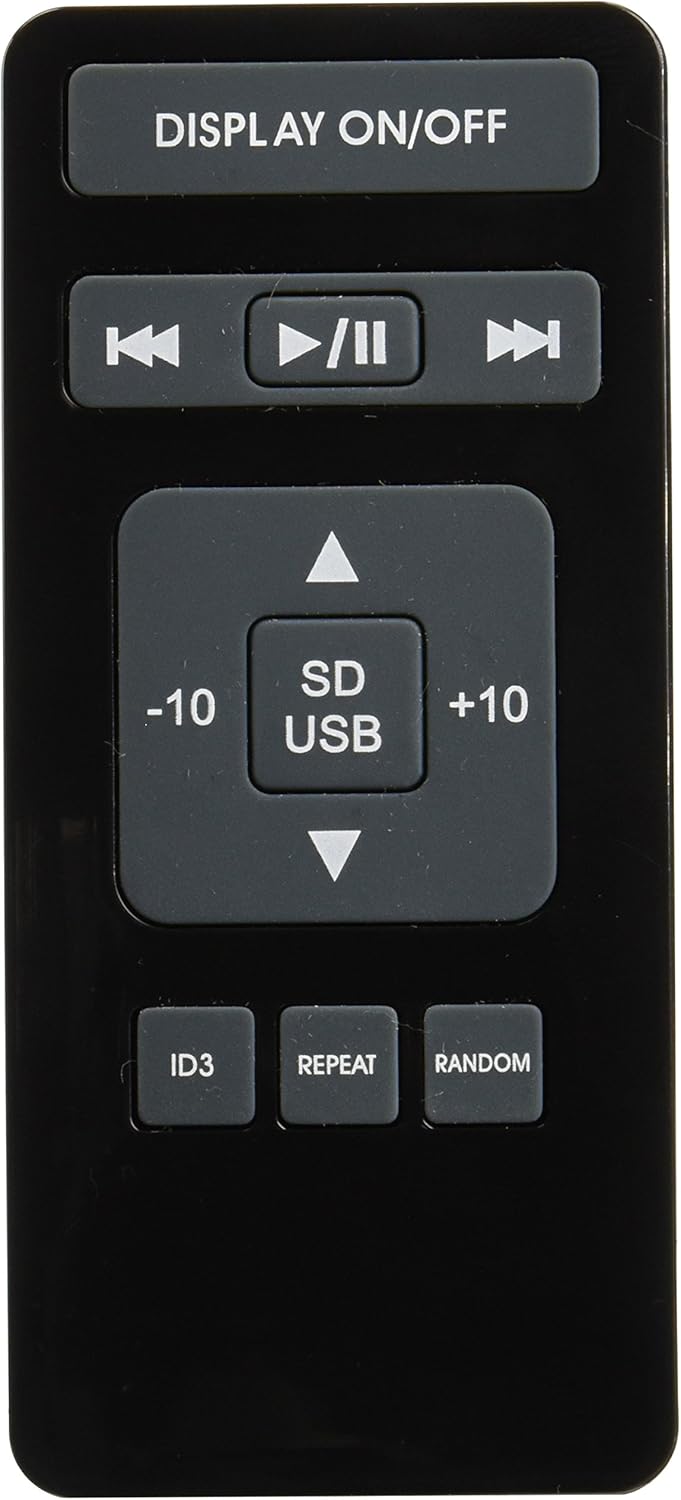
Image 3: Remote control for the Fonestar AS-24U amplifier, showing buttons for media playback and display control.
- DISPLEJ ZAPNUTO / VYPNUTO: Toggles the front panel display.
- PŘEHRÁT/PAUZA, PŘEDCHOZÍ/DALŠÍ: Controls for media playback.
- SD/USB: Selects between SD card and USB drive as the media source.
- -10/+10: Skips tracks by 10.
- ID3: Displays ID3 tag informace pro MP3 files.
- OPAKOVAT: Toggles repeat modes (e.g., repeat one, repeat all).
- NÁHODNÝ: Toggles random playback.
4. Nastavení
4.1 Připojení reproduktorů
- Zajistěte amplifier is powered off and unplugged.
- Connect your passive speakers to the SPEAKER OUT terminals on the rear panel.
- Přizpůsobte kladný (+) pól na amplifier to the positive (+) terminal on your speaker, and the negative (-) to the negative (-).
- For stereo speakers, use the 4-8 Ω terminals. For surround speakers, use the 8 Ω terminals. Ensure your speakers' impedance matches the ampspecifikace lifier.
4.2 Připojení zdrojů zvuku
- Connect your audio devices (e.g., CD player, tuner, auxiliary device) to the corresponding RCA INPUT jacks (CD, TUNER, AUX) on the rear panel.
- Ensure left and right channels are correctly matched (red for right, white for left).
4.3 Připojení napájení
- Verify the VOLTAGE SELECTOR switch on the rear panel is set to the correct voltage for your region (e.g., 230V).
- Connect the power cable to the POWER IN socket on the rear panel and then to a suitable wall outlet.
5. Návod k obsluze
5.1 Zapnutí/vypnutí
Press the power button on the front panel to turn the amplifier on or off. A soft start protection circuit is integrated.
5.2 Výběr vstupního zdroje
Use the input selector knob or buttons on the front panel to choose between CD, TUNER, AUX, USB, or SD inputs.
5.3 Nastavení hlasitosti
Rotate the main volume knob on the front panel to adjust the overall sound level. Start with a low volume and gradually increase it to a comfortable listening level.
5.4 Přehrávání z USB/SD karty
- Vložte USB flash disk nebo SD kartu s audio soubory ve formátu MP3 files into the respective slot on the front panel.
- Select the USB or SD input using the input selector.
- Use the playback controls (Play/Pause, Previous/Next) on the front panel or remote control to manage your music.
- The remote control allows for additional functions like skipping 10 tracks (+10/-10), displaying ID3 tags, repeating tracks, and random playback.
6. Údržba
6.1 Čištění
K čištění amplifier, first unplug it from the power outlet. Use a soft, dry cloth to wipe down the exterior surfaces. Do not use abrasive cleaners, waxes, or solvents as they may damage the finish.
6.2 Skladování
Pokud uchováváte amplifier for an extended period, ensure it is unplugged, clean, and stored in a cool, dry place away from direct sunlight and extreme temperatures.
7. Řešení problémů
- Bez napájení:
- Zkontrolujte, zda je napájecí kabel bezpečně připojen k oběma ampa zásuvku ve zdi.
- Ujistěte se, že je zásuvka funkční.
- Verify the VOLTAGE SELECTOR switch is set correctly.
- Žádný zvuk:
- Confirm that the correct input source is selected.
- Zkontrolujte všechna připojení reproduktorů, zda jsou dodržena správná polarita a zda jsou pevně upevněna.
- Ujistěte se, že je hlasitost zvýšena a není ztlumená.
- Vyzkoušejte s jiným zdrojem zvuku.
- Zkreslený zvuk:
- Snižte hlasitost.
- Zkontrolujte impedanční kompatibilitu reproduktorů.
- Ujistěte se, že audio kabely nejsou poškozené a jsou bezpečně připojené.
- Problémy s přehráváním z USB/SD karet:
- Ensure the USB drive or SD card is formatted to a compatible file systém (např. FAT32).
- Ověřte, že zvuk files jsou ve formátu MP3.
- Zkuste jiný USB disk nebo SD kartu.
8. Specifikace
| Značka | FONESTAR |
| Model | AS-24U |
| Stereo Power Output | 25 + 25 W max, 15 + 15 W RMS (4 Ω), 12 + 12 W RMS (8 Ω) |
| Surround Power Output | 10 + 10 W max, 6 + 6 W RMS (8 Ω) |
| Vstupy | 3 stereo (CD, Tuner, AUX), 2 x RCA 400 mV |
| Ochrany | Měkký start, zkrat, přetížení |
| svtage | 230 voltů |
| Rozměry (D x Š x V) | 5 × 5 × 10 cm (přibližně 50 × 50 × 100 mm) |
| Hmotnost | 1.9 kg |
| Připojení reproduktorů | Kabelové |
9. Záruka a podpora
This Fonestar AS-24U amplifier comes with a standard manufacturer's warranty. Please refer to the warranty card included with your purchase for specific terms and conditions. For technical support, service, or warranty claims, please contact your retailer or the official Fonestar customer service.