
1. Úvod
1.1 Konec produktuview
The Lutron EHDT554MU210 Ecosystem H-Series Dimming Ballast is a digitally addressable ballast designed for fluorescent lighting systems. It provides precise dimming control for two 54W lamps, offering a flexible solution for various lighting applications. This ballast is part of the EcoSystem H-Series, known for its ability to dim to less than 1% for demanding environments.
1.2 Klíčové vlastnosti
- Compatible with Energi Savr Node, GRAFIK Eye, QS control unit, and Quantum software for integrated lighting control.
- Features programmed rapid start for efficient lamp zapalování.
- Maintains low harmonic distortion throughout the entire dimming range, ensuring stable power quality.
- 100% compatible with all EcoSystem digital controls.
- Designed for two 54W fluorescent lamps.
- Univerzální svtage (UNV) compatibility.
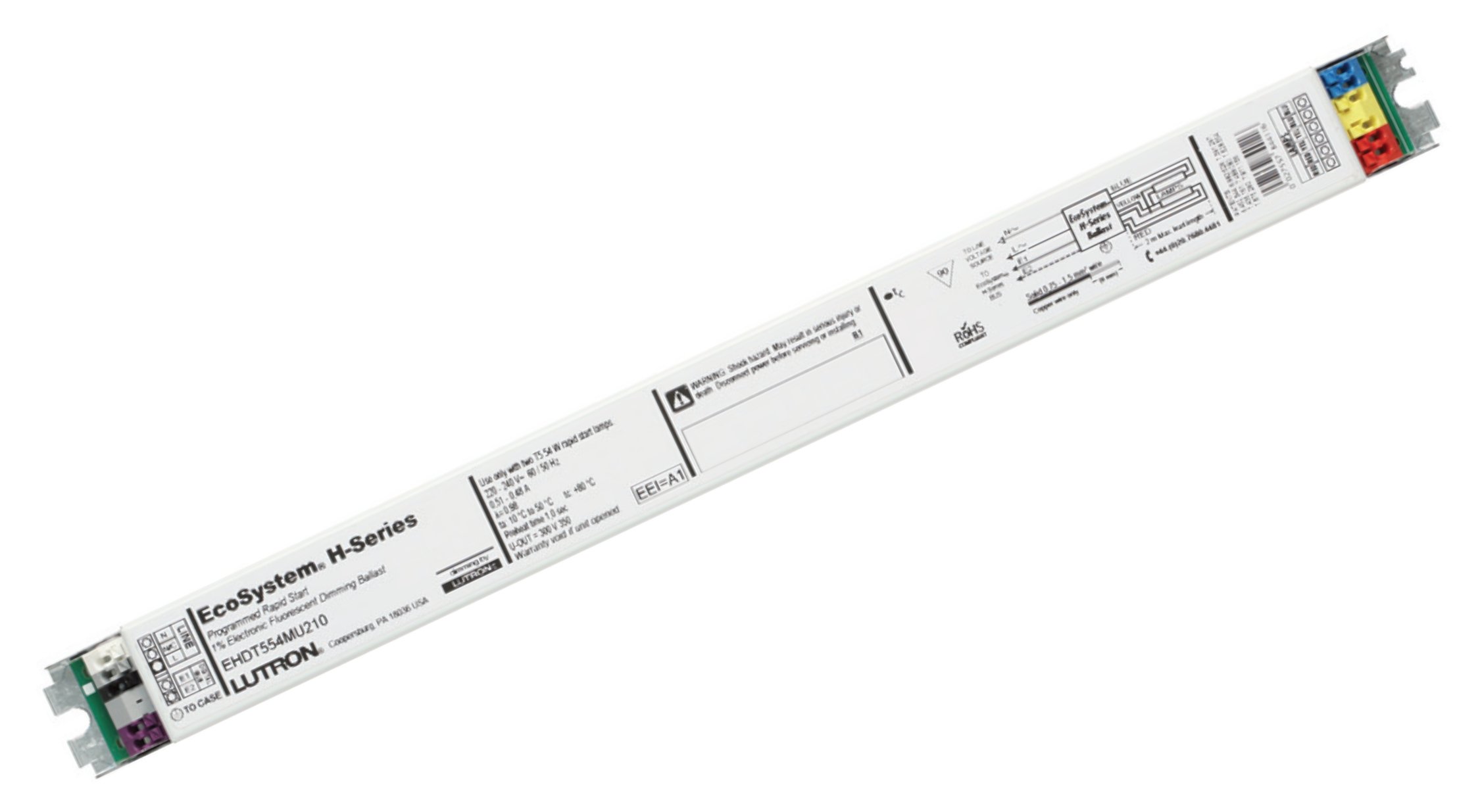
Figure 1: Lutron EHDT554MU210 Ecosystem H-Series Dimming Ballast. This image shows the compact design of the ballast unit, typically installed within a lighting fixture or electrical enclosure.
2. Nastavení a instalace
Důležité bezpečnostní informace: Installation should only be performed by a qualified electrician in accordance with all local and national electrical codes. Disconnect power at the circuit breaker before installing or servicing the ballast.
2.1 Kontrolní seznam před instalací
- Ověřte, že vstupní objemtage matches the ballast's universal voltage (UNV) rating.
- Ujistěte se, že lamps are compatible with a 54W fluorescent dimming ballast.
- Confirm availability of compatible EcoSystem digital controls if dimming functionality is desired.
- Gather necessary tools: wire strippers, screwdriver, multimeter, safety glasses.
2.2 Pokyny pro zapojení
- Odpojení napájení: Turn off power to the lighting circuit at the main electrical panel. Verify power is off using a multimeter.
- Montáž: Mount the ballast securely within the fixture or electrical enclosure, ensuring proper ventilation.
- Vstupní kabeláž: Connect the AC input wires (Line, Neutral, Ground) from the power supply to the corresponding ballast input terminals. Refer to the wiring diagram provided with the physical product for exact terminal identification.
- Výstupní kabeláž: Connect the ballast output wires to the fluorescent lamp holders. This ballast supports two lamps. Ensure correct polarity and secure connections.
- EcoSystem Digital Link Wiring (Optional): If using EcoSystem digital controls, connect the EcoSystem Digital Link wires (typically purple and grey) to the designated terminals on the ballast. This allows for digital dimming and control.
- Ověření: Double-check all wiring connections for security and correctness before restoring power.
Note: Specific wiring diagrams are typically printed on the ballast itself or included in the product packaging. Always consult these diagrams for precise connections.
3. Návod k obsluze
The Lutron EHDT554MU210 ballast operates in conjunction with compatible control systems to provide dimming and switching functionality for fluorescent lamps.
3.1 Základní obsluha
- Once installed and powered, the ballast will provide power to the connected fluorescent lamps.
- For basic on/off functionality, a standard wall switch can be used to control the power supply to the ballast.
3.2 Dimming Control with EcoSystem
To utilize the dimming capabilities of the EHDT554MU210 ballast, it must be connected to a compatible Lutron EcoSystem digital control system. These systems include:
- Energi Savr Node: Provides centralized control for energy-saving strategies.
- GRAFIK Eye: Offers scene control and multi-zone dimming.
- QS Control Unit: Integrates with Lutron Quantum systems for advanced building-wide control.
- Quantum Software: Enables comprehensive management and scheduling of lighting.
Refer to the specific user manual for your Lutron EcoSystem control system for detailed instructions on commissioning, addressing, and programming the dimming ballast.
The ballast supports dimming to less than 1%, allowing for precise light level adjustments.
4. Údržba
The Lutron EHDT554MU210 ballast is designed for long-term, reliable operation with minimal maintenance. However, periodic inspection can help ensure optimal performance.
4.1 Obecná péče
- Čištění: Ensure the ballast and surrounding area are free from excessive dust and debris, which can impede heat dissipation. Use a dry, soft cloth for cleaning. Do not use liquid cleaners.
- Větrání: Verify that the ballast's mounting location allows for adequate airflow to prevent overheating.
4.2 lamp Nahrazení
When replacing fluorescent lamps connected to the ballast:
- Odpojit napájení: Always turn off power to the fixture at the circuit breaker before replacing lamps.
- Use Compatible Lamps: Ensure replacement lamps jsou správného typu a velikostitage (54W fluorescent) as specified for this ballast.
- Správná instalace: Nainstalujte nový lamps securely into the lamp držáky.
- Obnovit napájení: Po lamp replacement, restore power and test operation.
5. Řešení problémů
If you experience issues with your Lutron EHDT554MU210 ballast, refer to the following common troubleshooting steps:
| Problém | Možná příčina | Řešení |
|---|---|---|
| Lamps do not turn on. |
|
|
| Lamps flicker or dim erratically. |
|
|
| Stmívání nefunguje. |
|
|
If the problem persists after attempting these solutions, contact Lutron technical support for further assistance.
6. Specifikace
Technical specifications for the Lutron EHDT554MU210 Ecosystem H-Series Dimming Ballast:
| Značka | Lutron |
| Číslo modelu | EHDT554MU210 |
| Wattage | 54 wattů (na litr)amp, supports 2 lamps) |
| svtage | Universal Voltage (UNV) - typically 120-277 Volts AC |
| Typ světelného zdroje | Fluorescenční |
| Balastní faktor | 1.00 |
| Rozsah stmívání | Dimmable to less than 1% |
| Kontrolní metoda | EcoSystem Digital Link (App/System Controlled) |
| Protokol připojení | X-10 (Note: While X-10 is listed, EcoSystem is the primary digital control protocol for this ballast.) |
| Typ pouzdra | M |
| Vede | N |
| Lamp Length Compatibility | 45.2 inches (for compatible lamps) |
| Hmotnost položky | 1 libra |
| UPC | 027557964029 |
| ASIN | B00BS92BOA |
7. Záruka a podpora
For specific warranty information regarding your Lutron EHDT554MU210 Ecosystem H-Series Dimming Ballast, please refer to the documentation included with your product or visit the official Lutron webZáruční podmínky se mohou lišit.
Technická podpora: If you require technical assistance, have questions about installation, operation, or troubleshooting that are not covered in this manual, please contact Lutron customer support. Contact information can typically be found on the Lutron webmísto nebo obal produktu.
Online zdroje: Additional resources, including detailed wiring diagrams, product specifications, and compatibility lists, may be available on the Lutron official webmísto: www.lutron.com