
1. Úvod
This manual provides essential information for the proper installation, operation, and maintenance of your Maxcom KXT480 landline telephone. Please read these instructions carefully before using the device to ensure optimal performance and longevity. The Maxcom KXT480 is a corded landline telephone designed for reliable communication in a home or office environment.
2. Obsah balení
Ověřte, zda jsou v balení přítomny všechny položky:
- Maxcom KXT480 Telephone Unit
- Sluchátko
- Svinutý kabel sluchátka
- Kabel telefonní linky
- Uživatelská příručka (tento dokument)
3. Konec produktuview
The Maxcom KXT480 is a corded telephone featuring a clear keypad, a comfortable handset, and essential functions for daily communication. It is designed for ease of use and durability.
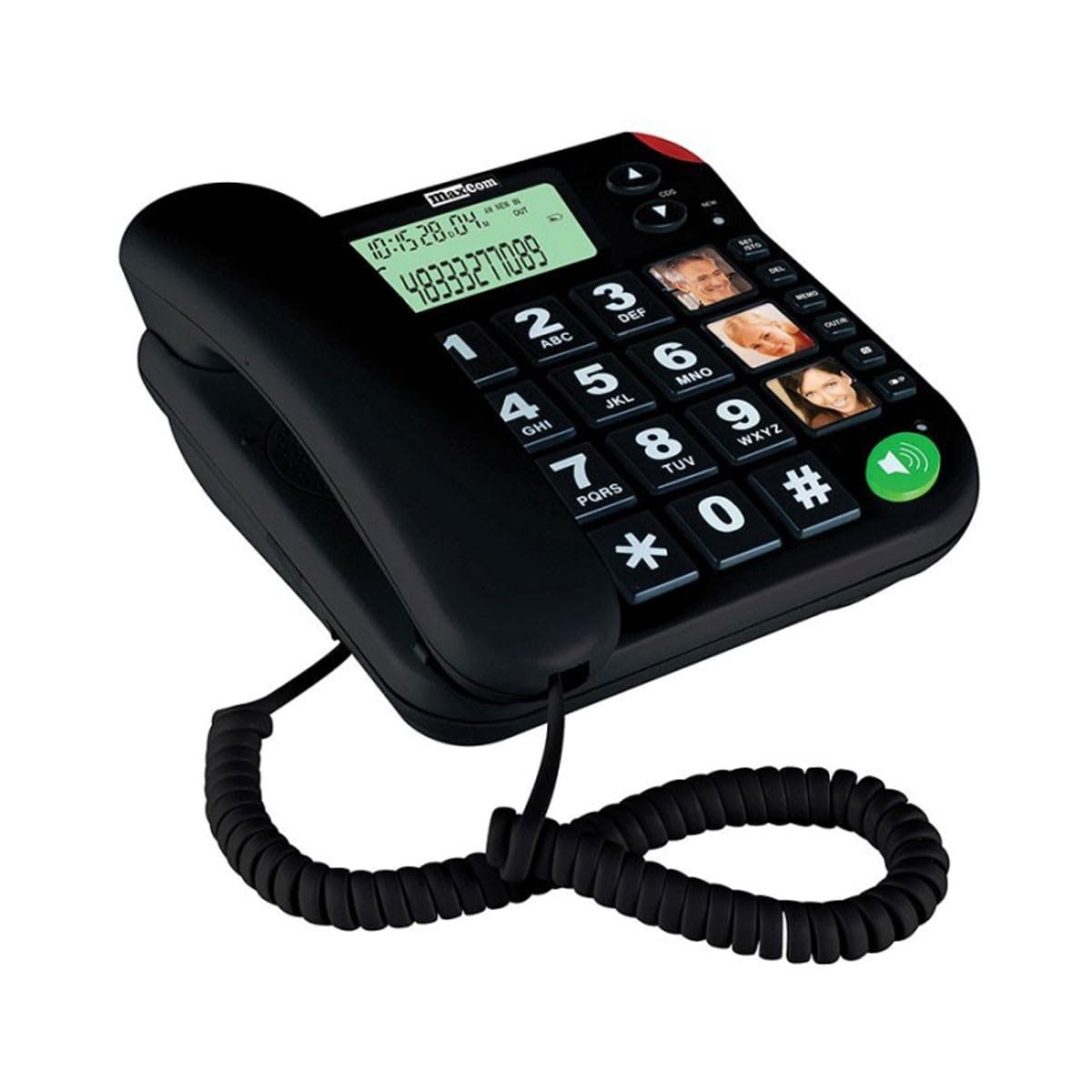
Image of the Maxcom KXT480 landline telephone, showing its black color, keypad, and handset.
Mezi klíčové vlastnosti patří:
- Corded telephone for reliable connection
- Caller ID functionality
- Speakerphone function (requires batteries for full functionality)
- Basic conference call capability
- Memory storage for frequently dialed numbers
4. Nastavení
4.1 Připojení telefonu
- Connect one end of the coiled handset cord to the handset and the other end to the handset jack on the side of the telephone base.
- Připojte jeden konec telefonního kabelu do zdířky LINE na zadní straně telefonní základny.
- Connect the other end of the telephone line cord to your wall telephone socket.
4.2 Battery Installation (Optional but Recommended)
The Maxcom KXT480 requires 1 Lithium-Ion battery (included) for certain advanced features such as the display and speakerphone functionality. While the basic telephone functions work without batteries, installing them is recommended for full feature access.
- Vyhledejte přihrádku na baterie na spodní straně telefonní základny.
- Otevřete kryt bateriového prostoru.
- Insert the Lithium-Ion battery, ensuring correct polarity (+ and -).
- Bezpečně zavřete kryt bateriového prostoru.
5. Návod k obsluze
5.1 Uskutečnění hovoru
- Zvedněte sluchátko nebo stiskněte tlačítko Hlasitý telefon button (if batteries are installed).
- Vytočte požadované telefonní číslo pomocí klávesnice.
- Počkejte, až se hovor spojí.
- Chcete-li hovor ukončit, zavěste sluchátko nebo stiskněte Hlasitý telefon znovu tlačítko.
5.2 Přijetí hovoru
- When the telephone rings, lift the handset or press the Hlasitý telefon tlačítko pro odpověď.
- Chcete-li hovor ukončit, zavěste sluchátko nebo stiskněte Hlasitý telefon znovu tlačítko.
5.3 ID volajícího
The telephone supports Caller ID functionality. When an incoming call is received, the caller's number will be displayed on the screen (if batteries are installed and Caller ID service is subscribed through your telephone provider).
5.4 Funkce hlasitého odposlechu
To use the speakerphone function, press the dedicated Hlasitý telefon button. This allows hands-free communication. Ensure batteries are installed for this feature to work correctly.
5.5 Memory Dialing
The Maxcom KXT480 allows you to store frequently used numbers for quick dialing. Refer to the on-screen prompts or specific buttons on your device for programming memory slots. Typically, this involves pressing a 'Store' or 'Memory' button, entering the number, and then selecting a memory location.
5.6 Conference Calling
The telephone supports basic conference call functionality. Consult your telephone service provider for details on how to initiate a three-way call, as this often depends on network services.
6. Údržba
6.1 Čištění
To clean the telephone, use a soft, damp cloth. Do not use abrasive cleaners or solvents, as these can damage the surface. Ensure the telephone is disconnected from the wall socket before cleaning.
6.2 Skladování
If storing the telephone for an extended period, disconnect it from the telephone line and remove any installed batteries. Store in a cool, dry place away from direct sunlight.
7. Řešení problémů
If you encounter issues with your Maxcom KXT480 telephone, please refer to the following common problems and solutions:
| Problém | Možná příčina | Řešení |
|---|---|---|
| Žádný oznamovací tón | Telefonní kabel je odpojený nebo vadný. | Check all cable connections. Try connecting another phone to the wall socket to verify line functionality. |
| Telefon nezvoní | Ringer volume is set to off or too low. | Adjust the ringer volume. Ensure the telephone line is active. |
| No display or speakerphone not working | Baterie nejsou vloženy nebo jsou vybité. | Install fresh batteries or check battery polarity. |
| Neslyším volajícího nebo volající neslyší mě | Handset or speakerphone volume too low; faulty connection. | Adjust volume. Check handset cord connection. If using speakerphone, ensure you are close to the microphone. |
8. Specifikace
Detailed technical specifications for the Maxcom KXT480 telephone:
| Funkce | Specifikace |
|---|---|
| Značka | Maxcom |
| Číslo modelu | KXT480 |
| Barva | Černý |
| Typ telefonu | Kabelové |
| Materiál | Plast |
| Zdroj napájení | AC/DC (Line Powered) |
| Požadavek na baterii | 1 Lithium-Ion battery (included) for display/speakerphone |
| Rozměry položky (DxŠxV) | 20.6 x 16.4 x 9.1 cm |
| Kompatibilní zařízení | Fixed networks |
| Typ vytáčení | Jedna klávesnice |
| Víceřádkový provoz | Jeden řádek |
| Identifikace volajícího | Ano |
| Conference Call Functionality | Základní |
| GTIN | 05908235972039 |
| Země původu | Portugalsko |
9. Záruka a podpora
Maxcom products are designed for reliability and performance. For warranty information, please refer to the warranty card included with your purchase or contact your retailer. For technical support or further assistance, please visit the official Maxcom webnebo se obraťte na jejich zákaznický servis. Uschovejte si účtenku jako doklad o koupi pro případ reklamace.