
1. Úvod
The Mac Mah Express V3 is a compact, self-contained, and complete portable sound system designed for various applications, from presentations to musical ambiance. This versatile unit features a 60W amplified 2-way speaker, integrated USB MP3 player, anti-shock CD player, and a dedicated dock for iPhone, iPod, and iPad devices. It also includes Bluetooth connectivity for wireless audio streaming from smartphones, tablets, or computers. The Express V3 comes equipped with two wireless microphones and offers a 7-channel mixer with ECHO and Talkover effects, ensuring clear audio and flexible control. Its robust ABS casing and integrated handle make it highly portable, complemented by a 5-hour battery life for autonomous operation.
2. Bezpečnostní pokyny
- Před použitím zařízení si pečlivě přečtěte všechny pokyny.
- Uschovejte tento návod pro budoucí použití.
- Nevystavujte jednotku dešti ani vlhkosti, abyste předešli požáru nebo úrazu elektrickým proudem.
- Zajistěte dostatečné větrání; neblokujte žádné větrací otvory.
- Používejte pouze nástavce/příslušenství určené výrobcem.
- Disconnect the unit during lightning storms or when unused for long periods.
- Veškeré opravy svěřte kvalifikovanému servisnímu personálu.
- Neumísťujte jednotku do blízkosti zdrojů tepla, jako jsou radiátory, topná tělesa, kamna nebo jiná zařízení (včetně amplifikátory), které produkují teplo.
- Chraňte napájecí kabel před šlapáním nebo přiskřípnutím, zejména u zástrček, zásuvek a v místě, kde vychází z přístroje.
3. Obsah balení
Zkontrolujte prosím, zda jsou ve vašem balení obsaženy všechny níže uvedené položky:
- Mac Mah Express V3 Amplified Speaker Unit
- 2 x bezdrátové ruční mikrofony
- Napájecí kabel
- Remote Control (for CD/USB/iPod/iPhone/iPad functions)
- Uživatelská příručka (tento dokument)
4. Konec produktuview
Familiarize yourself with the main components and controls of your Express V3 speaker.
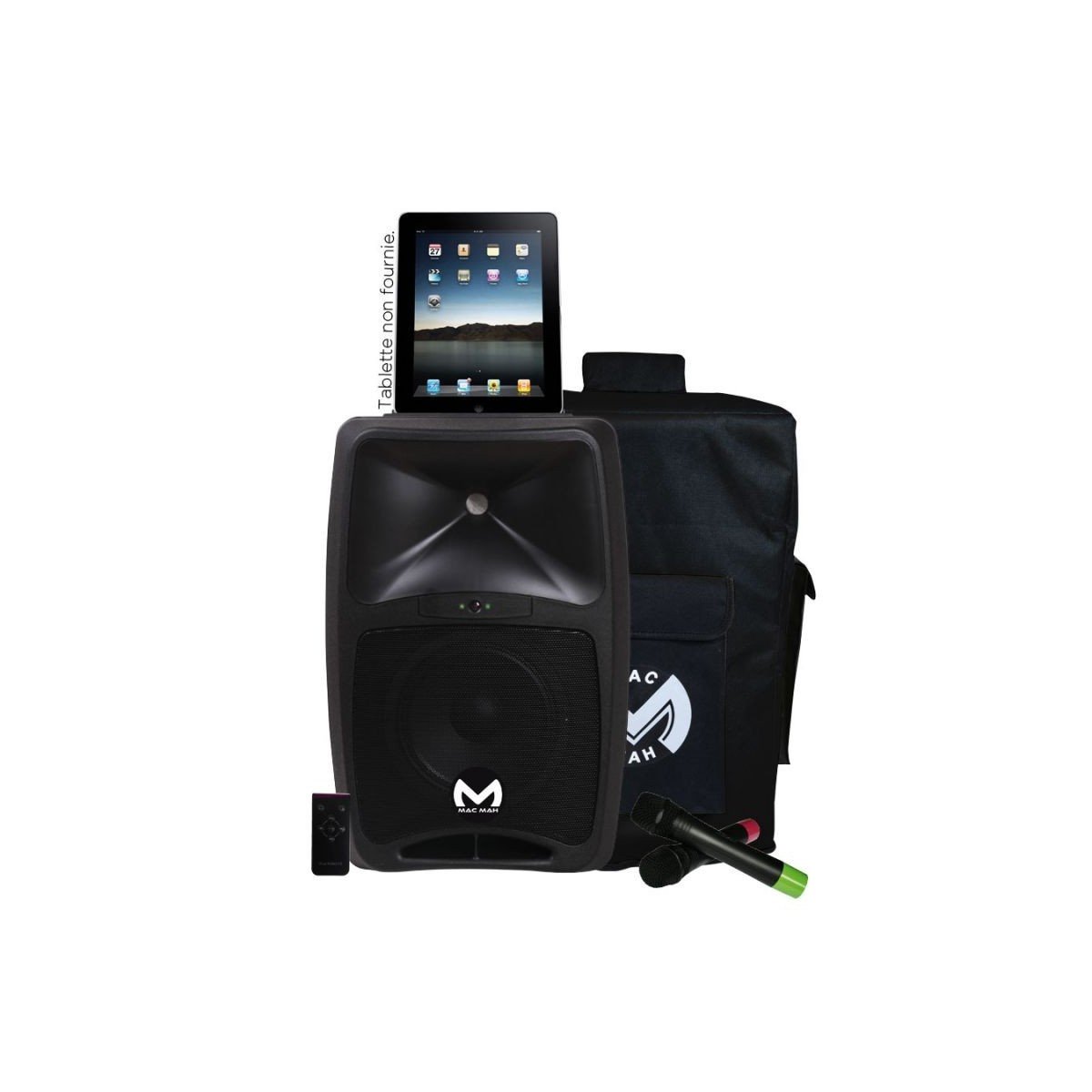
Obrázek 1: Front panel of the Mac Mah Express V3 amplified speaker, showing the main controls, display, CD slot, and dock for mobile devices.
The front panel typically includes:
- CD Player Slot: Pro vkládání audio CD.
- USB port: For connecting USB drives with MP3 files.
- iPod/iPhone/iPad Dock: For direct connection and playback from Apple devices.
- Displej: Zobrazuje aktuální režim, informace o trase a nastavení.
- Ovládací knoflíky: For master volume, microphone volumes, echo, and tone adjustments.
- Vstupní konektory: For wired microphones, line-in, and guitar.
The rear panel typically includes the power input, power switch, and line output (RCA).
5. Nastavení
5.1 Připojení k napájení a nabíjení
- Connect the supplied power cable to the AC IN port on the rear of the Express V3 and then to a suitable power outlet.
- The internal rechargeable batteries (2 x 12V4AH) will begin charging automatically. A full charge provides approximately 5 hours of autonomous operation.
- Ensure the unit is fully charged before initial use for optimal battery life.
5.2 Nastavení mikrofonu
- Bezdrátové mikrofony: Insert batteries into the two supplied wireless handheld microphones. Turn on the microphones. The Express V3 will automatically detect them. Adjust their individual volume using the dedicated knobs on the mixer panel.
- Drátové mikrofony/nástroje: Connect a wired microphone, line-level device, or guitar to the MIC/LINE/GUITAR (combo) input jack. Adjust its volume using the corresponding control.
5.3 Připojení zdrojů zvuku
- USB MP3 přehrávač: Vložte USB flash disk obsahující MP3 files into the USB port. The unit will automatically switch to USB mode or you can select it manually.
- CD přehrávač: Insert an audio CD into the CD slot. The unit will automatically switch to CD mode.
- iPhone/iPod/iPad: Place your compatible Apple device into the dedicated dock. Ensure it is securely seated. Use the device's controls or the supplied remote control for playback.
- Bluetooth: Activate Bluetooth on your smartphone, tablet, or computer. On the Express V3, select Bluetooth mode. Hledat 'Mac Mah Express V3' (or similar) in your device's Bluetooth settings and pair.
- External Line Input: Connect an external audio source (e.g., another mixer, laptop) to the LINE IN (RCA) inputs.
6. Návod k obsluze
6.1 Zapnutí/vypnutí
Locate the main power switch on the rear panel of the unit. Flip it to the 'ON' position to power on the speaker. Flip it to 'OFF' to power down.
6.2 Ovládání hlasitosti
- Hlavní hlasitost: Use the main volume knob to adjust the overall output level of the speaker.
- Individual Channel Volumes: Each input source (wireless mics, wired mic/line, USB, CD, iPod/iPhone/iPad, Bluetooth) has its own volume control knob on the mixer panel. Adjust these to balance the levels of different sources.
6.3 Media Playback (USB/CD/iPod/iPhone/iPad)
Once an audio source is connected and selected, use the playback controls (Play/Pause, Stop, Next/Previous Track, Repeat) on the unit's front panel or the remote control to manage your audio. The display screen will show relevant track information.
6.4 Streamování přes Bluetooth
After successful pairing (refer to Section 5.3), you can stream audio wirelessly from your paired device. Control playback and volume primarily from your source device, or use the Express V3's master volume and Bluetooth channel volume for overall level adjustment.
6.5 Microphone Functions (Echo and Talkover)
- Efekt ozvěny: Use the ECHO control knob to add a reverberation effect to the microphone inputs. Adjust to your desired level.
- Talkover Function: The Talkover feature automatically reduces the music volume when a microphone signal is detected, making speech clearer. This function is typically activated automatically when using the microphones.
7. Údržba
- Čištění: K čištění vnější strany jednotky používejte měkký, suchý hadřík. Nepoužívejte abrazivní čisticí prostředky, vosky ani rozpouštědla.
- Skladování: When not in use for extended periods, store the unit in a cool, dry place. Ensure the batteries are fully charged before storage and recharge them every few months to maintain battery health.
- Péče o baterie: Avoid completely draining the batteries regularly. Recharge them as soon as the low battery indicator appears.
8. Řešení problémů
| Problém | Možná příčina | Řešení |
|---|---|---|
| Žádná síla | Power cable not connected; Unit switched off; Battery drained | Check power cable connection; Ensure power switch is ON; Charge the battery. |
| Žádný zvukový výstup | Master volume too low; Input source volume too low; Incorrect input selected; Cables not connected properly | Increase master volume; Increase input source volume; Select correct input mode; Check all cable connections. |
| Bezdrátový mikrofon nefunguje | Microphone switched off; Batteries low/dead in mic; Microphone volume too low | Switch on microphone; Replace microphone batteries; Increase microphone volume knob. |
| Párování Bluetooth se nezdařilo | Bluetooth mode not selected; Device too far; Interference | Select Bluetooth mode on Express V3; Move device closer; Avoid strong interference sources. |
| Problémy s přehráváním CD/USB | Damaged CD/USB; Incorrect file format; CD/USB not inserted correctly | Try a different CD/USB; Ensure files are MP3 format; Re-insert CD/USB correctly. |
9. Specifikace
- Číslo modelu: Express V3
- Značka: Mac Mah
- Typ reproduktoru: 2-cestný amplified speaker (8'' 20 cmm woofer + 1.35'' HF driver)
- Výstupní výkon: 60 Watts (PROG)
- Technologie připojení: USB, Bluetooth
- Speciální vlastnosti: USB Port, Portable, Remote Control, iPhone/iPod/iPad Dock, CD Player, Wireless Microphones, Echo, Talkover
- Doporučená použití: For smartphone or tablet, portable PA system
- Barva: Černý
- Hmotnost položky: 15 kg
- Rozměry balení: 65.2 x 42 x 35 cm
- Zdroj napájení: Electric Cable (AC) / Rechargeable Batteries
- Typ baterie: 2 x 12V4AH
- Autonomie baterie: Přibližně 5 hodiny
10. Záruka a podpora
Mac Mah products are designed for reliability and performance. For specific warranty information, please refer to the warranty card included with your purchase or contact your local dealer. For technical support or service inquiries, please reach out to your authorized Mac Mah service center or the retailer where the product was purchased. Keep your proof of purchase for warranty claims.


