
AT&T TL88102
AT&T TL88102 DECT 6.0 2-Line Cordless Telephone System User Manual
Model: TL88102
1. Úvod
This manual provides comprehensive instructions for the AT&T TL88102 DECT 6.0 2-Line Cordless Telephone System, including the TL88102 base unit and TL88002 accessory handsets. This system is designed for clear, interference-free communication with extended range, featuring a 2-line answering system with caller ID/call waiting, and intercom capabilities.
The AT&T TL88102 system is ideal for busy households or home offices requiring dual line functionality and multiple cordless handsets for convenience.

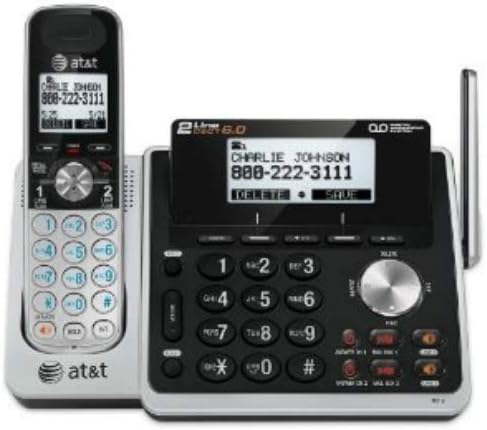
Figure 1: The AT&T TL88102 base unit with one cordless handset, and three additional TL88002 accessory handsets.
2. Nastavení
2.1 Obsah balení
- AT&T TL88102 Base Unit with Cordless Handset
- AC napájecí adaptér pro základní jednotku
- Kabel telefonní linky
- TL88002 Accessory Handsets (quantity may vary based on bundle)
- Chargers for Accessory Handsets
- Rechargeable Batteries for Handsets (AAA batteries required)
2.2 Připojení základní jednotky
- Connect the small end of the AC power adapter to the POWER jack on the back of the TL88102 base unit.
- Zapojte větší konec napájecího adaptéru do standardní elektrické zásuvky.
- Connect one end of the telephone line cord to the TEL LINE 1 or TEL LINE 2 jack on the back of the base unit. If using two lines, connect the second line cord to the other TEL LINE jack.
- Plug the other end(s) of the telephone line cord(s) into your telephone wall jack(s).
Obrázek 2: Zadní view of the TL88102 base unit, illustrating the connection points for power and telephone lines.
2.3 Instalace a nabíjení baterií do ručního ovladače
- Open the battery compartment cover on the back of each cordless handset.
- Insert the supplied rechargeable AAA batteries, observing the correct polarity (+ and - markings).
- Zavřete kryt prostoru pro baterie.
- Place each handset in its respective charger (base unit or accessory charger). The CHARGE light on the handset will illuminate, indicating proper charging.
- Před prvním použitím nechte sluchátka nabíjet alespoň 16 hodin, aby byl zajištěn optimální výkon baterie.
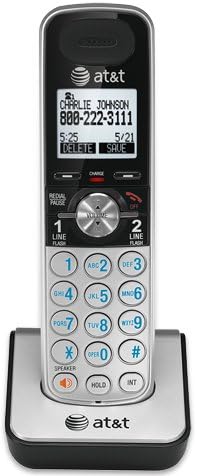
Figure 3: A cordless handset correctly seated in its charging cradle.
2.4 Registering Handsets
All accessory handsets (TL88002) must be registered to the TL88102 base unit before use. The handset included with the base unit is pre-registered.
- Place the handset you wish to register into the base unit's charger cradle.
- Na základní jednotce stiskněte a podržte tlačítko NAJDETE SLUCHÁTKO button for approximately 4 seconds until the IN USE light on the base unit begins to flash.
- Na sluchátku stiskněte tlačítko # key. The handset will display "Registering..." and then "Handset Registered" upon successful registration.
- If registration fails, remove the handset from the charger and repeat the steps.
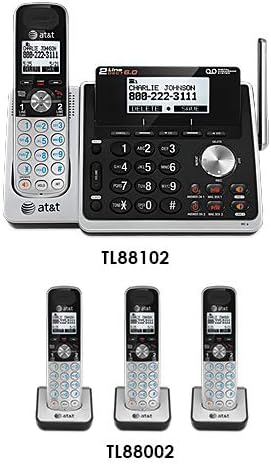
Figure 4: Illustration of the TL88102 base unit and TL88002 accessory handsets, indicating their relationship within the system.
3. Návod k obsluze
3.1 Uskutečňování a přijímání hovorů
- Chcete-li zavolat: Stiskněte ŘÁDEK 1 or ŘÁDEK 2, then dial the number. Alternatively, dial the number first, then press ŘÁDEK 1 or ŘÁDEK 2.
- Chcete-li přijmout hovor: Stiskněte ŘÁDEK 1, ŘÁDEK 2nebo REPRODUKTOR.
- Ukončení hovoru: Stiskněte VYPNUTO nebo vložte sluchátko do nabíječky.

Figure 5: The TL88102 base unit and its cordless handset, highlighting the keypad and display for call management.
3.2 záznamník
The TL88102 features a digital answering system for both lines, capable of storing up to 14 minutes of messages per line.
- Zapnutí/vypnutí: Stiskněte ANS ON/OFF 1 or ANS ON/OFF 2 on the base unit to activate or deactivate the answering system for each line.
- Přehrávání zpráv: Stiskněte PLAY/STOP on the base unit or access the answering system menu from any handset.
- Vzdálený přístup: You can retrieve messages remotely by calling your phone number and entering your remote access code.
3.3 Identifikace volajícího/Čekající hovor
The system supports Caller ID and Call Waiting features. Ensure you subscribe to these services from your telephone service provider.
- Incoming call information (name and number) will display on the handset and base unit screens.
- During a call, if another call comes in, you will hear a tone. Press BLIKAT pro přepínání mezi hovory.
3.4 Interkom
Use the intercom feature to communicate between the base unit and handsets, or between multiple handsets.
- To initiate intercom: Stiskněte INT on the handset, then select the desired handset or base unit to call.
4. Údržba
4.1 Čištění výrobku
Clean the telephone system with a soft, damp hadříkem. Nepoužívejte čisticí spreje ani agresivní chemikálie, protože by mohly poškodit povrchovou úpravu nebo elektrické součástky.
4.2 Péče o baterii
- Vždy používejte dodané dobíjecí baterie AAA.
- For optimal performance, keep handsets in their chargers when not in use.
- Pokud se sluchátko nebude delší dobu používat, vyjměte baterie, abyste zabránili jejich vytečení.
- Replace batteries when the handset displays "Low Battery" or when talk time significantly decreases.
5. Řešení problémů
| Problém | Řešení |
|---|---|
| Žádný oznamovací tón. |
|
| Handset displays "Out of Range" or "No Power at Base". |
|
| Špatná kvalita hovoru nebo statický šum. |
|
| Záznamník nezaznamenává zprávy. |
|
6. Specifikace
- Technologie: Digitální technologie DECT 6.0
- Řádky: 2-Line Operation
- Odpovídací systém: Digital, up to 14 minutes recording time per line
- ID volajícího/čekající hovor: Ano (vyžadováno předplatné)
- Adresář: 50-number phonebook
- Interkom: Handset to Handset, Handset to Base
- Zdroj napájení: AC Power Adapter (Base Unit), Rechargeable AAA Batteries (Handsets)
- Rozměry produktu (základní jednotka): Přibližně 12.1 x 10.2 x 8.6 palce
- Hmotnost položky: Přibližně 1.8 libry
- Barva: Stříbro
- Materiál: Plast
- Kompatibilní zařízení: Kompatibilní s naslouchátky
7. Záruka a podpora
For warranty information and technical support, please refer to the documentation included with your product or visit the official AT&T website. You may also contact AT&T customer service directly for assistance with product setup, operation, or troubleshooting.
Uschovejte si účtenku jako doklad o koupi pro případ reklamace.
Ask a question about this manual
Ask about setup, troubleshooting, compatibility, parts, safety, or missing instructions. Manuals+ will review the question and use this page’s manual context to help answer it.