
1. Úvod
This manual provides essential information for the safe and efficient operation of your AudioCodes Mediant 1000B (M1KB-D2) VoIP router. Please read this manual thoroughly before installation and use, and retain it for future reference. The Mediant 1000B is a compact, cost-effective, and high-performance VoIP media gateway designed for small to medium-sized businesses and branch offices.
2. Bezpečnostní informace
Dodržujte následující bezpečnostní opatření, abyste zabránili poškození zařízení a zajistili bezpečnost uživatele:
- Ujistěte se, že je zařízení připojeno k uzemněné zásuvce.
- Nevystavujte zařízení vodě, vlhkosti ani extrémním teplotám.
- Neblokujte ventilační otvory, aby nedošlo k přehřátí.
- Používejte pouze napájecí adaptér dodaný se zařízením.
- Nepokoušejte se zařízení otevírat ani opravovat sami. Veškerý servis svěřte kvalifikovanému personálu.
3. Obsah balení
Ověřte, zda váš balíček obsahuje následující položky:
- AudioCodes Mediant 1000B (M1KB-D2) Unit
- Napájecí adaptér
- Ethernetový kabel
- Rychlý průvodce
Pokud některé položky chybí nebo jsou poškozené, ihned kontaktujte svého prodejce.
4. Konec produktuview
The AudioCodes Mediant 1000B (M1KB-D2) is a robust VoIP gateway. Familiarize yourself with its components:
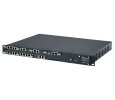
Obrázek 1: Přední strana view of the AudioCodes Mediant 1000B (M1KB-D2) VoIP router, showing status indicators and front panel ports.
4.1 Přední panel
- Stavové LED diody: Indicators for Power, System Status, WAN, LAN, and Voice Port activity.
- Voice Ports: Connect to traditional telephony equipment (e.g., PBX, PSTN lines).
- Resetovací tlačítko: Používá se k obnovení továrního nastavení (vyžaduje kancelářskou sponku nebo podobný nástroj).
4.2 Zadní panel
- Příkon: Připojuje se k dodanému napájecímu adaptéru.
- Ethernet Ports (WAN/LAN): Connect to your network infrastructure.
- Port konzoly: For direct serial connection for advanced configuration.
5. Nastavení
Follow these steps for initial installation:
- Umístění: Position the Mediant 1000B on a stable, flat surface, ensuring adequate ventilation. Avoid direct sunlight or heat sources.
- Připojte síťové kabely:
- Connect an Ethernet cable from your internet router/modem to the WAN port on the Mediant 1000B.
- Připojte ethernetový kabel z LAN port on the Mediant 1000B to your local network switch or a computer for initial configuration.
- Connect Voice Lines (if applicable): Connect your telephony equipment (e.g., PBX, analog phones) to the designated voice ports.
- Připojte napájení: Plug the power adapter into the device's power input, then plug the adapter into a grounded electrical outlet. The Power LED should illuminate.
- Počáteční spuštění: Allow several minutes for the device to boot up. Observe the status LEDs for normal operation.
- Přístup Web Rozhraní: Otevřete a web browser on a computer connected to the LAN port. Enter the default IP address (refer to the Quick Start Guide or device label for the specific IP, commonly 192.168.1.1 or 10.0.0.1) to access the configuration interface.
6. Obsluha zařízení
Once the device is set up, you can configure and monitor its operation through the webrozhraní pro správu.
6.1 Základní konfigurace
- Přihlášení: Use the default username and password (typically "Admin" and "Admin" or similar, check your Quick Start Guide). Change these credentials immediately for security.
- Nastavení sítě: Configure WAN and LAN settings, including IP addresses, subnet masks, and DNS servers, according to your network requirements.
- VoIP Settings: Configure SIP trunks, voice codecs, and dial plans to integrate with your VoIP service provider or IP PBX.
6.2 Monitorování
The web interface provides status pages to monitor:
- System status and resource utilization.
- Network connection status.
- Voice port status and call activity.
- System logs for troubleshooting.
7. Údržba
Regular maintenance ensures optimal performance and longevity of your Mediant 1000B.
- Aktualizace firmwaru: Periodically check the AudioCodes support website for new firmware versions. Update the firmware to benefit from new features, bug fixes, and security enhancements. Follow the instructions provided with the firmware package carefully.
- Čištění: Keep the device clean and free of dust. Use a soft, dry cloth. Do not use liquid cleaners or aerosols.
- Konfigurace zálohy: Pravidelně zálohujte nastavení konfigurace zařízení prostřednictvím web interface. This allows for quick restoration in case of a factory reset or device replacement.
- Podmínky prostředí: Ujistěte se, že zařízení pracuje v rámci specifikovaných teplotních a vlhkostních rozsahů.
8. Řešení problémů
Tato část se zabývá běžnými problémy, se kterými se můžete setkat:
| Problém | Možná příčina | Řešení |
|---|---|---|
| Zařízení se nezapne. | Žádné napájení, vadný napájecí adaptér. | Check power cable connection. Verify power outlet. Test with another power adapter if available. |
| Nelze získat přístup web rozhraní. | Incorrect IP address, network cable issue, firewall. | Verify device IP address. Check Ethernet cable connection. Temporarily disable computer firewall. Ensure computer is on the same subnet. |
| No dial tone or calls failing. | VoIP configuration error, network connectivity, service provider issue. | Check VoIP settings (SIP registration, dial plan). Verify internet connectivity. Contact your VoIP service provider. |
| Pomalý výkon sítě. | Network congestion, faulty cable, device overload. | Check network cables. Monitor network traffic. Restart the device. |
If the problem persists after attempting these solutions, contact AudioCodes technical support.
9. Specifikace
Key technical specifications for the AudioCodes Mediant 1000B (M1KB-D2):
- Značka: Audiokódy
- Číslo modelu: M1KB-D2
- Technologie připojení: Bluetooth, Firewire, USB (Note: These may refer to management or auxiliary ports, primary connectivity is Ethernet for VoIP gateway function)
- Bezpečnostní protokol: WEP, WPA-PSK, WPS
- Podpora operačního systému: Linux, Mac OS X v10.4 Tiger, Windows XP Home Edition Service Pack 2 (Note: These typically refer to client OS for management tools, not the device's internal OS)
- Speciální funkce: WPS (Wi-Fi Protected Setup) (Note: This feature is typically for Wi-Fi devices, and its relevance to a VoIP router like M1KB-D2 might be for an optional Wi-Fi module or a miscategorization in source data.)
- Výrobce: AUDIOCODES, INC.
10. Záruka a podpora
AudioCodes products are covered by a limited warranty. For detailed warranty terms and conditions, please refer to the warranty card included with your product or visit the official AudioCodes website. For technical assistance, product documentation, and software downloads, please visit the AudioCodes support portal or contact your authorized reseller.
Online podpora: www.audiocodes.com/support