
MXL 2008PF001
Uživatelská příručka k balíčku MXL2008 PF001
Professional Condenser Microphone System
Zavedení
Thank you for choosing the MXL2008 PF001 Bundle. This professional condenser microphone system is designed to deliver high-quality audio capture for a variety of applications, including studio recording, broadcasting, and live sound. This manual provides essential information for the proper setup, operation, and maintenance of your microphone to ensure optimal performance and longevity.
Před použitím produktu si prosím pečlivě přečtěte tento návod k obsluze a uschovejte si jej pro budoucí použití.
Důležité bezpečnostní informace
Abyste předešli úrazu elektrickým proudem, požáru nebo poškození jednotky, dodržujte prosím následující bezpečnostní opatření:
- Do not expose the microphone to rain or moisture.
- Avoid extreme temperatures or high humidity.
- Nepokoušejte se mikrofon rozebírat ani upravovat. Veškerý servis svěřte kvalifikovanému personálu.
- Ensure proper phantom power (48V) is supplied by your audio interface or mixer, if required.
- S mikrofonem zacházejte opatrně, aby nedošlo k jeho fyzickému poškození.
Co je v krabici
The MXL2008 PF001 Bundle typically includes:
- Kondenzátorový mikrofon MXL 2008
- Shock Mount (PF001 component)
- Hard Mount Adapter
- Čisticí hadřík
- Uživatelská příručka (tento dokument)
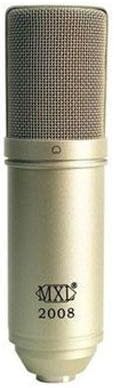
Image: The MXL 2008 condenser microphone, a cylindrical microphone with a metallic mesh grille at the top and the MXL 2008 logo on its body. This is the primary component of the bundle.
Průvodce nastavením
Follow these steps to set up your MXL2008 PF001 Bundle:
- Montáž mikrofonu:
- Attach the shock mount (PF001) to a standard microphone stand.
- Carefully insert the MXL 2008 microphone into the shock mount. Ensure it is securely held by the elastic bands. The shock mount helps to isolate the microphone from vibrations and handling noise.
- Connecting to Audio Interface/Mixer:
- Connect one end of an XLR cable (not included) to the XLR output at the base of the MXL 2008 microphone.
- Connect the other end of the XLR cable to an available XLR input on your audio interface, mixer, or preampživější.
- Použití fantomového napájení:
- The MXL 2008 is a condenser microphone and requires 48V phantom power to operate.
- Activate the +48V phantom power switch on your audio interface or mixer for the input channel connected to the microphone.
- Pozor: Ensure the microphone is connected before activating phantom power to avoid potential pops or damage.
- Nastavení vstupního zisku:
- With phantom power active, gradually increase the input gain (preamp level) on your audio interface or mixer.
- Speak or sing into the microphone at your typical performance level and adjust the gain until you achieve a strong signal without clipping (distortion). Most interfaces have a peak indicator light to help with this.
Návod k obsluze
The MXL 2008 is a versatile microphone suitable for various recording scenarios. Here are general guidelines for operation:
- Umístění mikrofonu:
- Position the microphone approximately 6-12 inches (15-30 cm) from the sound source for vocals or acoustic instruments. Adjust distance based on desired proximity effect and room acoustics.
- The MXL 2008 has a cardioid polar pattern, meaning it picks up sound primarily from the front and rejects sound from the sides and rear. Point the front of the microphone (where the MXL logo is) directly at the sound source.
- Použití pop filtru:
- For vocal recordings, it is highly recommended to use an external pop filter (not included) placed between the vocalist and the microphone. This helps to reduce plosive sounds (P's and B's) and protect the microphone capsule from moisture.
- Sledování:
- Monitor your audio through headphones or studio monitors connected to your audio interface/mixer. This allows you to hear the microphone's output and make necessary adjustments to gain and placement.
- Nahrávací software:
- Ensure your Digital Audio Workstation (DAW) software is configured to recognize your audio interface and the correct input channel.
- Arm the track for recording and begin capturing your audio.
Údržba a péče
Proper care will extend the life and maintain the performance of your MXL 2008 microphone:
- Čištění: Use a soft, dry, lint-free cloth to wipe the microphone body. Do not use liquid cleaners or solvents, as they may damage the finish or internal components.
- Skladování: When not in use, store the microphone in its original packaging or a protective case to shield it from dust, moisture, and physical impact.
- Podmínky prostředí: Avoid exposing the microphone to extreme temperatures, high humidity, or direct sunlight for prolonged periods.
- Zacházení: Always handle the microphone by its body, not by the cable or grille.
Odstraňování problémů
If you encounter issues with your MXL 2008 microphone, refer to the following common problems and solutions:
| Problém | Možná příčina | Řešení |
|---|---|---|
| Žádný zvukový výstup |
|
|
| Zkreslený zvuk |
|
|
| Hučení nebo bzučení |
|
|
If the problem persists after trying these solutions, please contact MXL customer support.
Specifikace
| Funkce | Detail |
|---|---|
| Výrobce | MXL |
| Číslo modelu | 2008PF001 |
| Hmotnost položky | 5.05 libry (přibližně 2.29 kg) |
| ASIN | B009TT7AO2 |
| Datum první dostupnosti | 14. dubna 2012 |
| Zahrnuté komponenty | Microphone (MXL 2008), PF001 (Shock Mount) |
Poznámka: Specifikace se mohou změnit bez předchozího upozornění z důvodu vylepšení produktu.
Záruka a podpora
MXL products are manufactured to the highest quality standards. For information regarding warranty coverage, please refer to the warranty card included with your product or visit the official MXL webmísto.
For technical support, troubleshooting assistance beyond this manual, or service inquiries, please contact MXL customer support through their official channels. Always provide your product model number (MXL2008 PF001) and ASIN (B009TT7AO2) when seeking support.
Více informací a podpůrných zdrojů naleznete na adrese Obchod MXL na Amazonu.
Ask a question about this manual
Ask about setup, troubleshooting, compatibility, parts, safety, or missing instructions. Manuals+ will review the question and use this page’s manual context to help answer it.