
Zavedení
This manual provides comprehensive instructions for the setup, operation, and maintenance of your AT&T CL2940 Corded Phone. The CL2940 is designed for ease of use, featuring a large tilt display, extra-large buttons, a speakerphone, Caller ID/Call Waiting, and Audio Assist functionality. Please read this manual thoroughly to ensure proper use and to take full advantage of all available features.
Obsah balení
Ujistěte se, že máte v balení všechny položky:
- AT&T CL2940 Corded Speakerphone with Large Display
- Sluchátko
- Svinutý kabel sluchátka
- Kabel telefonní linky
- Uživatelská příručka (tento dokument)
- Note: 4 AA batteries (not included) are required for Caller ID functionality.
Konec produktuview
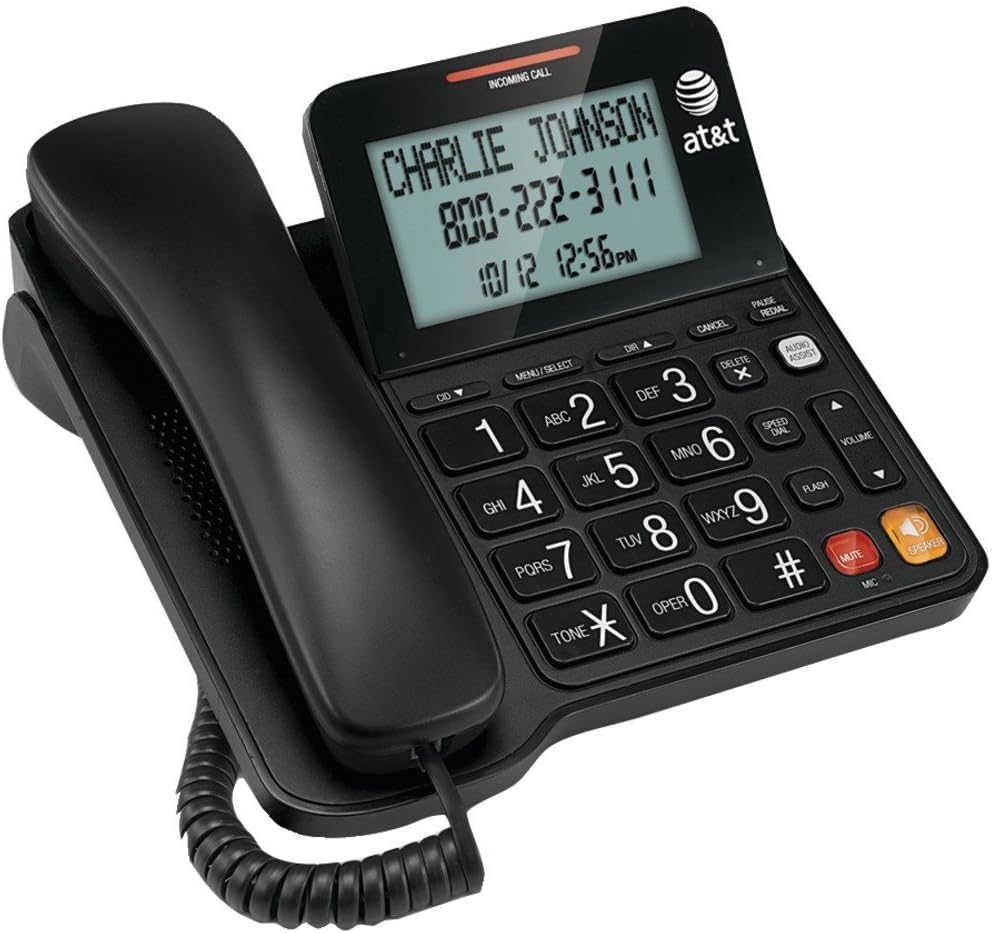
Figure 1: AT&T CL2940 Corded Phone
This image shows the AT&T CL2940 corded phone in black. The phone features a large, easy-to-read tilt display that currently shows an incoming call from 'CHARLIE JOHNSON' with the number '800-222-3111' and the date/time '10/12 12:56PM'. The large, clearly labeled buttons are visible on the keypad, including number keys, navigation buttons, and dedicated buttons for Speaker, Mute, Volume, and Audio Assist. The coiled handset cord connects the handset to the main unit.
Key Features and Components:
- Extra-Large Tilt Display: Provides clear visibility of Caller ID information, time, and menu options.
- Extra-Large Buttons: Navrženo pro snadné vytáčení a navigaci.
- Hlasitý telefon: Umožňuje hands-free konverzace.
- Audio Assist: Enhances audio clarity during calls.
- ID volajícího/čekající hovor: Displays incoming caller information and manages multiple calls.
- Adresář telefonního seznamu: Uloží až 25 jmen a čísel.
- Rychlé vytáčení: 10-number speed dial for frequently called contacts.
- Extra-Loud Ringer: Adjustable ringer volume for clear alerts.
- Montáž na stěnu: Can be placed on a desk or mounted on a wall.
Nastavení
1. Připojení telefonu
- Connect one end of the coiled handset cord to the handset and the other end to the jack labeled SLUCHÁTKO na boku základny telefonu.
- Connect one end of the telephone line cord to the jack labeled ČÁRA on the back of the phone base.
- Připojte druhý konec telefonního kabelu do telefonní zásuvky ve zdi.
2. Installing Batteries (for Caller ID/Display)
The phone operates without AC power for basic calling functions. However, to enable the Caller ID display and other display-dependent features, 4 AA batteries (not included) are required.
- Locate the battery compartment on the underside of the phone base.
- Otevřete kryt bateriového prostoru.
- Vložte 4 baterií typu AA a dodržujte správnou polaritu (+ a -) uvedenou uvnitř přihrádky.
- Nasaďte kryt prostoru pro baterie.
3. Montáž na stěnu (volitelné)
The CL2940 can be mounted on a wall to save desk space. Ensure you have a standard wall plate with two pins spaced appropriately.
- Remove the desk stand if attached.
- Align the two keyhole slots on the back of the phone with the wall plate pins.
- Slide the phone downwards to secure it in place.
Návod k obsluze
Uskutečnění hovoru
- Zvedněte sluchátko nebo stiskněte REPRODUKTOR tlačítko.
- Vytočte požadované telefonní číslo pomocí klávesnice.
- Chcete-li hovor ukončit, vraťte sluchátko zpět do kolébky nebo stiskněte REPRODUKTOR znovu tlačítko.
Příjem hovoru
- Když telefon zvoní, zvedněte sluchátko nebo stiskněte REPRODUKTOR tlačítko pro odpověď.
- Chcete-li hovor ukončit, vraťte sluchátko zpět do kolébky nebo stiskněte REPRODUKTOR tlačítko.
Používání hlasitého telefonu
- Chcete-li během hovoru aktivovat hlasitý odposlech, stiskněte REPRODUKTOR tlačítko.
- To switch back to the handset, pick up the handset.
- Chcete-li ukončit hovor přes hlasitý odposlech, stiskněte tlačítko REPRODUKTOR znovu tlačítko.
ID volajícího a čekající hovor
- When an incoming call is received, the caller's name and number will appear on the display (requires battery installation and subscription to Caller ID service).
- Použijte CID ▼ a DIR ▲ tlačítky pro procházení protokolu ID volajícího.
- If you subscribe to Call Waiting, a tone will indicate a second incoming call. Press BLIKAT pro přepínání mezi hovory.
Phonebook and Speed Dial
The phone allows you to store frequently called numbers for quick access.
- Programming Phonebook Entries: Refer to the detailed instructions in the full user manual for programming names and numbers into the 25-entry phonebook.
- Používání rychlé volby: Stiskněte tlačítko RYCHLÉ VYTÁČENÍ button, then the corresponding number (0-9) for the stored entry.
Audio Assist
Stiskněte tlačítko AUDIO ASISTENT button during a call to temporarily boost the audio volume and clarity, making conversations easier to hear.
Ovládání hlasitosti a ztlumení
- Objem: Použijte VOLUME ▲/▼ buttons to adjust the listening volume during a call (for both handset and speakerphone).
- Ztlumit: Stiskněte tlačítko ZTLUMIT button to temporarily silence your microphone during a call. The other party will not hear you, but you can still hear them. Press ZTLUMIT znovu, abyste mohli pokračovat v mluvení.
Údržba
Čištění telefonu
To keep your phone in good condition, periodically wipe it with a soft, slightly damp cloth. Avoid using harsh chemicals or abrasive cleaners, as these can damage the phone's finish or electronic components.
Výměna baterie
If the Caller ID display becomes dim or unresponsive, it may be time to replace the 4 AA batteries. Follow the battery installation steps outlined in the "Setup" section.
Odstraňování problémů
If you experience issues with your AT&T CL2940 phone, try the following common troubleshooting steps:
- Žádný oznamovací tón:
- Ujistěte se, že je telefonní kabel bezpečně připojen k telefonu i k zásuvce ve zdi.
- Test the wall jack with another working phone to confirm the line is active.
- ID volajícího se nezobrazuje:
- Verify that 4 AA batteries are correctly installed in the battery compartment.
- Check if your telephone service provider offers Caller ID service and that it is activated on your line.
- Vyměňte staré baterie za nové.
- Špatná kvalita zvuku:
- Upravte hlasitost pomocí OBJEM tlačítka.
- Ujistěte se, že je kabel sluchátka bezpečně připojen.
- If using the speakerphone, ensure you are within a reasonable distance from the microphone.
- Try activating the AUDIO ASISTENT funkce.
- Tlačítka nereagují:
- Ensure the phone is connected to a live telephone line.
- If the issue persists, try disconnecting the phone from the wall jack for a few minutes, then reconnecting it.
For more detailed troubleshooting or persistent issues, please refer to the full product support documentation or contact AT&T customer service.
Specifikace
| Značka | AT&T |
| Číslo modelu | CL2940 |
| Typ telefonu | Kabelové |
| Barva | Černý |
| Rozměry produktu | 7.9 x 8.8 x 3.7 palce |
| Hmotnost položky | 1 liber |
| Zdroj napájení | Telephone Line Powered (Batteries for Caller ID/Display) |
| Jsou vyžadovány baterie | 4 AA batteries (for Caller ID/Display, not included) |
| Výrobce | Vtech |
| Vlastnosti | Caller ID/Call Waiting, Speakerphone, Audio Assist, Extra-Large Tilt Display, Extra-Large Buttons, Extra-Loud Ringer, 10-Number Speed Dial, 25-Name/Number Phonebook |
Záruka a podpora
Your AT&T CL2940 Corded Phone is manufactured by Vtech. For warranty information and customer support, please refer to the documentation included with your purchase or visit the official AT&T or Vtech support websites. Keep your purchase receipt as proof of purchase.
For assistance, you may contact AT&T customer service directly.