
Zavedení
This manual provides comprehensive instructions for the safe and efficient use of your Marmitek BoomBoom 560 Bluetooth Over-Ear Headphones. These headphones offer excellent digital sound quality with clear mid-tones and deep bass, along with passive noise reduction for an immersive audio experience. Please read this manual thoroughly before operating the device.

Image: Marmitek BoomBoom 560 Bluetooth Over-Ear Headphones, black, shown from a slight angle.
Obsah balení
Zkontrolujte prosím, zda jsou v balení přítomny všechny níže uvedené položky:
- 1x Marmitek BoomBoom 560 Bluetooth Over-Ear Headphones
- 1x Micro USB to USB charging cable
- 1x 3.5mm Mini-jack audio cable (160 cm)
- 1x Uživatelská příručka (tento dokument)

Image: Visual representation of the Marmitek BoomBoom 560 package contents, including the headphones, charging cable, audio cable, and user manual.
Konec produktuviewOvládací prvky a porty
Familiarize yourself with the controls and ports on your BoomBoom 560 headphones:
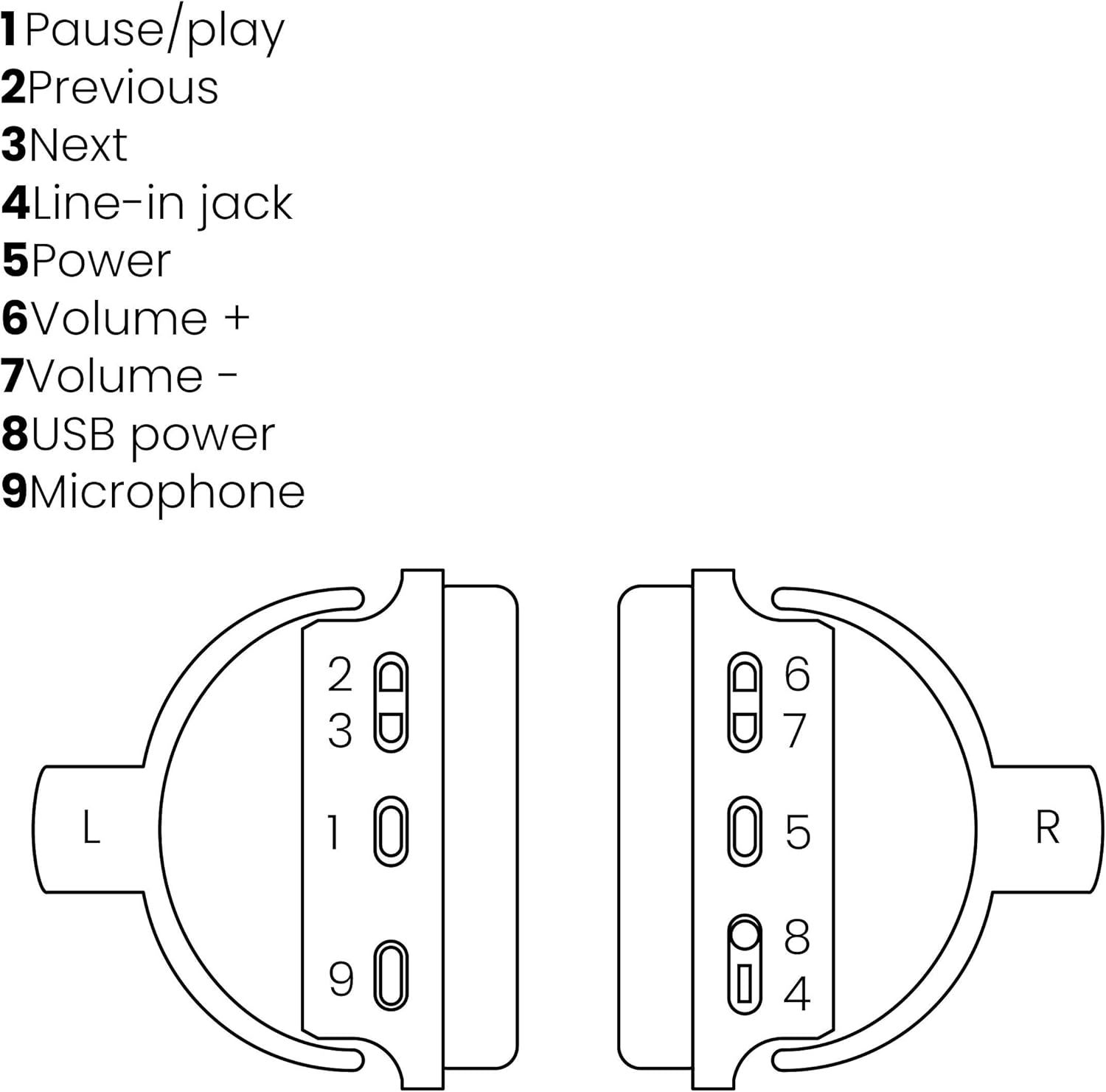
Image: A line drawing illustrating the left and right ear cup controls and ports, numbered for identification.
- Tlačítko Pozastavit/Přehrát: Ovládá přehrávání hudby.
- Tlačítko předchozí stopy: Skips to the previous song.
- Tlačítko Next Track: Přeskočí na další skladbu.
- Line-in Jack: For wired audio connection using the 3.5mm cable.
- Vypínač: Turns the headphones on/off and initiates Bluetooth pairing.
- Tlačítko hlasitosti +: Zvyšuje hlasitost.
- Tlačítko hlasitosti: Snižuje hlasitost.
- USB napájecí port: For charging the headphones using the Micro USB cable.
- Mikrofon: Vestavěný mikrofon pro hands-free hovory.
Nastavení
1. Nabíjení sluchátek
Before first use, fully charge your headphones. Connect the Micro USB end of the charging cable to the USB Power Port (8) on the headphones and the standard USB end to a USB power adapter (not included) or a computer's USB port. The LED indicator will show charging status. A full charge provides over 8 hours of playback time.
2. Párování Bluetooth
To connect your headphones wirelessly to a Bluetooth-enabled device:
- Ujistěte se, že jsou sluchátka vypnutá.
- Stiskněte a podržte Vypínač (5) dokud LED indikátor nezačne blikat modře a červeně, což signalizuje režim párování.
- Na smartphonu, tabletu nebo jiném zařízení Bluetooth povolte Bluetooth a vyhledejte dostupná zařízení.
- Select "BoomBoom 560" from the list of found devices.
- Po připojení bude LED indikátor pomalu blikat modře.

Image: Illustration depicting various Bluetooth-enabled devices (laptop, smartphone, tablet) wirelessly transmitting audio to the headphones.
3. Kabelové připojení
If Bluetooth is not available or the battery is depleted, you can use the included 3.5mm audio cable. Connect one end of the cable to the Line-in Jack (4) on the headphones and the other end to the audio output of your device.
Návod k obsluze
Zapnutí/vypnutí
- Zapnutí: Stiskněte a podržte Vypínač (5) for approximately 3 seconds until the LED indicator flashes blue.
- Vypnutí: Stiskněte a podržte Vypínač (5) for approximately 3 seconds until the LED indicator turns off.
Přehrávání hudby
- Přehrát/pozastavit: Stiskněte tlačítko Pause/Play Button (1) jednou.
- Další skladba: Stiskněte tlačítko Next Track Button (3) jednou.
- Předchozí skladba: Stiskněte tlačítko Previous Track Button (2) jednou.
Správa hovorů
When connected via Bluetooth, you can manage phone calls using the built-in microphone (9):
- Přijmout/ukončit hovor: Stiskněte tlačítko Pause/Play Button (1) jednou.
- Odmítnout hovor: Stiskněte a podržte Pause/Play Button (1) po dobu přibližně 2 sekund.
Ovládání hlasitosti
- Zvýšení hlasitosti: Stiskněte tlačítko Volume + Button (6).
- Snížit hlasitost: Stiskněte tlačítko Volume - Button (7).

Image: A user enjoying music or media with the Marmitek BoomBoom 560 headphones while relaxing at home.
Údržba
Pro zajištění dlouhé životnosti a optimálního výkonu vašich sluchátek:
- Sluchátka čistěte měkkým, suchým hadříkem. Nepoužívejte abrazivní čisticí prostředky ani rozpouštědla.
- Nevystavujte sluchátka extrémním teplotám, vlhkosti nebo přímému slunečnímu záření.
- Když sluchátka nepoužíváte, uchovávejte je na chladném a suchém místě.
- Nepokoušejte se sluchátka rozebírat ani opravovat sami, jinak by došlo ke ztrátě záruky.
Odstraňování problémů
If you encounter issues with your BoomBoom 560 headphones, refer to the following common solutions:
- Bez napájení: Ujistěte se, že jsou sluchátka plně nabitá. Připojte je ke zdroji napájení pomocí nabíjecího kabelu USB.
- Nelze spárovat přes Bluetooth:
- Ujistěte se, že sluchátka jsou v režimu párování (LED bliká modře a červeně).
- Ensure your Bluetooth device's Bluetooth function is enabled and within range (typically 10 meters).
- Try turning off and on both the headphones and your Bluetooth device.
- Delete "BoomBoom 560" from your device's Bluetooth list and attempt to pair again.
- Žádný zvuk:
- Zkontrolujte úroveň hlasitosti na sluchátkách i na připojeném zařízení.
- Ujistěte se, že jsou sluchátka správně spárována nebo že je 3.5mm audio kabel bezpečně připojen.
- If using Bluetooth, try disconnecting and reconnecting.
- Špatná kvalita zvuku:
- Pro snížení rušení se přibližte k zařízení Bluetooth.
- Ujistěte se, že mezi sluchátky a zařízením nejsou žádné překážky.
- Zkontrolujte zdroj zvuku, zda nemá problémy s kvalitou.
- Loose Earcup Bracket: If the earcup bracket feels loose, handle the headphones with care. Avoid excessive force when adjusting or folding. If the issue persists and affects functionality, contact customer support.
Specifikace
| Název modelu | BoomBoom 560 |
| Číslo modelu | 8122 |
| Značka | Marmitek |
| Technologie připojení | Wireless (Bluetooth), Wired (3.5mm jack) |
| Kompatibilita Bluetooth | Ano |
| Form Factor | Přes ucho |
| Materiál | Kůže (náušníky) |
| Speciální funkce | Redukce šumu |
| Technologie mikrofonu | Omni (Built-in) |
| Popis baterie | Lithium-iontový (Li-Ion) |
| Životnost baterie | Over 8 hours (approx.) |
| Poměr signálu k šumu (SNR) | 82 dB |
| Rozměry produktu | 23 x 5 x 18 cm; 100 g |
Záruka a podpora
Marmitek products are designed and manufactured to high quality standards. For information regarding warranty terms and conditions, please refer to the documentation provided with your purchase or visit the official Marmitek webmísto.
Pro další pomoc nebo technickou podporu navštivte prosím Marmitek Store on Amazon or the official Marmitek support channels.

Image: Logo indicating "Dutch Quality" and compliance with "EU European Standards".