
Zavedení
This manual provides detailed instructions for the operation and maintenance of your PENTAX Q10 digital interchangeable lens camera. The PENTAX Q10 is a super-compact and lightweight camera designed to deliver high-quality photography with a 12.4MP CMOS image sensor and improved autofocus performance.
Co je v krabici
- PENTAX Q10 Camera Body
- 02 Standard Zoom Lens (5-15mm)
- Nabíjecí lithium-iontová baterie
- Nabíječka baterií
- USB kabel
- Popruh
- Krytka uchycení těla
- Krytky objektivů (přední a zadní)
- CD-ROM se softwarem
- Návod k použití (tento dokument)
Fotoaparát skončilview

Obrázek 1: Přední strana View (Lens Removed) - This image displays the front of the Pentax Q10 camera body with the lens detached, revealing the image sensor and the Q-mount for interchangeable lenses. The 'PENTAX' logo is visible at the top, and 'SR' (Shake Reduction) is indicated on the grip.
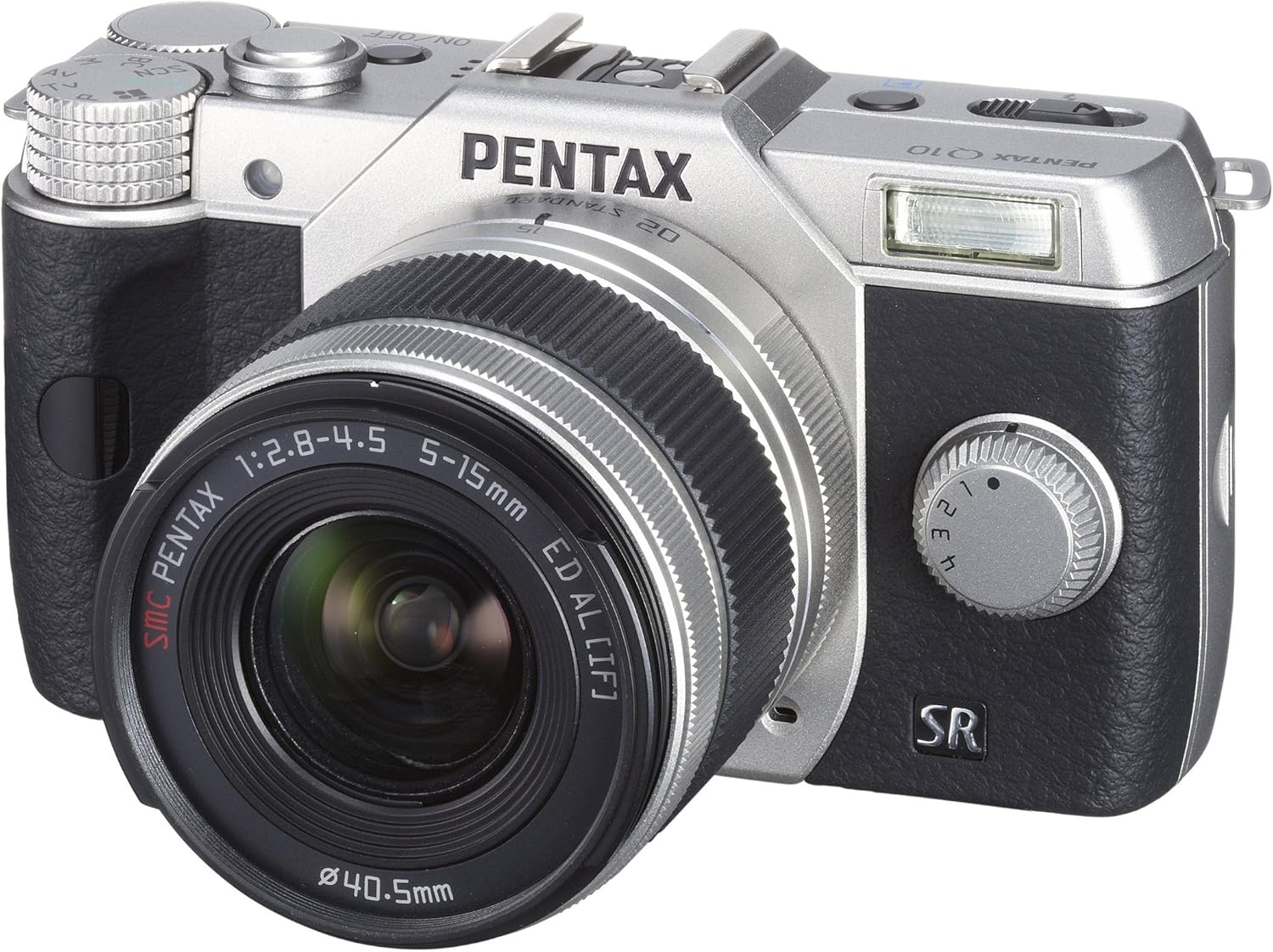
Obrázek 2: Přední strana View with Lens Attached - The Pentax Q10 camera is shown with the 02 Standard Zoom Lens (5-15mm) mounted. This view highlights the compact size of the camera with its standard kit lens.

Obrázek 3: Nahoře View - This overhead view of the Pentax Q10 shows the main controls on the top panel, including the mode dial (with Auto, P, Av, Tv, M, SCN settings), the power ON/OFF button, the shutter release button, and the hot shoe for external flash units.

Obrázek 4: Přední strana View with Flash Activated - The Pentax Q10 is depicted with its built-in pop-up flash extended, ready for use. This view also shows the 02 Standard Zoom Lens attached.

Obrázek 5: Zadní View - The back of the Pentax Q10 camera features the 3-inch LCD screen, along with various control buttons such as the playback button, delete button, ISO, OK, WB, and menu navigation buttons.
Základní nastavení
1. Nabíjení baterie
Insert the provided rechargeable battery into the battery charger. Connect the charger to a power outlet. The charging indicator light will show the charging status. Once fully charged, remove the battery.
2. Vložení baterie a paměťové karty
Open the battery/memory card compartment cover located at the bottom of the camera. Insert the charged battery with the correct orientation until it clicks into place. Insert an SD/SDHC/SDXC memory card into the card slot until it locks. Close the compartment cover securely.
3. Nasazení objektivu
Align the red dot on the lens with the red dot on the camera's lens mount. Rotate the lens clockwise until it clicks into place. To remove the lens, press the lens release button on the camera body and rotate the lens counter-clockwise.
4. Počáteční nastavení
Upon first power-on, the camera may prompt you to set the date, time, and language. Follow the on-screen instructions using the control buttons and LCD screen.
Obsluha fotoaparátu
Zapnutí/vypnutí
Stiskněte tlačítko ON/OFF button located on the top panel to power the camera on or off.
Režimy fotografování
Rotate the mode dial on the top of the camera to select your desired shooting mode:
- Auto: Fully automatic shooting for ease of use.
- P (Program AE): Camera sets aperture and shutter speed, but allows for program shift.
- Av (Aperture Priority AE): Vy nastavíte clonu, fotoaparát nastaví rychlost závěrky.
- Tv (Shutter Priority AE): Vy nastavíte rychlost závěrky, fotoaparát nastaví clonu.
- M (Manuální): Nastavujete clonu i rychlost závěrky.
- SCN (scénické režimy): Pre-set modes for specific situations (e.g., Portrait, Landscape, Night Scene, Macro, Blue Sky, Forest, Blur control).
Fotografování
- Select a shooting mode using the mode dial.
- Kompozice snímku se provede pomocí LCD monitoru.
- Press the shutter release button halfway down to focus. The camera will confirm focus.
- Stiskněte tlačítko spouště až na doraz pro pořízení snímku.
Nahrávání videa
The PENTAX Q10 supports Full 1080p HD video recording at 30 frames per second with H.264 compression. To record video:
- Switch the camera to movie mode (if available on the mode dial or via menu setting).
- Press the dedicated movie recording button (if present) or the shutter release button to start recording.
- Dalším stisknutím tlačítka nahrávání zastavíte.
Provoz blesku
The camera features a built-in pop-up flash. To activate the flash, slide the flash release lever. The flash has various modes (e.g., Auto, Flash On, Red-eye Reduction) which can be selected via the camera's menu or dedicated flash button.
Systém automatického zaostřování
The PENTAX Q10 utilizes a contrast detection autofocus system with 25 autofocus points. Available AF modes include Continuous, Face Detection, Multi-area, Selective single-point, Single, and Tracking. Select the appropriate AF mode from the camera's menu to suit your shooting conditions.
Stabilizace obrazu
The camera incorporates a sensor-shift shake reduction system to minimize blur caused by camera shake, especially in low light conditions or when using longer focal lengths.
Údržba
Čištění těla fotoaparátu
Tělo fotoaparátu otřete měkkým, suchým hadříkem. V případě odolných nečistot lehceampen the cloth with water or a mild cleaning solution specifically designed for electronics. Avoid using strong solvents.
Čištění objektivu
Use a lens blower to remove dust from the lens surface. For smudges, use a specialized lens cleaning cloth and lens cleaning fluid. Never touch the lens surface with your fingers.
Čištění senzoru
The PENTAX Q10 features an integrated DRII (Dust Removal II) dust reduction system. If dust spots appear on your images, consult a professional service center for sensor cleaning. Attempting to clean the sensor yourself can cause damage.
Péče o baterie
Store batteries in a cool, dry place. Do not expose them to extreme temperatures. If the camera will not be used for an extended period, remove the battery.
Odstraňování problémů
Fotoaparát se nezapne
- Ujistěte se, že je baterie plně nabitá a správně vložená.
- Zkontrolujte, zda jsou kontakty baterie čisté.
Nelze fotografovat
- Ověřte, zda je vložena paměťová karta a zda je na ní dostatek volného místa.
- Check if the lens is properly attached and unlocked.
- Ujistěte se, že fotoaparát není v režimu přehrávání.
- If the flash is set to a slow sync mode, the shutter may not release immediately.
Obrázky jsou rozmazané
- Ujistěte se, že je čočka čistá.
- Check if the camera is properly focused.
- Use a faster shutter speed or increase ISO in low light conditions.
- Confirm that the image stabilization (SR) is active if needed.
Chyba paměťové karty
- Znovu vložte paměťovou kartu.
- Zkuste jinou, kompatibilní paměťovou kartu.
- Naformátujte paměťovou kartu (poznámka: tím se vymažou všechna data).
Specifikace
| Název modelu | Pentax Q10 |
| Obrazový snímač | 12.4 MP Backlit CMOS (1/2.3-inch) |
| Efektivní rozlišení | 12.4 MP |
| Držák objektivu | Pentax Q-mount |
| Stabilizace obrazu | Posun senzoru |
| Rozlišení videa | Full HD 1080p (1920x1080) at 30fps (H.264) |
| Zobrazit | 3palcový LCD displej (460 000 bodů) |
| Citlivost ISO | Expanded ISO Minimum 100 |
| Rychlost závěrky | 1/8000 až 30 sekund |
| Systém automatického zaostřování | Detekce kontrastu (25 bodů) |
| Nepřetržité fotografování | Až 5 fps |
| Paměťová média | Paměťová karta SD/SDHC/SDXC |
| Konektivita | HDMI (Type C Mini), USB |
| Hmotnost (přibližně) | 0.44 libry (pouze tělo) |
Poznámka: Specifikace se mohou změnit bez předchozího upozornění.
Záruka a podpora
Informace o záruce
The PENTAX Q10 camera comes with a 1letá záruka na díly a práci from the date of purchase. Please retain your proof of purchase for warranty claims. This warranty covers manufacturing defects and workmanship under normal use.
Zákaznická podpora
Pro technickou pomoc, servis nebo další dotazy navštivte oficiální podporu Pentaxu. webnebo kontaktujte jejich oddělení zákaznických služeb. Kontaktní informace obvykle naleznete na webových stránkách výrobce webna webu nebo v záručním listu dodaném s vaším produktem.