
beyerdynamic 721360
Beyerdynamic Stegos TB Wireless Boundary Microphone User Manual
Model: 721360
Zavedení
This manual provides comprehensive instructions for the setup, operation, and maintenance of your Beyerdynamic Stegos TB Wireless Boundary Microphone. Please read this manual thoroughly before using the device to ensure optimal performance and longevity.
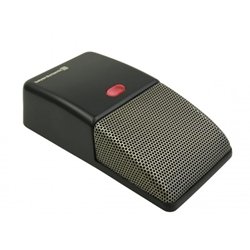
Image: Beyerdynamic Stegos TB Wireless Boundary Microphone. This image displays the compact, black wireless boundary microphone, designed for discreet placement on surfaces like conference tables.
Důležité bezpečnostní pokyny
- Nevystavujte zařízení vodě ani nadměrné vlhkosti.
- Vyhněte se extrémním teplotám.
- Nepokoušejte se zařízení otevírat ani upravovat. Veškerý servis svěřte kvalifikovanému personálu.
- Používejte pouze určené zdroje napájení a příslušenství.
- Uchovávejte mimo dosah dětí.
Obsah balení
Ověřte, zda jsou v balení přítomny všechny položky:
- Beyerdynamic Stegos TB Wireless Boundary Microphone
- Nabíjecí kabel USB (Micro USB)
- Uživatelská příručka (tento dokument)
Nastavení
1. Nabíjení mikrofonu
- Connect the Micro USB end of the charging cable to the microphone's charging port.
- Connect the standard USB end of the cable to a powered USB port (e.g., computer, USB wall adapter).
- The LED indicator on the microphone will show charging status.
- Po úplném nabití odpojte nabíjecí kabel.
2. Připojení k zařízení
The Stegos TB microphone connects wirelessly to compatible devices, typically personal computers, for video conferencing applications.
- Ujistěte se, že je mikrofon nabitý a zapnutý.
- Activate Bluetooth on your personal computer or compatible device.
- Put the microphone into pairing mode (refer to the device's specific button combination, usually holding a power/pairing button). The LED indicator will typically flash to indicate pairing mode.
- On your computer, search for available Bluetooth devices. Select "Beyerdynamic Stegos TB" from the list.
- Once paired, the LED indicator on the microphone will show a solid light, indicating a successful connection.
- In your computer's sound settings or video conferencing software, select the "Beyerdynamic Stegos TB" as the input audio device.
Návod k obsluze
Zapnutí/vypnutí
- To power on: Press and hold the power button for approximately 3 seconds. The LED indicator will illuminate.
- To power off: Press and hold the power button for approximately 3 seconds. The LED indicator will turn off.
Funkce ztlumení
The microphone features a mute function for privacy during calls.
- To mute: Press the mute button once. The LED indicator may change color or flash to indicate mute status.
- To unmute: Press the mute button again. The LED indicator will return to its normal operating state.
Umístění pro optimální výkon
For best audio pickup, place the Stegos TB microphone on a flat surface in the center of the participants. Its omnidirectional polar pattern ensures 360-degree sound capture.
Údržba
Čištění
- Wipe the microphone's exterior with a soft, dry, or slightly damp tkanina.
- Nepoužívejte agresivní chemikálie, rozpouštědla ani abrazivní čisticí prostředky.
- Ensure no liquid enters the microphone grille or ports.
Skladování
When not in use for extended periods, store the microphone in a cool, dry place, away from direct sunlight and extreme temperatures. It is recommended to fully charge the battery before long-term storage and recharge it every few months to maintain battery health.
Odstraňování problémů
| Problém | Možná příčina | Řešení |
|---|---|---|
| Mikrofon se nezapíná. | Slabá nebo vybitá baterie. | Nabijte mikrofon pomocí dodaného USB kabelu. |
| Cannot connect wirelessly. | Bluetooth is off on the device; microphone not in pairing mode; out of range. | Ensure Bluetooth is enabled. Put microphone into pairing mode. Move microphone closer to the device. |
| No audio input from microphone. | Microphone is muted; incorrect audio input selected on computer/software. | Unmute the microphone. Select "Beyerdynamic Stegos TB" as the input device in your system settings or application. |
| Špatná kvalita zvuku. | Microphone too far from speaker; environmental noise; interference. | Place microphone closer to speakers. Reduce background noise. Ensure no obstructions between microphone and receiving device. |
Specifikace
- Značka: Beyerdynamic
- Model: Stegos TB (721360)
- Technologie připojení: Wireless (USB for charging)
- Typ konektoru: Micro USB (pro nabíjení)
- Speciální funkce: Bezdrátový
- Kompatibilní zařízení: Osobní počítač
- Barva: Černý
- Polární vzor: Všesměrový
- Zdroj napájení: Napájení z baterie
- Doporučená použití: Videokonference
Informace o záruce
Beyerdynamic products are covered by a limited warranty. For specific warranty terms and conditions, please refer to the warranty card included with your product or visit the official Beyerdynamic webUschovejte si doklad o koupi pro případ reklamace.
Note: Warranty details are subject to change and may vary by region.
Podpora a kontakt
For further assistance, technical support, or service inquiries, please contact Beyerdynamic customer support through their official webwebu nebo kontaktních informací uvedených na obalu produktu.
Oficiální Webmísto: www.beyerdynamic.com
Při kontaktování podpory mějte prosím připravené číslo modelu (721360) a sériové číslo.
Související dokumenty - 721360
 |
Polsen US-OB-33 Omnidirectional USB Boundary Microphone Product Manual Product manual for the Polsen US-OB-33 Omnidirectional USB Boundary Microphone, detailing setup, operation, troubleshooting, specifications, and warranty information. |
 |
BOYA BY-BMW700 2.4GHz Wireless Conference Microphone - User Manual Official instruction manual for the BOYA BY-BMW700, a 2.4GHz wireless boundary microphone system for conferences and presentations. Learn about features, specifications, and setup. |
 |
BOYA Blobby USB Conference Microphone with Wireless Charger - User Manual User manual for the BOYA Blobby USB conference microphone with wireless charging. Learn about its features, setup, operation, specifications, and troubleshooting for clear audio in meetings and online calls. |
 |
BOYA BY-BMM400 Conference Microphone Speaker User Manual and Guide Comprehensive user manual and guide for the BOYA BY-BMM400 omnidirectional conference microphone speaker. Learn about its features, setup instructions for smartphones, tablets, and computers (Windows/macOS), technical specifications, and important maintenance notes. |
 |
Návod k obsluze konferenčního mikrofonu Audio Array AM-C28 USB Tento dokument obsahuje návod k obsluze konferenčního mikrofonu Audio Array AM-C28 USB a podrobně popisuje jeho příslušenství, funkce, technické specifikace a postupy nastavení pro operační systémy macOS i Windows. |
 |
Behringer BU100 USB Boundary Microphone - Features, Specifications, and Compliance Explore the Behringer BU100, a USB boundary microphone designed for dedicated vocal applications. This overview covers its key features, technical specifications, and FCC compliance information, making it ideal for streamers, podcasters, and recording professionals. |
Ask a question about this manual
Ask about setup, troubleshooting, compatibility, parts, safety, or missing instructions. Manuals+ will review the question and use this page’s manual context to help answer it.