
1. General Overview
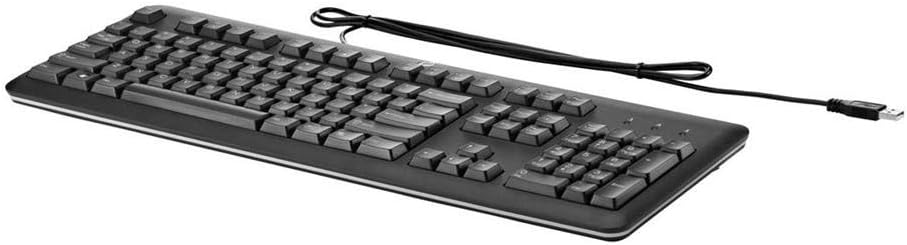
The HP QY776AA#ABA USB Keyboard is a full-size, wired keyboard designed for reliable and comfortable use with various computer systems. It features a U.S. English localization layout, quiet keys, and a durable, spill-resistant design, making it suitable for both home and office environments.
2. Pokyny k nastavení
Setting up your HP QY776AA#ABA USB Keyboard is a straightforward process, thanks to its plug-and-play functionality.
- Rozbalte klávesnici: Opatrně vyjměte klávesnici z obalu.
- Vyhledejte USB port: Identify an available USB-A port on your computer (desktop, laptop, gaming console, or smart TV).
- Připojte kabel USB: Insert the USB-A connector of the keyboard's cable into the available USB port on your device.
- Rozpoznávání systému: Your operating system should automatically detect and install the necessary drivers for the keyboard. This may take a few moments.
- Začněte používat: Once the system recognizes the keyboard, it is ready for immediate use.
3. Ovládání klávesnice
The HP QY776AA#ABA keyboard offers a standard, comfortable typing experience with several convenient features.
3.1 Rozložení a funkce kláves
- Rozložení v plné velikosti: The keyboard features a complete QWERTY layout, including a dedicated numeric keypad on the right side for efficient data entry.
- Tiché klávesy: The keys are designed for quiet operation, minimizing typing noise in shared environments.
- Funkční klávesy (F1–F12): These keys provide standard functionality and often include secondary media control functions (e.g., volume up/down, play/pause) when used in combination with the 'Fn' key.
- Klávesa Windows: A dedicated Windows key provides quick access to the Start Menu and other operating system functions.
3.2 Nastavitelné sklopné nohy
For enhanced ergonomic comfort, the keyboard is equipped with adjustable tilt legs located on the underside. These legs can be extended to raise the back of the keyboard, providing a slight incline that some users prefer for typing. To adjust, simply flip out the legs to your desired position.

4. Údržba
To ensure the longevity and optimal performance of your HP QY776AA#ABA USB Keyboard, follow these simple maintenance guidelines:
- Čištění: Regularly wipe the keyboard surface with a soft, slightly damp cloth. Avoid using harsh chemicals or abrasive materials. For cleaning between keys, use compressed air to dislodge dust and debris.
- Odolnost proti rozlití: The keyboard features a spill-resistant design. In case of accidental spills, immediately disconnect the keyboard from your computer, gently wipe away the liquid, and allow it to air dry completely before reconnecting.
- Skladování: Pokud klávesnici delší dobu nepoužíváte, skladujte ji v čistém a suchém prostředí mimo dosah extrémních teplot.
5. Řešení problémů
If you encounter issues with your HP QY776AA#ABA USB Keyboard, try the following troubleshooting steps:
- Klávesnice nereaguje:
- Ujistěte se, že je kabel USB bezpečně zapojený do funkčního portu USB v počítači.
- Zkuste zapojit klávesnici do jiného USB portu.
- Restartujte počítač.
- Klávesy nefungují:
- Check for any physical obstructions or debris under the affected keys.
- Ensure the keyboard is clean (refer to the Maintenance section).
- Nesprávný výstup znaků:
- Verify that your operating system's keyboard language settings match the U.S. English layout of the keyboard.
If problems persist after attempting these steps, consult the HP support resources mentioned in the Warranty and Support section.
6. Specifikace
| Funkce | Specifikace |
|---|---|
| Značka | HP |
| Název modelu | QY776AA#ABA |
| Technologie připojení | USB, USB-A |
| Popis klávesnice | Standard Full-size |
| Speciální funkce | Spill-resistant, Adjustable Tilt Legs |
| Barva | Černý |
| Rozměry položky (DxŠxV) | 18.12 x 6.47 x 0.96 palce |
| Hmotnost položky | 2 libry |
| Zdroj napájení | USB Powered |
| Jazyk | English (U.S. localization) |
| Kompatibilní zařízení | Herní konzole, notebook, počítač, chytrá televize |
7. Záruka a podpora
This HP USB Keyboard is covered by HP's limited warranty. For detailed information regarding warranty terms, regulatory notices, and technical support, please refer to the documentation included with your product or visit the official HP website. You can often find specific regulatory information by scanning the QR code provided in the product packaging or by visiting hp.com/go/regulatory.
For customer service and technical assistance, please consult the contact information provided in your product's warranty card or on the HP support webmísto.