
Zavedení
Thank you for choosing the KabelDirekt 4K HDMI Cable. This high-performance cable is engineered to deliver superior audio and video quality for your home theater, gaming, and professional AV setups. This manual provides essential information for setting up, operating, maintaining, and troubleshooting your HDMI cable to ensure optimal performance.
Vlastnosti produktu
- Vysoký výkon: Thanks to premium build quality, HDMI-to-HDMI cables of 20ft and longer support up to 4K@60Hz. Also supports HDR, 7.1 surround sound, ARC, and Ethernet for stunning image and sound quality.
- German-Engineered: Unlike standard HDMI cables, KabelDirekt cables feature a German-engineered multi-layer shielding system inside the connector. Gold-plated, break-resistant connectors and high-purity copper conductors ensure stable, interference-free transmission and long-lasting durability.
- Length Options for Every Setup: Available in a wide range of lengths from 0.5ft to 75ft. Ideal for home theaters, gaming setups, offices, and pro AV installations.
- Široká kompatibilita: Works perfectly with PCs, laptops, game consoles (PS5, Xbox, Switch/Switch 2), Blu-ray/DVD players, TVs, streaming devices, monitors, projectors, and all HDMI-enabled devices.
Co je v krabici
- 1x KabelDirekt - HDMI TOP Series - 25ft (7.6m)
Pokyny pro nastavení
Follow these steps to connect your KabelDirekt 4K HDMI Cable:
- Identifikace portů: Locate the HDMI output port on your source device (e.g., PC, game console, Blu-ray player) and the HDMI input port on your display device (e.g., TV, monitor, projector).
- Připojovací kabel: Gently insert one end of the KabelDirekt HDMI cable into the HDMI output port of your source device.
- Připojení k displeji: Insert the other end of the HDMI cable into an available HDMI input port on your display device. Ensure both connections are secure.
- Zapnutí zařízení: Zapněte zdrojové zařízení i zobrazovací zařízení.
- Vyberte vstup: On your display device, use the remote control or menu buttons to select the correct HDMI input source that corresponds to the port where you connected the cable.

Image: KabelDirekt HDMI cable securely connected to a TV's HDMI port.

Image: The KabelDirekt HDMI cable is compatible with a wide range of devices, including PCs, game consoles, Blu-ray players, and projectors.
Video: An official KabelDirekt video demonstrating the features and connection of their High Speed HDMI Cable.
Návod k obsluze
Once connected, your KabelDirekt HDMI cable will automatically transmit audio and video signals. For optimal performance:
- Verify Display Settings: Ensure your display device is set to the highest possible resolution and refresh rate supported by both the display and the source device (e.g., 4K@60Hz).
- Nastavení zvuku: Check your source device's audio output settings to ensure it's configured for HDMI audio, especially if using features like ARC (Audio Return Channel).
- HDR/UHD: If your devices support HDR or UHD, confirm these settings are enabled in your device's display options for enhanced visual experience.

Image: Enjoy crystal clear 4K@60Hz visuals and immersive 7.1 surround sound for movies and gaming.
Údržba
To ensure the longevity and performance of your KabelDirekt HDMI cable:
- Zacházejte opatrně: Zabraňte nadměrnému ohýbání, kroucení nebo tahání kabelu, zejména v blízkosti konektorů.
- Zabezpečená připojení: Ensure connectors are fully inserted into ports to prevent accidental disconnections and signal loss.
- Vyčistěte konektory: Periodically clean the gold-plated connectors with a dry, lint-free cloth to remove dust or debris.
- Skladování: Pokud kabel nepoužíváte, volně jej smotejte a skladujte na suchém a chladném místě mimo dosah přímého slunečního záření a extrémních teplot.
Odstraňování problémů
If you encounter issues with your KabelDirekt HDMI cable, try the following solutions:
- Žádný obraz/zvuk:
- Verify that both ends of the HDMI cable are securely connected to the correct ports.
- Ensure your display device is set to the correct HDMI input source.
- Try connecting the cable to a different HDMI port on your display or source device.
- Restart both your source and display devices.
- Poor Picture Quality (Flickering, Static, Distorted Colors):
- Zkontrolujte, zda kabel nebo konektory nejsou fyzicky poškozené.
- Ensure your source device's resolution and refresh rate settings are compatible with your display.
- Reduce the resolution or refresh rate on your source device to see if the issue resolves.
- Test the cable with another device or display to rule out a faulty cable.
- Přerušované připojení:
- Ensure all connections are tight and not loose.
- Avoid placing heavy objects on the cable or routing it through areas where it might be pinched or stressed.
Specifikace
| Funkce | Popis |
|---|---|
| Značka | KabelDirekt |
| Název modelu | KabelDirekt 4K HDMI Cable – 25ft & Longer HDMI Cables (20ft–75ft) – German-Engineered HDMI Cord – Supports 4K@60Hz, UHD, HDR, ARC, Ethernet – HDMI Cable for HDTV, PC, PS5, Xbox, Switch |
| Číslo modelu položky | 270 |
| Typ konektoru | HDMI |
| Typ kabelu | HDMI |
| Barva | Černá/Modrá |
| Pohlaví konektoru | Muž k muži |
| Rychlost přenosu dat | 18 Gigabit za sekundu |
| Frekvence | 60 Hz |
| Speciální funkce | Gold plated, Shielding |
| Kompatibilní zařízení | Any device with an HDMI port, including: TVs, notebooks, projectors, A/V receivers, Xbox Series X, Xbox Series S, Xbox One, PS4, PS5 & other video game consoles, monitors, UHD players, Apple TV devices, PCs, Blu-ray players |
| Hmotnost položky | 1 libry |
| Rozměry produktu | 6.8 x 1.9 x 6.3 palce |
| UPC | 609224989384 |
Záruka a podpora
KabelDirekt stands by the quality of its products. This HDMI cable is backed by a Záruka výrobce 36 měsíců. Each cable undergoes strict quality checks and is individually machine-tested for flawless performance and long-term reliability.
For any issues or questions, please contact KabelDirekt Products directly. We are committed to ensuring your complete satisfaction.
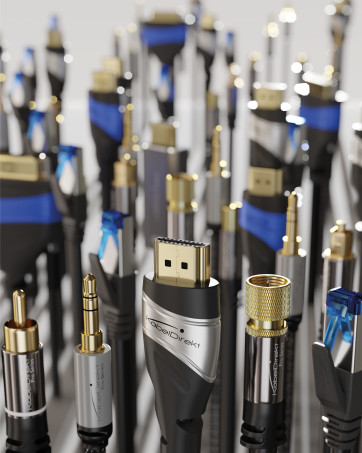
Image: German-engineered quality ensures durability and reliable performance.
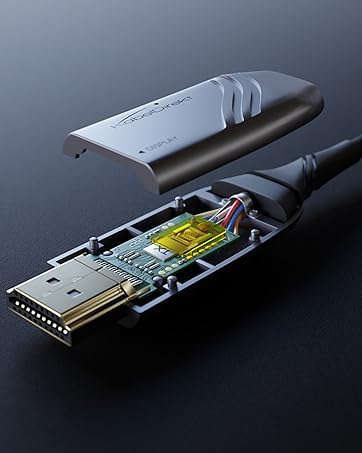
Image: High-purity copper conductors and robust shielding contribute to stable, interference-free transmission.