
1. Úvod
The D-Link GO-SW-5G is a 5-Port Unmanaged Gigabit Desktop Switch designed for home and small office environments. This device provides a simple and cost-effective solution to expand your network connectivity, offering high-speed Gigabit Ethernet ports for reliable data transfer. It incorporates D-Link's Green Technology for energy efficiency, reduced heat generation, and extended product lifespan.
This switch is a plug-and-play device, requiring no complex configuration or software installation, making it easy to integrate into an existing network.
2. Obsah balení
Ověřte prosím, zda jsou ve vašem balení obsaženy všechny níže uvedené položky:
- D-Link GO-SW-5G 5-Port Gigabit Desktop Switch
- Napájecí adaptér
- Průvodce rychlou instalací
Pokud některé položky chybí nebo jsou poškozené, obraťte se na svého prodejce.
3. Pokyny k nastavení
The D-Link GO-SW-5G switch is designed for easy plug-and-play installation. Follow these steps to set up your device:
3.1. Připojte napájecí adaptér
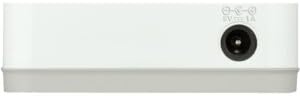
- Locate the power input port on the side of the D-Link GO-SW-5G switch.
- Připojte dodaný napájecí adaptér k tomuto portu.
- Zapojte druhý konec napájecího adaptéru do standardní elektrické zásuvky.
- The power LED on the front of the switch will illuminate, indicating that the device is receiving power.

Obrázek 1: Strana view of the D-Link GO-SW-5G switch with the power input port.
3.2. Připojte se k vaší síti
- Using a standard Ethernet cable (RJ45), connect one end to an available LAN port on your router (not your modem).
- Connect the other end of this Ethernet cable to any of the five available ports on the back of the D-Link GO-SW-5G switch.
- The corresponding LED on the front of the switch will light up, indicating an active connection.
Obrázek 2: Zadní view of the D-Link GO-SW-5G switch with five Ethernet ports.
3.3. Connect Network Devices
- Connect your network devices (e.g., computers, gaming consoles, network printers, smart TVs) to the remaining available Ethernet ports on the D-Link GO-SW-5G switch using Ethernet cables.
- Each connected device will have its corresponding LED on the front of the switch illuminate, confirming a successful connection.

Obrázek 3: Přední view of the D-Link GO-SW-5G switch showing active port LEDs.
4. Návod k obsluze
The D-Link GO-SW-5G is an unmanaged switch, meaning it operates automatically without requiring user configuration. Once connected as described in the Setup section, it will begin forwarding network traffic between connected devices.
- Automatické vyjednávání: The switch automatically detects the network speed (10/100/1000 Mbps) and duplex mode (half/full) of connected devices and adjusts accordingly.
- Automatické MDI/MDIX: All ports support automatic MDI/MDIX crossover, eliminating the need for crossover cables when connecting to other switches or hubs.
- LED indikátory: Each port has an LED indicator on the front panel. A lit LED indicates an active link, and blinking indicates network activity.
5. Údržba
To ensure optimal performance and longevity of your D-Link GO-SW-5G switch, consider the following maintenance guidelines:
- Umístění: Umístěte přepínač na chladné a suché místo mimo dosah přímého slunečního záření, zdrojů tepla a nadměrné vlhkosti. Zajistěte dostatečné větrání v okolí zařízení.
- Čištění: Use a soft, dry cloth to clean the exterior of the switch. Avoid using liquid or aerosol cleaners, as they may damage the device.
- Správa kabelů: Udržujte ethernetové kabely úhledně uspořádané, abyste zabránili jejich zamotání a náhodnému odpojení.
- Cyklus napájení: If you experience network issues, a simple power cycle (unplugging the power adapter for 10 seconds and then plugging it back in) can often resolve minor problems.
6. Řešení problémů
If you encounter issues with your D-Link GO-SW-5G switch, refer to the following common troubleshooting steps:
- Bez LED diody napájení:
- Ujistěte se, že je napájecí adaptér bezpečně připojen k přepínači i k funkční elektrické zásuvce.
- Ověřte funkčnost elektrické zásuvky zapojením jiného zařízení.
- No Link/Activity LED for a Connected Device:
- Zkontrolujte, zda je ethernetový kabel bezpečně zapojený do portu přepínače i do síťového zařízení.
- Zkuste jiný ethernetový kabel, abyste vyloučili vadný kabel.
- Ujistěte se, že je připojené zařízení zapnuté a jeho síťový adaptér funguje správně.
- Zkuste zařízení připojit k jinému portu na přepínači.
- Pomalá rychlost sítě:
- Verify that all connected devices and cables support Gigabit Ethernet (1000 Mbps) for optimal performance. The switch will operate at the lowest common speed.
- Ensure your router and internet service provider (ISP) plan support the desired speeds.
- Perform a power cycle on the switch and your router.
- Přerušované připojení:
- Zkontrolujte, zda nejsou uvolněné kabelové spoje.
- Ensure the switch is not overheating; provide adequate ventilation.
- Vyzkoušejte s různými ethernetovými kabely.
7. Specifikace
| Značka | D-Link |
| Číslo modelu | GO-SW-5G/B |
| Počet portů | 5 |
| Typ přepínače | Neřízená |
| Rychlost přenosu dat | 1 Gigabits Per Second (10/100/1000 Mbps) |
| Rozhraní | RJ45 |
| Barva | Bílý |
| Hmotnost položky | 0.22 libry |
| svtage | 100-240 voltů |
| Kompatibilní zařízení | PC, Mac, and other Ethernet-enabled devices |
| Spínací tkanina | 10 Gbps |
| UPC | 790069365669 |
8. Záruka a podpora
Omezená záruka: The D-Link GO-SW-5G switch comes with a 3-year limited warranty. For detailed terms and conditions, please refer to the warranty information included in your package or visit the official D-Link webmísto.
Technická podpora: For technical assistance, product registration, or to download the latest firmware and documentation, please visit the Podpora D-Link Webmísto or contact D-Link customer service.