
1. Úvod
Thank you for choosing the Atlantic Full Motion TV Wall Mount. This mount is designed to securely hold flat-panel televisions ranging from 37 inches to 64 inches, offering versatile viewing angles and space-saving capabilities. Please read this manual thoroughly before installation and use to ensure safe and proper operation.
2. Bezpečnostní informace
VAROVÁNÍ:
- For stud mounting, use only lag bolts.
- Plastic anchors are only for concrete, stone, or masonry installations.
- Tento výrobek je určen pro použití v dřevěných sloupech a masivních betonových stěnách. NEINSTALUJTE do sádrokartonu samostatně.
- Ensure the TV's weight, including accessories, does not exceed 132 lbs (60 kg).
- Improper use could result in serious injury or property damage.
- Always ensure all bolts are securely tightened before hanging the TV.
If you have any questions or concerns during installation, please contact customer support.
3. Obsah balení
Před zahájením instalace se prosím ujistěte, že jsou všechny komponenty přítomny:
- TV Wall Mount Assembly (1)
- Standard Mounting Hardware (various screws, washers, spacers)
- Small Tool (1)
- Pásky na suchý zip (2)
- Návod k použití (1)
4. Vlastnosti produktu
- Univerzální design: Compatible with 37" - 84" flat-panel TVs up to 132 lbs. VESA certified 100mm x 100mm to 600mm x 400mm.
- Adjustable Optimal Viewing: Features +5°/-15° tilt and +/-180° swivel for flexible viewing úhly.
- Prostorově úsporný design: Retracts to 3.1" from the wall and extends up to 21.5" for maximum versatility.
- Odolná konstrukce: Built with solid heavy gauge steel and a durable coated finish for secure support.
5. Nastavení a instalace
Before you begin, ensure you have the necessary tools (not included): tape measure, pencil, screwdriver, electric drill, stud finder, and possibly a hammer drill for concrete walls.
5.1. Připevnění držáků k televizoru
Identify the correct screws and washers for your TV's VESA mounting holes. For flat-back TVs, screws may connect directly. For curved or concave-back TVs, use appropriate spacers and washers to ensure a secure fit.
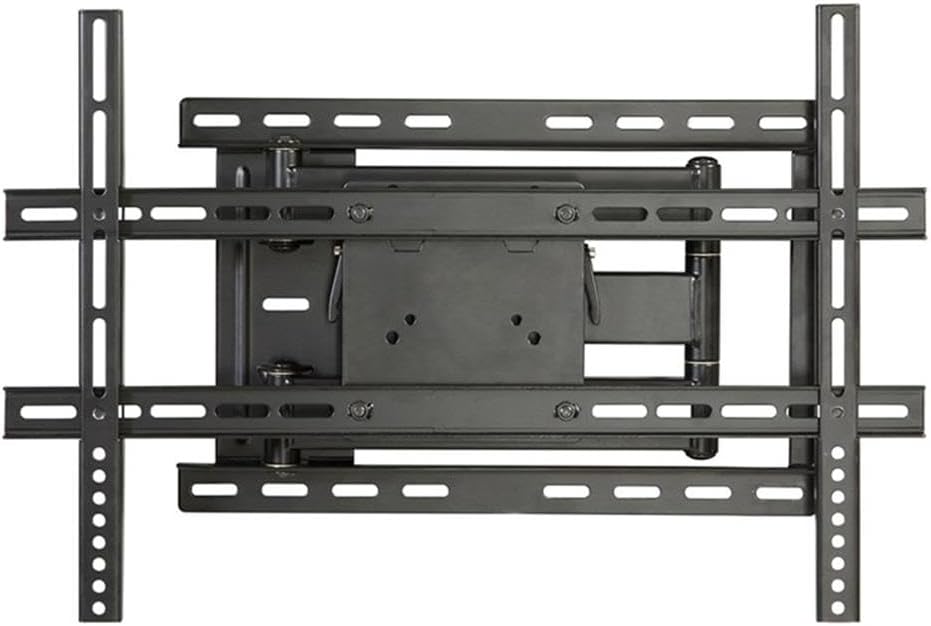
Obrázek: Overview of the Atlantic Full Motion TV Wall Mount components.
Attach the TV brackets to the back of your television using the selected screws and washers. Ensure they are securely fastened but do not overtighten.
5.2. Attaching Wall Plate to Wall
For Wood Stud Mounting:
- Locate wood studs using a stud finder. Mark the center of the studs.
- Position the mounting template (provided) at your desired height and align the holes with your stud center line. Mark the drill locations.
- Vyvrtejte vodicí otvory pomocí vrtáku o průměru 7/32 palce (5.5 mm).
- Install the wall plate using the lag bolts. Tighten the lag bolts only until the wall plate is firmly against the wall. Do not overtighten.
For Solid Concrete Wall Mounting:
- Position the mounting template at your desired height on the concrete surface. Mark the drill locations.
- Drill pilot holes using a 3/8 in. (10 mm) diameter masonry drill bit, to a depth of 2.5 in. (64 mm).
- Insert plastic anchors into the drilled holes. Ensure they are flush with the concrete surface.
- Install the wall plate using the lag bolts. Tighten the lag bolts only until the wall plate is firmly against the wall. Do not overtighten.

Image: The TV wall mount with a transparent TV outline, illustrating how the mount supports the television.
5.3. Hanging and Securing TV to Wall Plate
Carefully lift the TV with the attached brackets and hook them onto the wall plate. Ensure the TV is level. Once positioned, secure the TV to the wall plate using the locking mechanisms or screws as indicated in the detailed instructions provided with the product.

Image: The Atlantic Full Motion TV Wall Mount extended from the wall, holding a television in a living room setting.
6. Návod k obsluze
The Atlantic Full Motion TV Wall Mount allows for easy adjustment to achieve optimal viewing úhly.
6.1. Nastavení sklonu
The mount allows for a tilt range of +5° (upward) to -15° (downward). To adjust the tilt, loosen the tilting bolts (usually located on the side of the TV plate), set the TV to your desired angle, and then tighten the bolts to secure it in place.

Image: Diagram illustrating the +5° to -15° tilt adjustment range of the TV wall mount.
6.2. Nastavení otočení
The mount offers a +/-180° swivel capability. Gently push or pull the TV to the left or right to achieve your desired viewing angle. The articulating arms will extend and retract smoothly.

Image: Diagram illustrating the +/-180° swivel adjustment range of the TV wall mount.
6.3. Prodloužení a zatažení
To extend the TV from the wall, gently pull the screen forward. To retract, push the screen back towards the wall until it reaches its home position (3.1" from the wall).
6.4. Správa kabelů
Use the provided Velcro straps to organize and secure cables along the articulating arms to maintain a neat appearance and prevent damage.
7. Údržba
- Regularly check all screws and bolts to ensure they remain tight and secure.
- Držák čistěte měkkým, suchým hadříkem. Nepoužívejte abrazivní čisticí prostředky ani rozpouštědla.
- Do not hang anything on the mount or TV that exceeds the specified weight limit.
8. Řešení problémů
| Problém | Možná příčina | Řešení |
|---|---|---|
| Televizor není v rovině. | Mounting plate or TV brackets are not perfectly level. | Adjust the leveling screws on the TV plate or re-level the wall plate. |
| Držák se zdá být nestabilní. | Loose mounting bolts or incorrect installation. | Ensure all lag bolts are securely tightened into studs/concrete. Verify correct installation steps. |
| Cables are blocked by the mount. | Incorrect cable routing or VESA mount position. | Add spacers between the bracket and TV back if needed. Reroute cables using Velcro straps. |
| Arm is stiff to move. | Joints may need lubrication. | Apply a small amount of lubricant to the arm's joints. |
9. Specifikace
- Číslo modelu: 63607068
- Kompatibilní velikosti televizorů: 37" - 84" (optimal for 37" - 64" as per product title)
- Maximální nosnost: 132 lb (60 kg)
- Kompatibilita VESA: 100 mm x 100 mm až 600 mm x 400 mm
- Úhel náklonu: +5° / -15°
- Úhel otočení: +/-180°
- Distance from Wall (Retracted): 3.1 palců
- Distance from Wall (Extended): 21.5 palců
- Rozměry produktu: 3.25 x 25.63 x 11.5 palce
- Hmotnost položky: 15.7 libry
- Materiál: Metal; Plastic
- Barva: Černý
10. Záruka a podpora
For warranty information or technical support, please refer to the product packaging or contact Atlantic customer service directly. Keep your purchase receipt for warranty claims.