
Zavedení
The Jabra Music Street2 Bluetooth Stereo Headset is designed to provide high-quality audio and hands-free communication. This manual provides essential information for the proper use, maintenance, and troubleshooting of your device. Please read it carefully before use.
Nastavení
1. Nabíjení náhlavní soupravy
Before first use, fully charge the headset. Connect the micro-USB charging cable to the charging port on the headset and the other end to a USB power source.
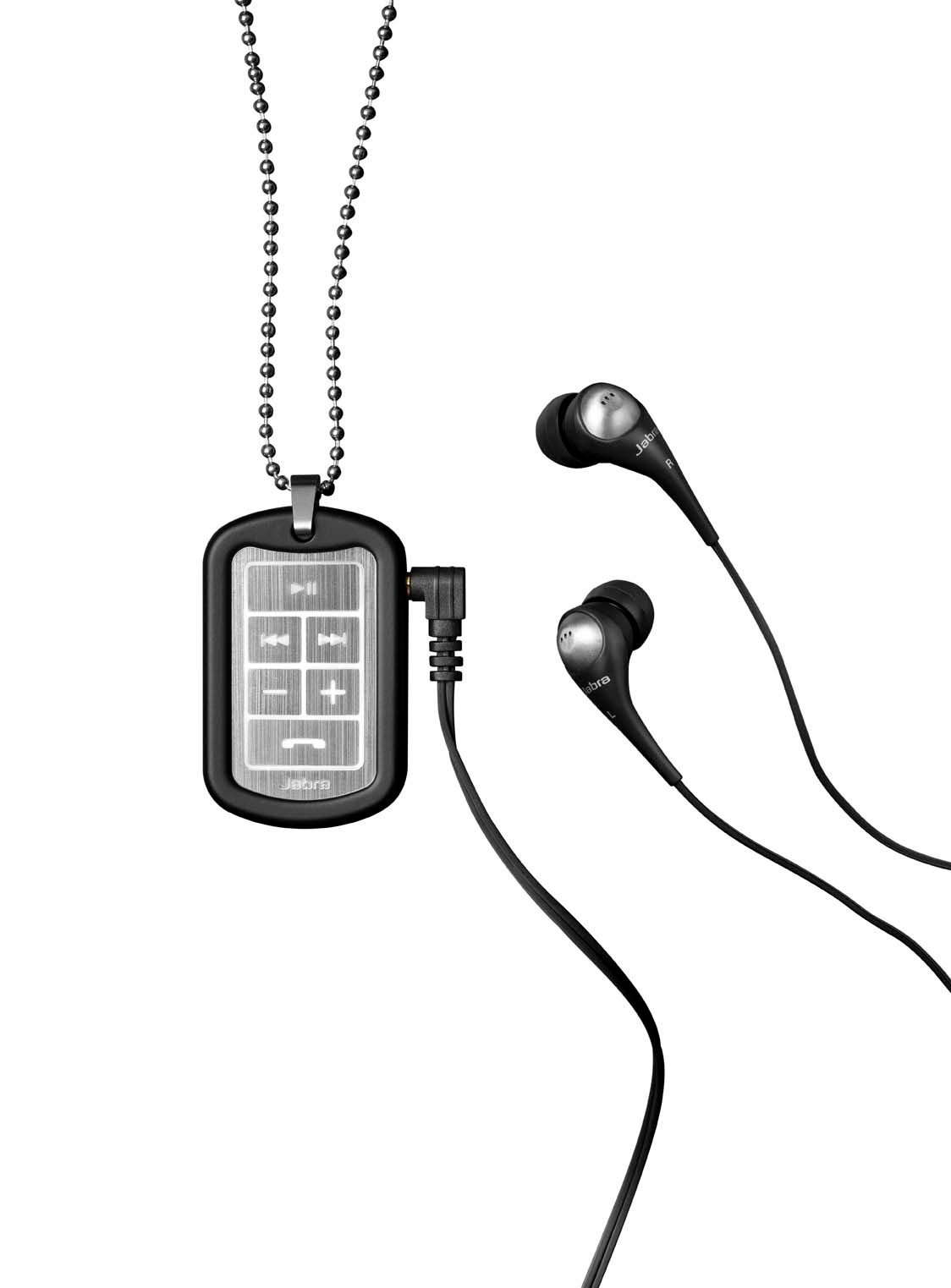
Image: The Jabra Music Street2 headset, highlighting the micro-USB charging port located on the side of the control unit.
- Plné nabití obvykle trvá přibližně 2 hodiny.
- LED indikátor bude zobrazovat stav nabíjení (např. červená pro nabíjení, modrá pro plné nabití).
2. Spárování se zařízením Bluetooth
- Zkontrolujte, zda je náhlavní souprava vypnutá.
- Press and hold the Multi-function button (usually the play/pause button) for approximately 5-7 seconds until the LED indicator flashes blue rapidly. This indicates pairing mode.
- Na zařízení s podporou Bluetooth (chytrý telefon, tablet atd.) přejděte do nastavení Bluetooth a povolte Bluetooth.
- Hledat available devices. "Jabra Street2" should appear in the list.
- Select "Jabra Street2" to connect. If prompted for a passcode, enter "0000" (four zeros).
- Po úspěšném spárování bude LED indikátor pomalu modře blikat.
The headset can remember multiple paired devices but can only be connected to one at a time.
Návod k obsluze
Zapnutí/vypnutí
- Zapnutí: Press and hold the Multi-function button until the LED flashes blue.
- Vypnout: Press and hold the Multi-function button until the LED flashes red and then turns off.
Ovládání hudby
- Přehrát/pozastavit: Stiskněte jednou multifunkční tlačítko.
- Další skladba: Stiskněte tlačítko „Další skladba“ (obvykle označené šipkou vpřed).
- Předchozí skladba: Stiskněte tlačítko „Předchozí skladba“ (obvykle označené šipkou zpět).
- Zvýšit hlasitost: Stiskněte tlačítko „+“.
- Snížit hlasitost: Stiskněte tlačítko „-“.
Správa hovorů
- Přijmout hovor: Stiskněte jednou multifunkční tlačítko.
- Ukončit hovor: Během hovoru stiskněte jednou multifunkční tlačítko.
- Odmítnout hovor: Stiskněte a podržte multifunkční tlačítko po dobu 2 sekund.
- Znovu vytočit poslední číslo: Dvojitým stisknutím multifunkčního tlačítka neprobíhá hovor.
- Hlasové vytáčení: Press the Multi-function button once when not on a call (if supported by your phone).
The headset automatically switches between music and calls.
Údržba
- Keep the headset dry. Moisture can damage the electronic circuits.
- Vyhněte se extrémním teplotám. Vysoké teploty mohou zkrátit životnost elektronických zařízení, poškodit baterie a deformovat nebo roztavit některé plasty.
- Do not attempt to open the headset. Unauthorized modifications can damage the unit and void your warranty.
- Clean the headset with a soft, dry cloth. Do not use harsh chemicals or detergents.
- Pokud sluchátka delší dobu nepoužíváte, skladujte je na chladném a suchém místě.
Odstraňování problémů
Žádná síla
- Ensure the headset is fully charged. Connect it to a power source and check the charging indicator.
Nelze spárovat se zařízením
- Make sure the headset is in pairing mode (LED flashing blue rapidly).
- Ujistěte se, že je na vašem zařízení povoleno rozhraní Bluetooth a že je v dosahu (obvykle 10 metrů nebo 33 stop).
- Try turning off and on both the headset and your Bluetooth device.
- If previously paired, try deleting "Jabra Street2" from your device's Bluetooth list and re-pairing.
Žádný zvuk nebo špatná kvalita zvuku
- Zkontrolujte úroveň hlasitosti na sluchátkách i na připojeném zařízení.
- Ujistěte se, že je sluchátko správně připojeno k vašemu zařízení.
- Přesuňte se blíže k zařízení, abyste se vyhnuli rušení.
- Ensure the ear buds are correctly inserted and fit snugly to block external noise.
Calls Not Switching Automatically
- Verify that the headset is the active audio device for calls on your phone's Bluetooth settings.
- Some phone models may require manual selection of the audio output during a call.
Specifikace
| Název modelu | Jabra Music Street2 |
| Verze Bluetooth | 3.0 + EDR |
| Bezdrátové Dosah | Až 10 metrů (33 stop) |
| Doba hovoru | Až 8 hodin |
| Pohotovostní doba | Až 9.5 dní |
| Doba nabíjení | Přibližně 2 hodiny |
| Konektivita | Bluetooth, 3.5 mm Jack (for wired connection if applicable) |
| Vlastnosti | Virtual surround sound, power bass, noise-blocking ear buds, automatic music/call switching |
Záruka a podpora
Jabra products are covered by a limited warranty. For specific warranty terms and conditions, please refer to the warranty card included with your product or visit the official Jabra webmísto.
For technical support, frequently asked questions, or to download the latest software/firmware updates, please visit the official Jabra support page:
You may also contact Jabra customer service directly for assistance.