
Zavedení
Thank you for choosing the Acoustic Audio AA5105 5.1 Surround Sound Home Entertainment System. This system is designed to provide an immersive audio experience for your home theater, personal computer, gaming system, or other audio devices. It features a powerful subwoofer and five satellite speakers, offering versatile connectivity options including RCA, USB, and SD/MMC card inputs.
To ensure proper operation and longevity of your system, please read this manual thoroughly before setup and use. Keep this manual for future reference.
Důležité bezpečnostní informace
- Elektrická bezpečnost: Nevystavujte tento spotřebič dešti ani vlhkosti. Nesnímejte kryt. Servis svěřte pouze kvalifikovanému personálu.
- Zdroj napájení: Zajistěte napájení objtage matches the requirements specified on the unit. Unplug the unit during lightning storms or when unused for long periods.
- Větrání: Nezakrývejte žádné větrací otvory. Nainstalujte v souladu s pokyny výrobce.
- Teplo: Neinstalujte v blízkosti zdrojů tepla, jako jsou radiátory, tepelné regulátory, kamna nebo jiná zařízení (včetně amplifikátory), které produkují teplo.
- Čištění: Čistěte pouze suchým hadříkem.
- Umístění: Place the unit on a stable, flat surface to prevent it from falling. Keep speakers away from strong magnetic fields.
- Kabely: Chraňte napájecí kabel před šlapáním nebo přiskřípnutím, zejména u zástrček, zásuvek a v místě, kde vychází z přístroje.
Obsah balení
Carefully unpack your system and ensure all items are present. If any items are missing or damaged, please contact your retailer.
- 1x Powered Subwoofer (300W)
- 5x Satellite Speakers (80W each)
- 1x Dálkové ovládání
- Audio Cables (RCA to RCA, 3.5mm to RCA)
- Návod k použití

Image: Included accessories and manual. Shows the remote control, the front cover of the instruction manual, and three sets of RCA audio cables.
Konec produktuview
Subwoofer (Main Unit)
The subwoofer houses the amplifier for the entire system and features all input/output connections, as well as front panel controls for volume, bass, treble, and input selection. It provides deep bass response through its digitally tuned wooden enclosure.
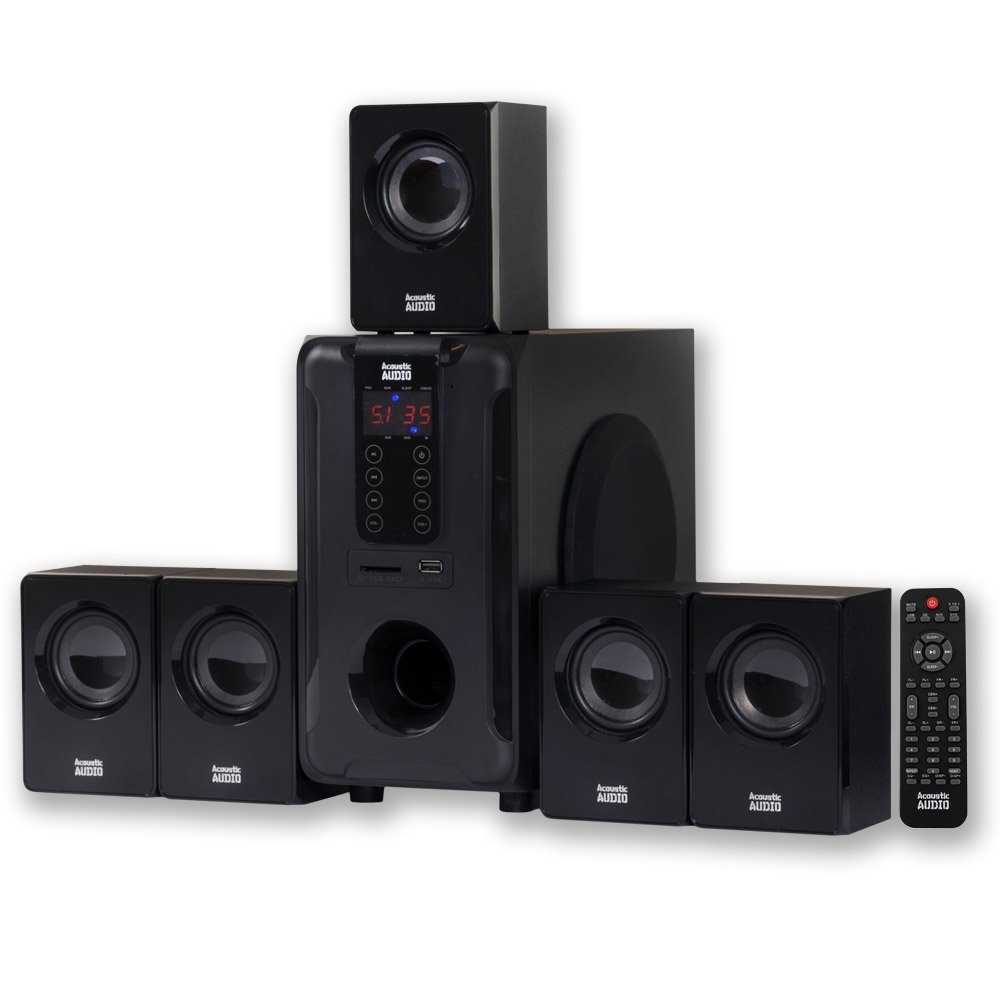
Image: The complete Acoustic Audio AA5105 5.1 Surround Sound System, showing the central subwoofer unit and five satellite speakers.
Satelitní reproduktory
The five full-range satellite speakers are magnetically shielded, allowing for placement near televisions and computer monitors without interference. They come with mounting hardware for flexible installation.

Image: A single Acoustic Audio satellite speaker, showcasinjeho kompaktní design a mřížku reproduktoru.
Pokyny pro nastavení
1. Umístění reproduktoru
- Přední levý/pravý: Umístěte tyto reproduktory vlevo a vpravo od viewing area, equidistant from the listener.
- Centrum: Position the center speaker directly above or below your display.
- Prostorový levý/pravý zvuk: Place these speakers to the sides or slightly behind your listening position.
- subwoofer: The subwoofer can be placed anywhere in the room, preferably near a wall or corner for enhanced bass.
2. Connecting Speakers to the Subwoofer
Connect each satellite speaker to the corresponding output on the rear panel of the subwoofer. Ensure correct polarity (positive to positive, negative to negative) for optimal sound quality.

Image: Rear panel of the subwoofer. This image displays the power source input, AUX audio inputs (L/R, FL, FR, CEN, SW, SL, SR), DVD audio inputs (FL, FR, CEN, SL, SR), audio outputs for speakers, and the power switch.
- Identify the speaker outputs on the subwoofer's rear panel. These are typically labeled FL (Front Left), FR (Front Right), CEN (Center), SL (Surround Left), and SR (Surround Right).
- Connect the wires from each satellite speaker to its corresponding terminal on the subwoofer.
3. Připojení zdrojů zvuku
The AA5105 offers multiple ways to connect your audio devices:
- RCA Audio Input (AUX/DVD): Use the provided RCA cables to connect your TV, DVD player, gaming console, or other devices.
- For 2.1 stereo sound, use the "AUX AUDIO INPUT" L/R (Red/White) jacks.
- For 5.1 surround sound, use the "AUX AUDIO INPUT" or "DVD AUDIO INPUT" jacks, connecting FL, FR, CEN, SW, SL, SR from your source to the corresponding inputs on the subwoofer. A 3.5mm to RCA cable is included for connecting devices with a 3.5mm headphone jack.
- Vstup USB: Vložte USB flash disk s audio soubory ve formátu MP3 filedo USB portu na předním panelu.
- SD/MMC Card Input: Insert an SD or MMC memory card containing MP3 audio files into the card slot on the front panel.
4. Připojení napájení
- Ensure the power switch on the rear of the subwoofer is in the "OFF" position.
- Připojte napájecí kabel do portu AC IN na subwooferu.
- Zapojte druhý konec napájecího kabelu do standardní zásuvky ve zdi.
Návod k obsluze
1. Zapnutí/vypnutí
Flip the power switch on the rear panel of the subwoofer to the "ON" position. The system will power on. To turn off, flip the switch to "OFF".
2. Výběr vstupu
Use the "Input" button on the front panel of the subwoofer or the remote control to cycle through available audio sources: AUX, DVD, USB, SD/MMC.
3. Volume, Bass, and Treble Control
- Hlavní hlasitost: Adjust the overall system volume using the main volume knob on the front panel or the VOL+/- buttons on the remote.
- Basy/výšky: Use the dedicated Bass and Treble controls on the front panel or remote to fine-tune the audio output to your preference.
- Individual Speaker Volume: The subwoofer features independent speaker controls for each satellite speaker. Adjust these to balance the sound across your 5.1 setup.
4. Surround Sound Mode (5.1 / 2.1)
Upon startup, the unit is typically set to 2.1 stereo mode. To activate 5.1 surround sound, press the "5.1/2.1" button on the remote control or front panel. Ensure your audio source is providing a 5.1 signal for true surround sound.
5. USB/SD/MMC Playback
When a USB drive or SD/MMC card is inserted, the system will automatically switch to the corresponding input and begin playing MP3 files. Use the playback controls (Play/Pause, Next/Previous Track) on the front panel or remote control.
6. Funkce dálkového ovládání
The included remote control provides full functionality for the system. Refer to the remote control diagram (if available in the physical manual) for specific button functions, including Mute, Sleep, Repeat, and Reset.
Údržba
- Čištění: Wipe the surfaces of the subwoofer and satellite speakers with a soft, dry cloth. Do not use liquid cleaners or aerosols, as they may damage the finish or internal components.
- Větrání: Ujistěte se, že ventilační otvory na subwooferu nejsou zakryty, aby nedošlo k přehřátí.
- Skladování: Pokud systém skladujete delší dobu, odpojte jej ze zásuvky a uložte jej na chladném a suchém místě mimo dosah přímého slunečního záření a extrémních teplot.
Odstraňování problémů
If you encounter issues with your AA5105 system, please consult the following table before contacting customer support.
| Problém | Možná příčina | Řešení |
|---|---|---|
| Žádná síla | Napájecí kabel není připojen; Vypínač je vypnutý; Zásuvka nefunguje. | Ujistěte se, že je napájecí kabel bezpečně zapojený; Zapněte vypínač; Vyzkoušejte zásuvku s jiným zařízením. |
| Žádný zvuk | Incorrect input selected; Volume too low; Mute function active; Loose audio cables; Incorrect 5.1/2.1 mode. | Select correct input source; Increase volume; Deactivate mute; Check all audio cable connections; Press 5.1/2.1 button to switch modes. |
| Zkreslený zvuk | Volume too high; Poor audio source quality; Loose speaker wires. | Reduce volume; Try a different audio source; Check speaker wire connections for proper polarity. |
| Only 2 speakers working in 5.1 setup | System in 2.1 mode; Audio source not providing 5.1 signal; Incorrect wiring. | Press 5.1/2.1 button to switch to 5.1 mode; Ensure your source (e.g., DVD player) is outputting 5.1 audio; Verify all 5.1 input cables are correctly connected. |
| USB/SD karta se nepřehrává | Incorrect input selected; Incompatible file formát; Poškozené médium. | Select USB/SD input; Ensure filejsou ve formátu MP3; Zkuste jiný USB disk/SD kartu. |
Specifikace
| Číslo modelu | AA5105 |
| Power Rating (RMS System) | 700 wattů |
| Frekvenční odezva | 40Hz - 20KHz |
| Výkon subwooferu | 300 wattů |
| Satellite Speaker Power (each) | 80 wattů |
| Konfigurace kanálů prostorového zvuku | 5.1 |
| Technologie připojení | USB, RCA |
| Další vstupy | SD Card, MMC Card |
| Impedance | 8 ohmů |
| Rozměry produktu (subwoofer) | 10.75 x 20 x 11.25 palce |
| Hmotnost položky | 14.25 libry |
| Barva | Černý |
| UPC | 784620026670, 033586864902 |
Záruka a podpora
For warranty information or technical support, please refer to the documentation included with your purchase or contact Acoustic Audio by Goldwood customer service. Keep your proof of purchase for warranty claims.
Manufacturer: Goldwood Sound, Inc.