
Braeburn 5310
Uživatelská příručka k termostatu BRAEBURN 5310
Model: 5310 | Značka: Braeburn
Zavedení
This manual provides comprehensive instructions for the installation, operation, and maintenance of your Braeburn 5310 Touchscreen Hybrid Thermostat. The Braeburn 5310 is a versatile thermostat designed for universal auto changeover, compatible with low voltage single stage gas, oil, or electric heating/cooling systems, and single stage heat pump systems. It also supports 250Mv – 750Mv millivolt heating-only systems.
Key features include a bright blue backlight display, a responsive touchscreen with a Speedbar for quick adjustments, and a separate sub-base for easy installation. The thermostat offers multi-level keypad lockout for security and retains all user, installer, and program settings even during power failures due to its permanent non-volatile memory.
Přednosti produktu:
- Large 6.5 sq. in. easy-read touchscreen display.
- Flexible programming: 7-day, 5-2 day, or non-programmable options.
- Automatic or manual changeover between heating and cooling.
- Speedbar multi-function button for intuitive control.
- Adjustable temperature limits for energy management.
- Indoor or outdoor remote sensing capability.
- Speed Set programming mode for quick setup.
- Meets Energy Aware guidelines.
- Separate user and installer reset buttons.
- Power options: Hardwire (24V AC) or battery (2 AA alkaline batteries).
- Multi-level keypad lockout for enhanced security.
- Circulating Fan mode and programmable Fan mode.
- Suitable for residential or commercial applications.

Obrázek 1: Přední strana view of the Braeburn 5310 Thermostat, showcasing its touchscreen and control interface.
Nastavení a instalace
Proper installation is crucial for the optimal performance of your Braeburn 5310 thermostat. It is recommended that installation be performed by a qualified technician. Ensure all power to the HVAC system is turned off at the circuit breaker before beginning installation.
Požadavky na napájení:
- The thermostat can be powered by 24 Volt AC (common wire required) or by two "AA" alkaline batteries (3.0 Volt DC).
- For continuous backlight and optimal performance, 24V AC power is recommended.
Montáž a zapojení:
- Vypnout napájení: Before any wiring, ensure the power to your heating and cooling system is completely off at the main circuit breaker.
- Odstraňte starý termostat: Carefully remove your old thermostat from the wall. Note the wiring connections. It is advisable to take a picture of the existing wiring for reference.
- Install Sub-Base: The Braeburn 5310 features a separate sub-base. Mount this sub-base securely to the wall using the provided screws. Ensure it is level for aesthetic purposes.
- Kabelová připojení: Connect the wires from your HVAC system to the corresponding terminals on the sub-base. Refer to the wiring diagram provided with your thermostat for specific connections. For systems requiring a common wire (C-wire), ensure it is connected for 24V AC power. If using battery power only, the C-wire may not be necessary, but connecting it is recommended for enhanced functionality.
- Připojení termostatu: Once wiring is complete and secure, carefully snap the main thermostat unit onto the sub-base.
- Vložte baterie: If using battery power, insert two fresh "AA" alkaline batteries into the battery compartment.
- Obnovit napájení: Znovu zapněte napájení na jističi.

Obrázek 2: Zadní view of the Braeburn 5310 Thermostat, illustrating the wiring terminal block and sub-base design.
Počáteční konfigurace:
After installation, the thermostat will guide you through initial setup. It features separate installer and user setup modes. To access installer options, you may need to press specific buttons simultaneously (e.g., "System" and "Config" as mentioned in user reviews) and then release. This allows configuration of system type, programming mode (7-day, 5-2 day), temperature differential, and other advanced settings.
A front reset button is available to return user settings to default values if needed.
Ovládání termostatu
The Braeburn 5310 thermostat is designed for user-friendly operation with its intuitive touchscreen and Speedbar.
Základní provoz:
- Nastavení teploty: Touch the desired temperature on the screen or use the up/down arrows (if present) to adjust the setpoint. The temperature control range is between 45°F and 90°F (7°C and 32°C), with an accuracy of +/- 1°F (+/- 0.5°C).
- Systémový režim: Select your desired system mode (Heat, Cool, Auto, Off) using the touchscreen options. "Auto" mode allows the thermostat to automatically switch between heating and cooling as needed.
- Režim ventilátoru: Choose between Fan ON (continuous operation), Fan AUTO (fan runs only when heating or cooling is active), or Circulating Fan mode (fan cycles on and off periodically to keep air moving).
- Podsvícení: The bright blue backlight display illuminates when the screen is touched and turns off shortly after to conserve energy.
Režimy programování:
The Braeburn 5310 offers flexible programming options to suit your lifestyle:
- 7denní program: Allows for different temperature settings for each day of the week.
- 5-2denní program: Provides one set of programs for weekdays (Monday-Friday) and another for weekends (Saturday-Sunday).
- Neprogramovatelné: Operates as a manual thermostat, maintaining a constant temperature until adjusted.
Refer to the detailed programming instructions in the full manual for setting up your desired schedule using the Speed Set programming mode.
Pokročilé funkce:
- Adaptive Recovery Mode (ARM): This feature learns how long it takes your system to reach programmed temperatures, activating heating or cooling early to ensure comfort at the scheduled time.
- Funkce Hold: Temporarily overrides the programmed schedule to maintain a specific temperature. The duration of the "Hold" can often be adjusted.
- Blokování klávesnice: Prevents unauthorized changes to settings. Multiple levels of lockout are available.
- Residual Cooling Fan Delay: Allows the fan to continue running for a short period after the cooling cycle ends to maximize efficiency.
Údržba
Regular maintenance ensures the longevity and accurate operation of your Braeburn 5310 thermostat.
Výměna baterie:
If your thermostat is battery-powered or uses batteries as a backup, replace the two "AA" alkaline batteries annually or when the low battery indicator appears on the display. To replace, gently pull the thermostat off its sub-base, remove the old batteries, insert new ones, and reattach the thermostat to the sub-base.
Čištění:
Vyčistěte dotykovou obrazovku termostatu aasing periodically with a soft, damp hadříkem. Nepoužívejte abrazivní čisticí prostředky ani rozpouštědla, protože by mohly poškodit displej nebo povrchovou úpravu.
Filter, UV, and Humidifier Pad Check Monitor:
The thermostat includes a monitor for air filter, UV lamp, and humidifier pad checks. The display will indicate when it's time to inspect or replace these components based on programmed intervals. Follow your HVAC system's recommendations for these maintenance tasks.
Odstraňování problémů
If you encounter issues with your Braeburn 5310 thermostat, try the following troubleshooting steps:
| Problém | Možná příčina | Řešení |
|---|---|---|
| Thermostat display is blank or dim. | No power (24V AC) or dead batteries. | Check circuit breaker for HVAC system. Replace "AA" batteries with fresh ones. Ensure C-wire is properly connected if using 24V AC. |
| Systém (topení/chlazení) nereaguje. | Incorrect system mode selected, wiring issue, or system lockout. | Verify the thermostat is set to the correct mode (Heat, Cool, Auto). Check wiring connections at the sub-base and HVAC unit. Ensure keypad lockout is not active. If the thermostat calls for heat/cool but no signal is sent to the equipment, consult a qualified technician. |
| Údaje o teplotě se zdají být nepřesné. | Thermostat location, sensor obstruction, or calibration needed. | Ensure the thermostat is not exposed to direct sunlight, drafts, or heat sources. Clean any dust from the thermostat vents. If issues persist, a professional may need to check calibration. |
| Obrazovka je špatně čitelná. | Lighting conditions, display settings. | The blue backlight activates upon touch. Ensure adequate ambient lighting in the area where the thermostat is mounted. |
| Thermostat not holding program. | "Hold" function active, or programming error. | Deactivate the "Hold" function. Re-enter your program schedule carefully, ensuring all steps are followed. |
If these steps do not resolve the issue, please contact a qualified HVAC technician or Braeburn customer support for further assistance.
Specifikace
| Funkce | Detail |
|---|---|
| Číslo modelu | 5310 |
| Rozměry (V x Š x H) | 3.94" x 5.56" x 1.19" (přibližně 10 cm x 14.1 cm x 3 cm) |
| Hmotnost | 14.4 unce (cca 408 gramů) |
| Zdroj napájení | 24 Volt AC or 2 "AA" Alkaline Batteries (3.0 Volt DC) |
| Rozsah regulace teploty | 45 °F až 90 °F (7 °C až 32 °C) |
| Přesnost teploty | +/- 1 °F (+/- 0.5 °C) |
| Rozsah provozní vlhkosti | 5% až 95% relativní vlhkost (bez kondenzace) |
| Kompatibilita | Nízký objemtage single stage gas, oil, or electric heating/cooling systems; single stage heat pump systems; 250Mv – 750Mv millivolt heating-only systems. |
| Typ zobrazení | Touchscreen with bright blue backlight |
| Speciální funkce | Permanent non-volatile memory, filter/UV/humidifier pad check monitor, Adaptive Recovery Mode (ARM), programmable independent Fan control, residual cooling Fan delay, indoor/outdoor remote sensor capability, multi-level keypad lockout. |
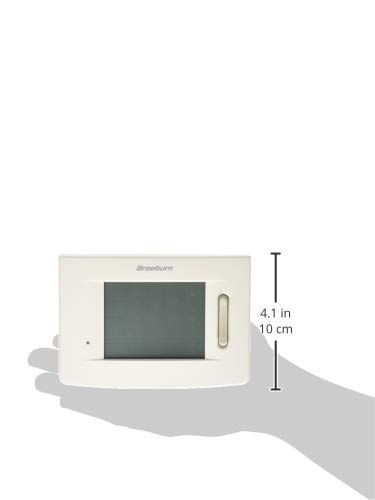
Figure 3: Size reference of the Braeburn 5310 Thermostat.
Záruka a podpora
For specific warranty information regarding your Braeburn 5310 Thermostat, please refer to the warranty card included with your product packaging or visit the official Braeburn webZáruční podmínky se obvykle vztahují na vady materiálu a zpracování po stanovenou dobu od data nákupu.
For technical support, troubleshooting assistance beyond this manual, or to inquire about replacement parts, please contact Braeburn customer service. Contact details can usually be found on the manufacturer's website or on the product packaging. Braeburn also provides English/Spanish packaging and instruction cards.
Ask a question about this manual
Ask about setup, troubleshooting, compatibility, parts, safety, or missing instructions. Manuals+ will review the question and use this page’s manual context to help answer it.