
1. Úvod
This manual provides essential information for the safe and efficient operation of your Alto Professional TMX160 DFX 16-Channel Powered Mixer. The TMX160 DFX is a versatile audio mixing console featuring 16 input channels, a built-in Alesis digital effects processor, and an integrated power amplifier capable of delivering 750W stereo output at 4Ω or 1500W mono output at 8Ω. It includes 12 XLR microphone inputs with phantom power, 16 line inputs, and stereo RCA inputs, along with a 3-band equalizer on each mono and stereo channel.
Please read this manual thoroughly before using the product to ensure proper setup and operation. Keep this manual for future reference.
2. Bezpečnostní informace
Při používání tohoto výrobku vždy dodržujte základní bezpečnostní opatření, abyste snížili riziko požáru, úrazu elektrickým proudem a zranění osob.
- Zdroj napájení: Zapojte přístroj pouze do zásuvky střídavého proudu s uvedeným objemem.tage.
- Základy: Ensure the unit is properly grounded. Do not defeat the safety purpose of the polarized or grounding-type plug.
- Voda a vlhkost: Do not expose this equipment to rain or moisture. Do not use near water.
- Větrání: Zajistěte dostatečné větrání. Neblokujte větrací otvory.
- Teplo: Neinstalujte v blízkosti zdrojů tepla, jako jsou radiátory, tepelné regulátory, kamna nebo jiná zařízení (včetně amplifikátory), které produkují teplo.
- Kabely: Chraňte napájecí kabely před pošlapáním nebo přiskřípnutím.
- Servis: Veškerý servis svěřte kvalifikovanému servisnímu personálu. Nepokoušejte se tento výrobek opravovat sami.
3. Nastavení
3.1 Vybalení a kontrola
Carefully unpack the TMX160 DFX mixer and inspect it for any signs of damage that may have occurred during transit. If any damage is found, contact your dealer immediately.
3.2 Připojení napájení
Connect the supplied AC power cord to the mixer's power input and then to a suitable grounded AC power outlet. Ensure the mixer's power switch is in the OFF position before connecting to power.
3.3 Připojení vstupů
The TMX160 DFX offers a variety of input options:
- Mikrofonní vstupy (MIC 1-12): Use XLR cables to connect microphones to the 12 XLR inputs. Phantom power (+48V) can be activated for condenser microphones.
- Linkové vstupy (kanály 1-16): Use 1/4-inch TRS or TS cables for line-level instruments or devices. Channels 13/14 and 15/16 are stereo line inputs, also accepting RCA for 2-Track In.
- 2-Track In: Připojte externí zdroje zvuku, jako jsou CD přehrávače nebo přehrávače médií, pomocí kabelů RCA.
3.4 Připojení výstupů
Connect your speakers or monitoring system to the appropriate outputs:
- Výstupy reproduktorů: Connect passive speakers to the power amplifier outputs. Ensure the impedance of your speakers matches the mixer's output capabilities (e.g., 4Ω for 750W stereo, 8Ω for 1500W mono).
- Monitor/Aux Outputs: Use these outputs to send signals to stagmonitory nebo externí efektové procesory.
- Stereo Out/Mono Out: These outputs provide the main mix signal for recording or connecting to additional sound systems.
3.5 První zapnutí
After all connections are made, ensure all channel faders and the main mix fader are at their lowest settings. Turn on any connected devices (e.g., microphones, instruments) first, then power on the TMX160 DFX mixer. Finally, turn on your power amplifikátory nebo aktivní reproduktory.
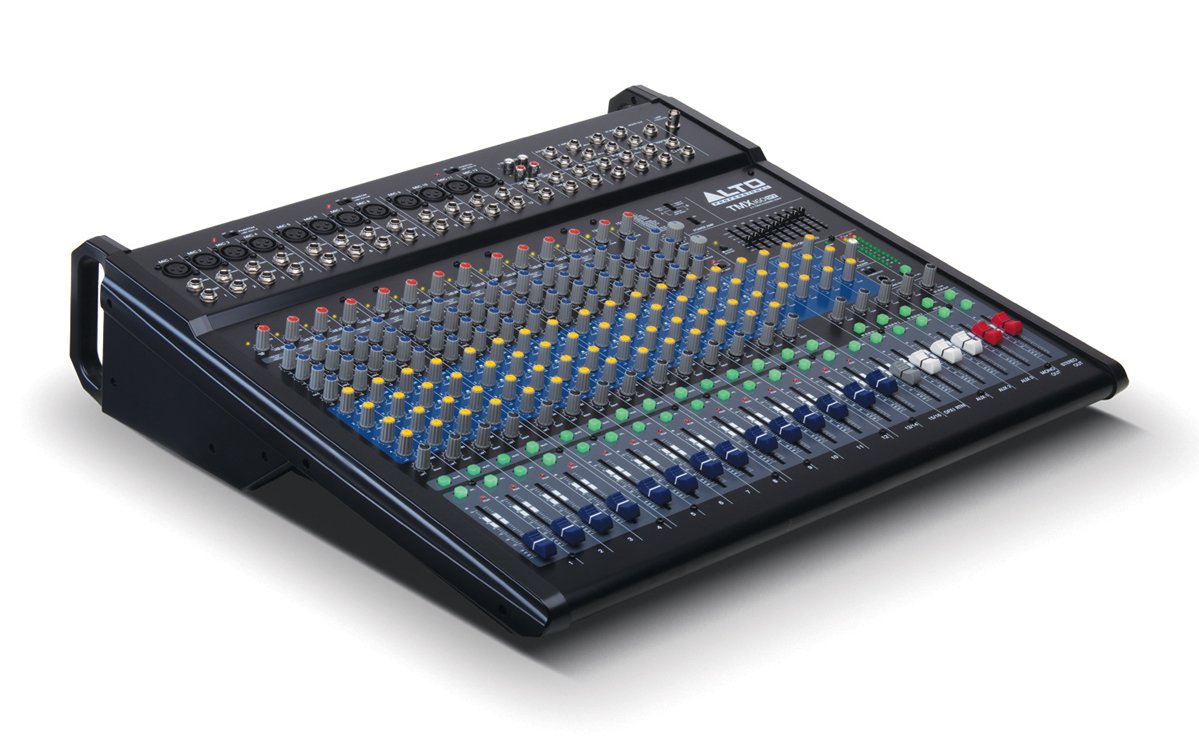
Obrázek 1: Přední panelview of the Alto Professional TMX160 DFX mixer. This image shows the comprehensive layout including microphone and line inputs at the top, channel controls in the middle, and faders at the bottom.
4. Provoz
4.1 Ovládání kanálů
Each input channel (1-16) features a set of controls to shape its sound:
- ZÍSKAT: Adjusts the input sensitivity for the connected microphone or line-level device. Set this to achieve a strong signal without clipping (distortion).
- EQ (vysoký, střední, nízký): A 3-band equalizer allows you to boost or cut frequencies (treble, midrange, bass) for each channel.
- AUX odesílá: Controls the amount of signal sent from the channel to the auxiliary outputs (e.g., for monitors or external effects).
- PÁNEV: Umístí signál kanálu v rámci stereo pole (zleva doprava).
- Fader LEVEL: Ovládá celkovou hlasitost kanálu v hlavním mixu.
4.2 Hlavní sekce
The master section controls the overall output of the mixer:
- Hlavní fadery mixu: Control the overall volume of the stereo output.
- DFX (Digital Effects) Controls: Select and adjust parameters for the built-in Alesis digital effects.
- Stereo Graphic EQ: A 7-band graphic equalizer allows for fine-tuning the overall frequency response of the main mix.
- Moc Amp Ovládání: Adjust the output level and mode (Stereo/Mono) for the integrated power ampživější.
4.3 Built-in Alesis Digital Effects
The TMX160 DFX features a high-quality Alesis digital effects processor. Use the DFX controls in the master section to browse and select from various effects such as reverb, delay, chorus, and more. Adjust the effect send levels on individual channels and the overall effect return level in the master section to blend the effects into your mix.
Obrázek 2: Detailní view of the input channels, showing individual GAIN, EQ, AUX, PAN, and LEVEL controls for precise audio shaping.
5. Údržba
Proper maintenance ensures the longevity and optimal performance of your TMX160 DFX mixer.
- Čištění: K čištění vnějšího povrchu mixéru používejte měkký, suchý hadřík. Nepoužívejte abrazivní čisticí prostředky, rozpouštědla ani vosky.
- Prach: Pravidelně odstraňujte prach z větracích otvorů, abyste zabránili přehřátí.
- Skladování: Pokud se mixér delší dobu nepoužívá, skladujte jej na chladném a suchém místě, mimo dosah přímého slunečního záření a extrémních teplot.
- Fadery a knoflíky: Avoid applying excessive force to faders and knobs. Keep them free from dust and debris.
6. Řešení problémů
If you encounter issues with your TMX160 DFX, refer to the following common problems and solutions:
- Bez napájení:
- Check if the power cord is securely connected to both the mixer and the AC outlet.
- Ověřte, zda je síťová zásuvka funkční.
- Ensure the power switch on the mixer is in the ON position.
- Žádný zvukový výstup:
- Zkontrolujte všechna připojení vstupních a výstupních kabelů.
- Ensure channel GAIN and LEVEL faders are appropriately set.
- Verify the Main Mix faders are raised.
- Check if connected speakers or power amplifiers are turned on and functioning.
- Zajistěte napájení Amp controls are set correctly for your speaker configuration.
- Zkreslený zvuk:
- Reduce the GAIN setting for the input channel.
- Lower the channel LEVEL fader or Main Mix faders.
- Zkontrolujte, zda nejsou kabely poškozené.
- Efekty neslyšitelné:
- Ensure the DFX send controls on the channels are turned up.
- Verify the DFX return level in the master section is raised.
- Check the selected effect program.
If the problem persists after trying these steps, contact Alto Professional customer support.
7. Specifikace
| Funkce | Specifikace |
|---|---|
| Značka | Alto Professional |
| Model | TMX160 DFX |
| Počet kanálů | 16 |
| Hmotnost položky | 12.5 kg |
| Technologie připojení | Pomocný |
| Zvukový vstup | XLR, RCA, Line, AUX, 2-Track |
| Výrobce | vMusic |
| ASIN | B007T1VZ52 |
| Power Output (Stereo) | 750 W při 4 Ω |
| Power Output (Mono) | 1500 W při 8 Ω |
| Ekvalizér | 3-band EQ per channel, Stereo Graphic EQ |
| Efekty | Built-in Alesis Digital Effector (24-bit A/D and D/A converters) |
| Rozměry (Š x H x V) | Cca. 21.9 x 22.2 x 5.7 palce (555 x 565 x 145 mm) |
8. Záruka a podpora
For warranty information and technical support, please refer to the documentation included with your product or visit the official Alto Professional webUschovejte si účtenku jako doklad o koupi pro případ reklamace.
For further assistance, you may contact Alto Professional customer service directly.