
1. Úvod
Thank you for choosing the Pro'sKit SS-206E Temperature Controlled Soldering Station. This device is designed for precise and efficient soldering tasks, featuring an analog temperature display and an ergonomically designed soldering iron. Please read this manual thoroughly before operation to ensure safe and correct use.
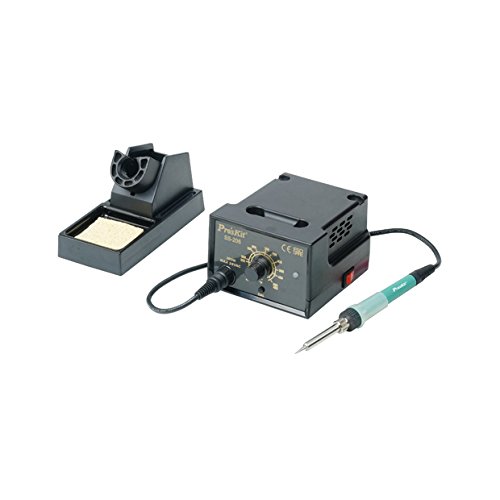
Image 1.1: The Pro'sKit SS-206E Soldering Station, showing the main unit with analog display and the connected soldering iron.
2. Bezpečnostní pokyny
Vždy dodržujte následující bezpečnostní opatření, abyste předešli zranění nebo poškození zařízení:
- Elektrická bezpečnost: Ujistěte se, že napájecí zdroj odpovídá objtage requirements of the unit (110V or 220V). Do not operate with wet hands or in damp prostředí.
- Nebezpečí tepla: The soldering iron tip reaches very high temperatures. Avoid direct contact with skin or flammable materials. Use the provided soldering iron stand.
- Vdechování výparů: Pájení produkuje výpary. Vždy pracujte v dobře větraném prostoru nebo používejte odsávač výparů.
- Ochrana očí: Wear safety glasses to protect against solder splashes.
- ESD ochrana: This unit is ESD safe. However, take appropriate ESD precautions when working with sensitive electronic components.
- Děti a domácí mazlíčci: Uchovávejte pájecí stanici mimo dosah dětí a domácích zvířat.
3. Obsah balení
Ověřte, zda jsou v balení přítomny všechny položky:
- Pro'sKit SS-206E Soldering Station Main Unit
- Soldering Iron with connecting cable
- Stojan na páječku
- Čisticí houba
- Napájecí kabel
4. Nastavení
- Rozbalit: Opatrně vyjměte všechny součásti z obalu.
- Připojení páječky: Plug the soldering iron's connector into the designated port on the front panel of the soldering station. Ensure a secure connection.
- Polohový stojan: Place the soldering iron stand on a stable, heat-resistant surface near your workspace. Insert the soldering iron into the stand when not in use.
- Připravte si houbičku: Dampen the cleaning sponge with water (do not soak) and place it in the sponge tray of the soldering iron stand.
- Připojení napájení: Connect the power cord to the back of the soldering station and then plug it into a suitable electrical outlet. Note: This model is available in 110V and 220V versions. Verify your unit's voltage requirement before plugging it in.
5. Návod k obsluze
- Zapnutí: Flip the power switch located on the front panel to the 'ON' position. The analog display will illuminate.
- Nastavit teplotu: Rotate the temperature control knob to your desired temperature. The analog meter will indicate the set temperature. The unit supports a temperature range of 200°C to 480°C (392°F to 896°F).
- Celsius/Fahrenheit Adjustment: A switch or internal jumper (refer to specific model documentation if available) allows selection between Celsius and Fahrenheit display.
- Předehřívání: Allow the soldering iron to preheat for approximately 2-3 minutes until the tip reaches the set temperature.
- Cínování špičky: Before first use and periodically during operation, apply a small amount of solder to the hot tip. This 'tins' the tip, preventing oxidation and improving heat transfer.
- Pájení: Bring the hot, tinned tip into contact with both the component lead and the PCB pad simultaneously. Apply solder to the joint, not directly to the iron tip. Remove the solder, then the iron, allowing the joint to cool naturally.
- Čištění hrotu: Pravidelně otírejte hrot páječky o damp sponge to remove excess solder and flux residue.
- Vypnout: After use, turn the temperature control knob to its lowest setting, then flip the power switch to 'OFF'. Allow the iron to cool completely in its stand before storing.
6. Údržba
- Péče o pájecí hrot: Always keep the tip tinned. Replace tips when they become pitted or heavily oxidized and cannot be cleaned. Use only compatible replacement tips.
- Sponge Maintenance: Uchovávejte houbu damp during operation. Replace the sponge when it becomes worn or heavily soiled.
- Čištění jednotky: Periodically wipe the exterior of the soldering station with a soft, dry cloth. Do not use abrasive cleaners or solvents.
- Kontrola kabelů: Regularly inspect the power cord and soldering iron cable for any signs of damage. Replace immediately if damaged.
7. Řešení problémů
| Problém | Možná příčina | Řešení |
|---|---|---|
| Páječka se nezahřívá | Power switch off; Loose connection; Incorrect voltage; Faulty heating element. | Ensure power is on. Check all cable connections. Verify unit voltage matches outlet. Contact support if heating element is suspected. |
| Špatné pájené spoje | Tip not tinned; Incorrect temperature; Dirty tip; Old solder. | Tin the tip. Adjust temperature. Clean or replace tip. Use fresh solder. |
| Analog display not working | Unit not powered; Internal fault. | Check power connection. If power is on and display is off, contact support. |
| Jednotka se nezapne | Power cord not connected; Outlet fault; Incorrect voltage. | Ujistěte se, že je napájecí kabel bezpečně zapojený. Vyzkoušejte zásuvku s jiným zařízením. Confirm unit voltage (110V or 220V) matches your power supply. |
8. Specifikace
- Model: SS-206E
- Vstupní objemtage: AC 110V or 220V (Konkrétní svtage depends on the purchased model. Please verify your unit.)
- Rozsah teplot: 200 °C - 480 °C (392 °F - 896 °F)
- Typ displeje: Analogový
- certifikace: CE, ESD Safe
- Zahrnuté komponenty: Páječka
9. Záruka a podpora
For warranty information and technical support, please refer to the warranty card included with your product or visit the official Pro'sKit webwebu. Uschovejte si účtenku jako doklad o koupi.