
1. Úvod
Děkuji za nákupasing the Gemini PS3-USB 3 Channel 10-Inch Mixer. This manual provides essential information for the proper setup, operation, and maintenance of your mixer. Please read this manual thoroughly before use to ensure optimal performance and to prevent damage.
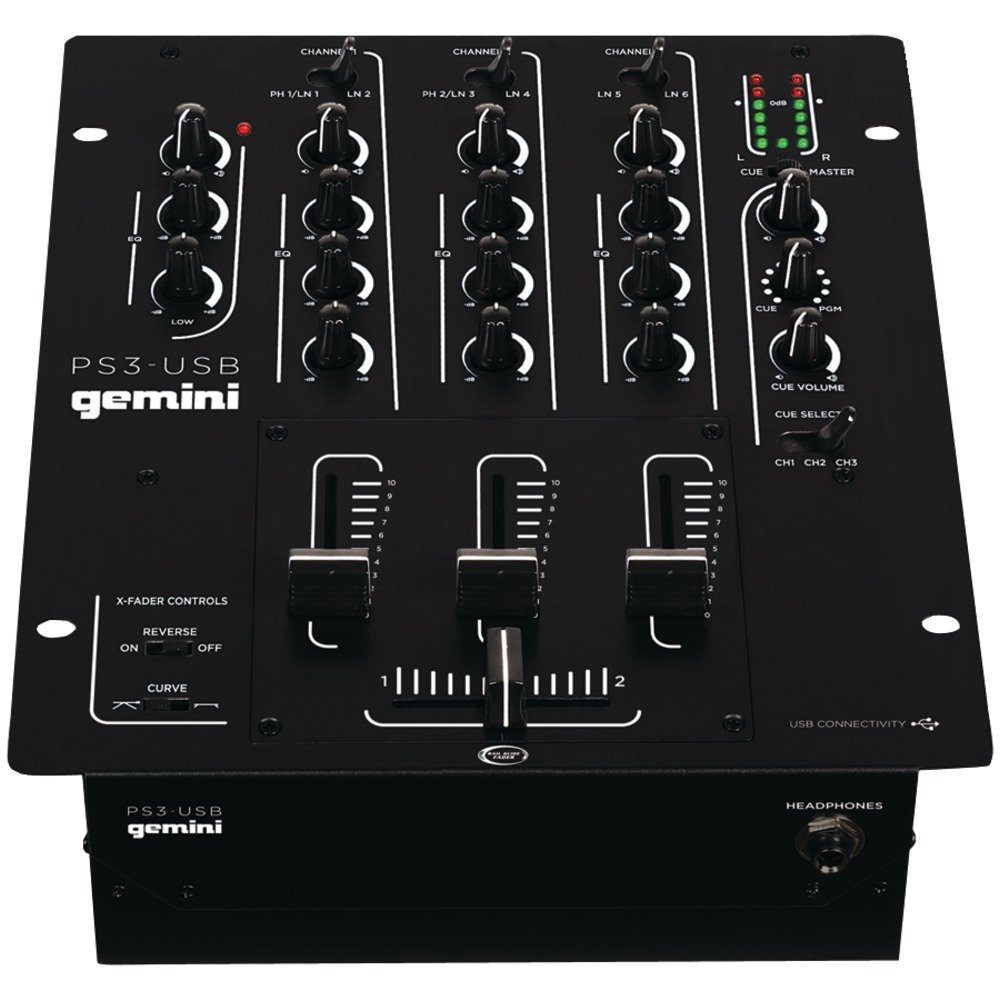
Obrázek 1: Přední strana view of the Gemini PS3-USB Mixer, showing controls and inputs.
2. Bezpečnostní pokyny
- Zdroj napájení: Připojujte jednotku pouze k určenému zdroji napájení.
- Větrání: Zajistěte dostatečné větrání. Neblokujte větrací otvory.
- Voda a vlhkost: Nevystavujte jednotku dešti ani vlhkosti. Nepokládejte na jednotku předměty naplněné tekutinami.
- Teplo: Udržujte jednotku mimo dosah zdrojů tepla, jako jsou radiátory, topná tělesa, sporáky nebo jiná zařízení (včetně amplifikátory), které produkují teplo.
- Čištění: Čistěte pouze suchým hadříkem.
- Servis: Veškerý servis svěřte kvalifikovanému servisnímu personálu. Nepokoušejte se tento výrobek opravovat sami.
3. Nastavení
3.1 Vybalení
Carefully unpack the mixer and check for any signs of damage. Retain the packaging materials for future transport or storage.
3.2 Připojení napájení
Připojte dodaný napájecí adaptér k napájecímu vstupu mixážního pultu a poté do vhodné elektrické zásuvky.
3.3 Audio připojení
The PS3-USB features 5-line, 3-channel inputs with 2 convertible Phono/Line RCA inputs.
- Phono/Linkové vstupy: Connect turntables or line-level devices (CD players, media players) to the RCA inputs. Use the Phono/Line switch to select the appropriate input type for each channel.
- Hlavní výstup: Connect the Master RCA outputs to your ampzesilovač nebo aktivní reproduktory.
- Výstup záznamu: Connect the Record RCA outputs to a recording device if you wish to record your mix.
- Sluchátka: Plug your 1/4" (6.3mm) headphones into the front panel headphone connector.
3.4 Připojení USB
Connect the mixer to your Mac or PC using a standard USB cable. This allows for simultaneous playback and recording through your computer's media player software.
4. Návod k obsluze
4.1 Ovládací prvky a funkceview
Familiarize yourself with the mixer's layout:
- Channel Gain Control: Upravuje vstupní úroveň pro každý kanál.
- 3-Band Rotary EQ: Provides control over High, Mid, and Low frequencies for each channel.
- Fadery kanálu: Control the volume of each individual channel.
- Crossfader: A user-replaceable Rail Glide crossfader with curve and reverse controls for blending between channels.
- Hlavní hlasitost: Ovládá celkovou výstupní úroveň mixpultu.
- VU metry: Visual indicators for master or cue levels.
- Cue Section: Includes rotary cue volume, CUE/PGM controls, and a split cue switch for headphone monitoring.
- Mikrofonní sekce: Features a rotary microphone volume control and a 2-band EQ for microphone input.
4.2 Základní míchání
- Connect your audio sources to the appropriate Phono/Line inputs.
- Set the Phono/Line switch for each channel to match your source.
- Adjust the Gain control for each active channel to achieve a healthy input level without clipping (distortion).
- Use the channel faders to bring up the volume of your desired audio sources.
- Utilize the 3-band EQ to shape the sound of each channel.
- Use the crossfader to smoothly transition between channels.
- Monitor your mix using headphones via the Cue section and adjust the Master Volume for the main output.
4.3 Přehrávání a nahrávání z USB
Once connected via USB, your computer should recognize the PS3-USB as an audio device.
- Přehrávání: Select the PS3-USB as the output device in your computer's sound settings or media player software to route audio through the mixer.
- Záznam: Select the PS3-USB as the input device in your recording software. The mixer's master output will be sent to your computer for recording.
5. Údržba
- Čištění: K čištění vnějšího povrchu mixéru používejte měkký, suchý hadřík. Nepoužívejte tekuté čisticí prostředky ani rozpouštědla.
- Crossfader Replacement: The Rail Glide crossfader is user-replaceable. Refer to the Gemini website or authorized service centers for replacement parts and instructions if needed.
- Skladování: When not in use for extended periods, store the mixer in a cool, dry place, preferably in its original packaging.
6. Řešení problémů
| Problém | Možná příčina | Řešení |
|---|---|---|
| No sound output from master. | Master volume too low; incorrect input selection; ampproblémy se zvukovým systémem/reproduktorem. | Increase Master Volume. Check Phono/Line switches. Verify amplifier/speaker connections and power. |
| Z konkrétního kanálu není slyšet zvuk. | Channel fader down; Gain too low; incorrect Phono/Line selection; source device off/muted. | Raise channel fader. Adjust Gain. Correct Phono/Line switch. Check source device. |
| Zkreslený zvuk. | Input Gain too high; Master Volume too high; faulty cable. | Reduce channel Gain. Reduce Master Volume. Replace cables. |
| USB recording/playback not working. | Incorrect USB connection; computer audio settings incorrect; driver issues. | Ensure USB cable is securely connected. Select PS3-USB as audio device in computer settings. Restart computer. |
7. Specifikace
- Model: PS3USB
- kanály: 3
- Vstupy: 5-Line, 2 Convertible Phono/Line RCA, USB
- výstupy: Master RCA, Record RCA, 1/4" (6.3mm) Headphone
- EQ: 3-Band Rotary EQ per channel, 2-Band EQ for Microphone
- Crossfader: User-replaceable Rail Glide with Curve and Reverse controls
- Konektivita: USB for Mac/PC Playback & Recording
- Dimensions (Approximate Shipping): 12.00 palce x 10.00 palce x 3.25 palce
- Weight (Approximate Shipping): 6.2 lb (2.8 kg)
- UPC: 747705208149
8. Záruka a podpora
This Gemini product is covered by a 90denní záruka from the date of purchase. This warranty covers manufacturing defects and workmanship under normal use. It does not cover damage caused by misuse, accident, modification, or unauthorized repair.
For technical support, service inquiries, or warranty claims, please contact your authorized Gemini dealer or visit the official Gemini webstránky pro kontaktní informace.
Uschovejte si prosím doklad o koupi pro ověření záruky.