
1. Úvod
This manual provides comprehensive instructions for the setup, operation, and maintenance of your Geemarc CL100 Amplified Big Button Corded Phone. Please read this manual carefully to ensure proper use and to maximize the benefits of your new telephone.
The Geemarc CL100 is designed for ease of use, featuring large buttons, adjustable amplification, and visual indicators, making it suitable for individuals with hearing or visual impairments. This telephone is line-powered and does not require an external power source.
Důležitá poznámka: This telephone does not include a built-in answering machine, speakerphone, caller display, talking caller ID, talking keypad, or voice assist functionality.
2. Konec produktuview
2.1 Obsah balení
- Geemarc CL100 Corded Telephone Base
- Sluchátko
- Svinutý kabel sluchátka
- Kabel telefonní linky
- Uživatelská příručka (tento dokument)
2.2 Telephone Layout
Familiarize yourself with the key components and controls of your Geemarc CL100 phone.

Obrázek 1: Shora dolů view of the Geemarc CL100 phone, illustrating the large numeric keypad, function buttons, and memory slots.
- Sluchátko: For speaking and listening during calls.
- Numerická klávesnice: Large, easy-to-read buttons for dialing numbers.
- P1, P2, P3 Buttons: Priority memory buttons for frequently called numbers.
- Tlačítka M1–M9: One-touch memory buttons for storing additional numbers.
- Tlačítko pro opakované vytáčení: Vytočí poslední volané číslo.
- Tlačítko blesku: Used for network services (e.g., call waiting).
- Tlačítko Store: Used for programming memory numbers.
- Tlačítko ztlumení: Dočasně ztlumí mikrofon během hovoru.
- Tone Control Switch: Adjusts the audio tone for clearer conversations.
- Přepínač ovládání hlasitosti: Adjusts the receiving volume during a call.
- Visual Ringer Indicator: Flashes when an incoming call is received.
- Memory Index Card: Pull-out card for noting stored memory numbers.

Obrázek 2: Strana view of the phone, illustrating the ringer ON/OFF switch and the telephone line connection port.
3. Nastavení
3.1 Připojení telefonu
- Připojení sluchátka: Plug one end of the coiled handset cord into the handset and the other end into the handset jack on the side of the telephone base.
- Připojení telefonní linky: Plug one end of the telephone line cord into the jack labeled with a telephone icon on the back or side of the phone base. Plug the other end into your wall telephone jack.
- Zdroj napájení: The Geemarc CL100 is powered by the telephone line and does not require an external power adapter.
- Ringer Switch: Ensure the ringer switch (located on the side) is set to "Low" or "High" for audible ringing.
3.2 Počáteční kontroly
- Zvedněte sluchátko a poslouchejte oznamovací tón. Pokud oznamovací tón neslyšíte, zkontrolujte všechna připojení.
- Make a test call to ensure proper functionality.
4. Návod k obsluze
4.1 Uskutečnění hovoru
- Zvedněte sluchátko.
- Počkejte na oznamovací tón.
- Dial the required number using the numeric keypad.
- Upon completion of the call, carefully replace the handset in the cradle to disconnect.
4.2 Přijetí hovoru
When an incoming call is received, the phone will ring and the visual indicator will flash.
- Hovor přijmete zvednutím sluchátka.
- Upon completion of the call, carefully replace the handset in the cradle.
4.3 Opakovaná volba posledního čísla
- Zvedněte sluchátko.
- Počkejte na oznamovací tón.
- Stiskněte tlačítko Redial button. The previously dialed number will be automatically redialed.
- Note: This function does not apply to numbers dialed from memory buttons.
4.4 Funkce ztlumení
The Mute button allows you to speak privately without your caller overhearing.
- Během hovoru stiskněte Ztlumit button. You will still hear the caller, but they will not hear you.
- Stiskněte tlačítko Ztlumit button again to resume normal conversation.
4.5 Storing Telephone Numbers (Memory Dialing)
Your telephone can store 12 direct memory numbers: 3 priority numbers (P1, P2, P3) and 9 standard memory numbers (M1-M9). Priority memories can store up to 24 digits, and M1-M9 can store up to 32 digits.
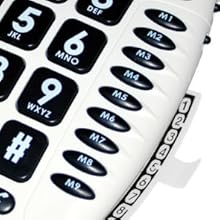
Obrázek 3: Detail of the memory buttons (M1-M9) and the integrated memory index card.
- Zvedněte sluchátko.
- Stiskněte tlačítko Obchod tlačítko.
- Dial the telephone number you wish to store.
- Stiskněte tlačítko Obchod znovu tlačítko.
- Press the desired memory button (P1, P2, P3, or M1-M9) where you want to save the number.
- Vyměňte sluchátko.
- Note: Use the index card located under the base to record your stored numbers for easy reference. Stored memories are protected even if the phone line is unplugged.
4.6 Dialing Stored Numbers
- Zvedněte sluchátko.
- Počkejte na oznamovací tón.
- Press the appropriate memory button (P1, P2, P3, or M1-M9). The stored number will be dialed automatically.
4.7 Recall (R), * & # Buttons
These buttons are used in conjunction with new services provided on digital exchanges. For specific details on their use, please contact your network operator.
4.8 Kompatibilita se sluchadly
If you are using this telephone with a hearing aid, set your hearing aid to the "T" (Telecoil) setting for optimal audio quality.
5. Údržba
- Čištění: Clean the telephone with a soft, damp tkanina. Nepoužívejte abrazivní čisticí prostředky nebo rozpouštědla.
- Skladování: Telefon skladujte na chladném a suchém místě mimo dosah přímého slunečního záření a extrémních teplot.
- Vyhněte se tekutinám: Do not expose the telephone to water or other liquids.
- Péče o šňůru: Ensure the handset and line cords are not tangled or pinched to prevent damage.
6. Řešení problémů
| Problém | Možná příčina | Řešení |
|---|---|---|
| Žádný oznamovací tón | Telefonní kabel není správně připojen. | Check that both ends of the telephone line cord are securely plugged in. |
| Neslyším volajícího / Volající neslyší mě | Volume settings are too low or Mute is active. | Adjust the Volume control. Ensure the Mute button is not pressed. |
| Telefon nezvoní | Ringer switch is set to "Off". | Set the ringer switch (on the side) to "Low" or "High". |
| Stored memory numbers are lost | This phone protects stored memories even if the phone line is unplugged. If numbers are lost, they may not have been stored correctly. | Re-store the numbers following the instructions in Section 4.5. |
| Difficulty dialing quickly | Some older phone systems may require a slower dialing pace. | Try dialing at a slightly slower pace. Consider using the memory dial function for frequently called numbers. |
7. Specifikace
- Model: Geemarc CL100
- Typ: Kabelový telefon
- Ampzvedání: Up to 30 dB receiving volume
- Hlasitost vyzvánění: Adjustable up to 85 dB
- Paměť: 3 Priority (P1-P3), 9 One-touch (M1-M9)
- Zdroj napájení: Line-powered (no external adapter required)
- Kompatibilní s naslouchátky: Yes (T-coil setting)
- Rozměry: Přibližně 7.5 x 8 x 3 palce (19 x 20.3 x 7.6 cm)
- Hmotnost: Přibližně 2.25 libry (1.02 kg)
- Barva: Bílý
8. Záruka a podpora
8.1 Informace o záruce
For information regarding the warranty period and terms for your Geemarc CL100 telephone, please refer to the warranty card included with your purchase or visit the official Geemarc webUschovejte si doklad o koupi pro případ reklamace.
8.2 Zákaznická podpora
If you encounter any issues not covered in the troubleshooting section or require further assistance, please contact Geemarc customer support. Contact details can typically be found on the Geemarc webmístě nebo na obalu produktu.
Online zdroje naleznete na adrese: www.geemarc.com