
Zavedení
Děkuji za nákupasing the Edifier Tick Tock Retro Multifunctional Alarm Clock. This device combines a retro design with modern functionality, offering an alarm clock, FM radio, and media playback from SD cards, USB drives, and auxiliary input. This manual provides detailed instructions for setup, operation, and maintenance to ensure optimal performance and longevity of your device.
Vlastnosti produktu
- SD card reader and USB input port for media playback.
- LCD display screen for time, date, alarm status, and input mode (SD/USB/FM/AUX).
- Alarm clock function with customizable audio sources: SD card, USB drive, FM radio, or Auxiliary input.
- Auxiliary 3.5mm input jack for connecting external audio devices.
- FM radio function with 24 preset channels for easy access to your favorite stations.
- Two 360° omni-directional full-range speakers for rich, multi-directional sound.
Ovládací prvky a porty
Porty na zadním panelu
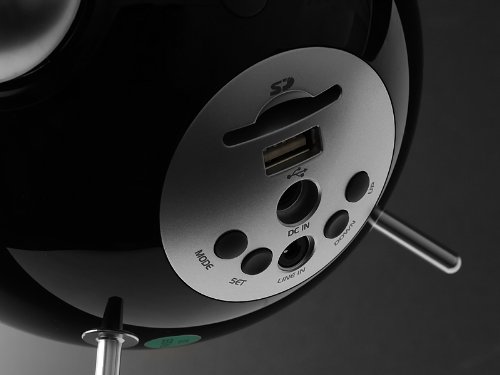
This image displays the rear panel of the Edifier Tick Tock alarm clock. Visible ports and buttons include:
- Slot pro SD kartu: Insert an SD card for music playback.
- USB port: Connect a USB flash drive for music playback.
- DC IN: Napájecí vstup pro přiložený síťový adaptér.
- LINE IN (AUX): 3.5mm audio vstup pro externí zařízení.
- Tlačítko MODE: Cycles through input modes (SD, USB, FM, AUX).
- Tlačítko SET: Used for entering settings menus (e.g., time, alarm).
- Tlačítka NAHORU/DOLŮ: Navigate menus, adjust volume, or change settings.
Ovládací prvky na horním panelu
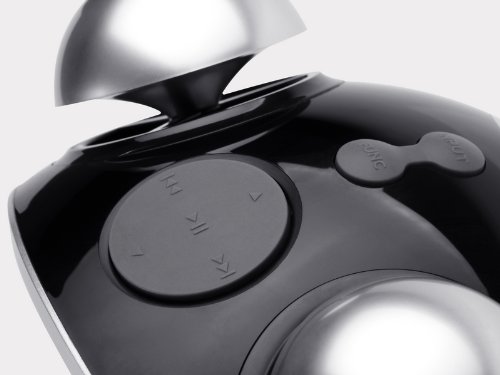
This image shows the top panel controls of the Edifier Tick Tock alarm clock. These include:
- Tlačítko Přehrát/Pozastavit: Spustí nebo pozastaví přehrávání médií.
- Tlačítka předchozí/následující stopy: Skips to the previous or next track during media playback. Also used for tuning FM radio.
- Tlačítka pro zvýšení / snížení hlasitosti: Upravuje hlasitost zvukového výstupu.
- Tlačítko ODLOŽENÍ/OSVĚTLENÍ: Activates snooze during an alarm or adjusts display brightness.
Nastavení
- Rozbalení: Carefully remove the alarm clock and all accessories from the packaging. Ensure all components are present: the alarm clock unit, AC power adapter, and this user manual.
- Připojení napájení: Connect the AC power adapter to the "DC IN" port on the rear of the alarm clock. Plug the adapter into a standard wall outlet. The display should illuminate.
- Počáteční zapnutí: The unit should power on automatically. If not, press the power button (if available, otherwise it's always on when plugged in).
- Anténa (FM rádio): Extend the FM antenna located at the back of the unit for optimal radio reception.
Návod k obsluze
Nastavení času a data
- Stiskněte a podržte SOUBOR tlačítko , dokud nezačne blikat zobrazení času.
- Použijte UP a DOLŮ tlačítka pro nastavení hodiny. Stiskněte SOUBOR pro potvrzení a přechod na minuty.
- Upravte minuty pomocí UP a DOLŮ. Stiskněte SOUBOR potvrdit.
- Continue this process to set the year, month, and day. Press SOUBOR to exit the time/date setting mode.
Nastavení alarmu
- Stiskněte tlačítko SOUBOR button once (do not hold) to enter alarm setting mode. The alarm time will flash.
- Použijte UP a DOLŮ tlačítka pro nastavení hodiny budíku. Stiskněte SOUBOR pro potvrzení a přechod na minuty.
- Upravte minuty pomocí UP a DOLŮ. Stiskněte SOUBOR potvrdit.
- Next, select the alarm source (FM, SD, USB, AUX). Use UP a DOLŮ to cycle through options. Press SOUBOR potvrdit.
- If FM is selected, use UP a DOLŮ to select a preset FM station (P01-P24).
- If SD or USB is selected, ensure a card/drive with audio is inserted. The alarm will play the first track.
- If AUX is selected, ensure an external device is connected and playing audio.
- Stiskněte SOUBOR again to activate the alarm. An alarm icon will appear on the display.
- To deactivate the alarm, press SOUBOR dokud ikona budíku nezmizí.
- Když zazní alarm, stiskněte SNOOZE / SVĚTLO button to activate snooze (typically 9 minutes). To turn off the alarm completely, press any other button.
Provoz FM rádia
- Stiskněte tlačítko MODE opakovaně stiskněte tlačítko , dokud se na displeji nezobrazí „FM“.
- Automatické skenování a předvolby: Stiskněte a podržte PLAY/PAUSE button. The radio will automatically scan for available stations and save them to presets (P01-P24).
- Ruční ladění: Použijte PŘEDCHOZÍ/DALŠÍ SKLADBA tlačítky pro jemné doladění frekvence.
- Výběr předvoleb: V režimu FM krátce stiskněte PŘEDCHOZÍ/DALŠÍ SKLADBA tlačítka pro procházení uložených předvoleb stanic.
- Upravte hlasitost pomocí UP a DOLŮ buttons on the rear panel.
SD Card / USB Playback
- Insert an SD card into the SD card slot or a USB flash drive into the USB port on the rear panel.
- Stiskněte tlačítko MODE button repeatedly until "SD" or "USB" appears on the display. The device will automatically start playing audio files.
- Použijte PLAY/PAUSE tlačítko pro pozastavení nebo obnovení přehrávání.
- Použijte PŘEDCHOZÍ/DALŠÍ SKLADBA buttons on the top panel to skip tracks.
- Upravte hlasitost pomocí UP a DOLŮ buttons on the rear panel.
Auxiliary Input (LINE IN)
- Connect an external audio device (e.g., smartphone, MP3 player) to the "LINE IN" (3.5mm) port on the rear panel using an audio cable (not included).
- Stiskněte tlačítko MODE button repeatedly until "AUX" appears on the display.
- Spusťte přehrávání na připojeném externím zařízení.
- Upravte hlasitost pomocí UP a DOLŮ buttons on the rear panel, and also control volume from your external device.
Jas displeje
Krátce stiskněte SNOOZE / SVĚTLO button on the top panel to cycle through different display brightness levels.
Údržba
- Čištění: Use a soft, dry cloth to clean the surface of the alarm clock. Do not use abrasive cleaners, waxes, or solvents.
- Umístění: Place the unit on a stable, flat surface. Avoid direct sunlight, high temperatures, humidity, or dusty environments.
- Moc: Pokud nebudete přístroj delší dobu používat, odpojte napájecí adaptér ze zásuvky.
Odstraňování problémů
| Problém | Možná příčina / řešení |
|---|---|
| Není napájení / Displej vypnutý |
|
| Žádný zvuk z reproduktorů |
|
| Špatný příjem FM rádia |
|
| Alarm does not sound or plays static |
|
| Displej je v noci příliš jasný |
|
Specifikace
| Značka | Edifier |
| Číslo modelu | MF240Reto |
| Typ zobrazení | LCD |
| Technologie připojení | AUX, USB |
| Speciální funkce | Alarm, Radio, SD Card Reader, USB Playback |
| Zdroj napájení | Elektrický kabel |
| Materiál | Plast |
| Hmotnost položky | 0.74 libry (přibližně 0.34 kg) |
| Výrobce | Edifier USA |
Záruka a podpora
This Edifier product comes with a 2letá záruka výrobce. For warranty claims, technical support, or further assistance, please contact Edifier USA customer service. Please retain your proof of purchase for warranty validation.
For the most up-to-date support information, please visit the official Edifier webmísto.