
1. Konec produktuview
The OSIM uPapa OS-8030 is a powerful drum-massager designed to provide targeted relief and relaxation. It features a symmetrical 6-point drum massage system with multiple rhythmic patterns and intensity levels to suit individual preferences. This manual provides essential information for the safe and effective use of your uPapa OS-8030.
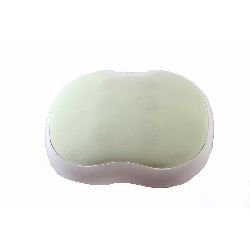
Obrázek 1.1: Nahoru view of the OSIM uPapa OS-8030 Power Drum-Massager, showing its ergonomic shape.
2. Bezpečnostní informace
Please read all instructions carefully before using the OSIM uPapa OS-8030. Retain this manual for future reference.
- Vždy po použití a před čištěním odpojte masážní přístroj od elektrické zásuvky.
- Nepoužívejte masážní přístroj v blízkosti vody nebo vamp prostředí.
- Udržujte napájecí kabel mimo dosah horkých povrchů.
- Never operate the massager if it has a damaged cord or plug, if it is not working properly, or if it has been dropped or damaged.
- Tento spotřebič není určen k používání osobami se sníženými fyzickými, smyslovými nebo duševními schopnostmi nebo s nedostatkem zkušeností a znalostí, pokud nejsou pod dohledem nebo pokud jim nebyly poskytnuty pokyny k používání spotřebiče osobou odpovědnou za jejich bezpečnost.
- Consult a doctor before use if you have any medical conditions, are pregnant, or have a pacemaker.
- Do not use on sensitive skin areas, swollen or inflamed areas, or open wounds.
- Do not use for more than 15 minutes at a time to avoid overheating and potential injury.
3. Obsah balení
Ověřte, zda jsou v balení přítomny všechny položky:
- OSIM uPapa OS-8030 Power Drum-Massager
- Napájecí adaptér
- Uživatelská příručka (tento dokument)
4. Vlastnosti produktu
The OSIM uPapa OS-8030 offers the following key features:
- Symmetrical 6-point drum massage for comprehensive coverage.
- 7 rhythmic massage programs to vary the massage experience.
- 7 drumming positions for targeted relief on different body areas.
- 5 adjustable massage intensities to customize your comfort level.
- Convenient controls for easy operation.
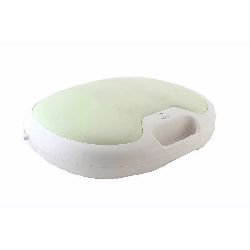
Obrázek 4.1: Strana view of the OSIM uPapa OS-8030, highlighting the control panel.
5. Nastavení
- Rozbalte zařízení: Carefully remove the OSIM uPapa OS-8030 and all accessories from the packaging.
- Kontrola poškození: Check the massager and power adapter for any signs of damage. Do not use if damaged.
- Připojte napájení: Insert the power adapter cable into the power input port on the massager. Then, plug the power adapter into a suitable electrical outlet. Ensure the voltage matches the device requirements (refer to specifications).
- Umístění: Place the massager on a flat, stable surface or position it comfortably on the desired body area (e.g., back, shoulders, thighs).
6. Návod k obsluze
Follow these steps to operate your OSIM uPapa OS-8030:
- Zapnutí: Stiskněte tlačítko Moc button once to turn on the massager. The default massage program will begin.
- Select Massage Program: Stiskněte tlačítko Režim button repeatedly to cycle through the 7 rhythmic massage programs. Each press will change the program.
- Adjust Drumming Position: Použijte Pozice button to select one of the 7 drumming positions. This allows you to target specific areas.
- Upravit intenzitu: Stiskněte tlačítko Intenzita button to increase or decrease the massage intensity. There are 5 levels of intensity.
- Vypnout: Stiskněte tlačítko Moc button again to turn off the massager. It is recommended to unplug the device from the power outlet after use.
Poznámka: The massager has an automatic shut-off feature after approximately 15 minutes of continuous use to prevent overheating. If the device stops, allow it to cool down before resuming use.
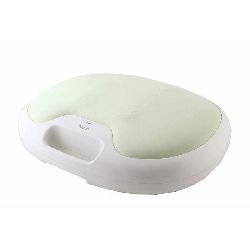
Obrázek 6.1: Úhlové view of the OSIM uPapa OS-8030, illustrating the user interface and control buttons.
7. Údržba a péče
Správná údržba zajistí dlouhou životnost a optimální výkon vašeho masážního přístroje.
- Čištění: Před čištěním masážní přístroj vždy odpojte ze zásuvky. Povrch otřete měkkým, lehce vlhkým hadříkem.amp cloth. Do not use abrasive cleaners, solvents, or harsh chemicals. Ensure no liquid enters the device.
- Skladování: Masážní přístroj skladujte na chladném a suchém místě, mimo dosah přímého slunečního záření a extrémních teplot. Nepokládejte na masážní přístroj těžké předměty.
- Péče o šňůru: Do not wrap the power cord tightly around the device. Avoid bending or twisting the cord excessively.
8. Řešení problémů
If you encounter issues with your OSIM uPapa OS-8030, refer to the following common problems and solutions:
| Problém | Možná příčina | Řešení |
|---|---|---|
| Masážní přístroj se nezapne. | Není zapojené; problém se zásuvkou; poškozený kabel/zástrčka. | Ensure power adapter is securely plugged into both the massager and a working electrical outlet. Check the power cord for damage. |
| Massage intensity is weak. | Nastavení intenzity je příliš nízké. | Stiskněte tlačítko Intenzita button to increase the massage intensity. |
| Massager stops during use. | Automatic shut-off activated (overheating protection). | This is a normal safety feature. Turn off the massager, unplug it, and allow it to cool down for at least 30 minutes before resuming use. |
Pokud problém přetrvává i po vyzkoušení těchto řešení, kontaktujte zákaznickou podporu.
9. Specifikace
| Funkce | Detail |
|---|---|
| Název modelu | OS-8030 |
| Značka | Osim |
| Zdroj napájení | Elektrický kabel |
| Hmotnost položky | 6 kg 480 g |
| Rozměry balení | 50.2 x 41.8 x 16.8 cm |
| Speciální funkce | Symmetrical 6 point drum massage, 7 rhythmic massages, 7 drumming positions, 5 massage intensities |
| Barva | Zelený |
| Výrobce | Osim |
10. Záruka a podpora
Informace o záruce: The OSIM uPapa OS-8030 Power Drum-Massager comes with a 1letá omezená záruka od data nákupu. Tato záruka se vztahuje na výrobní vady vzniklé běžným používáním. Nevztahuje se na škody způsobené nesprávným použitím, nehodami, neoprávněnými úpravami nebo běžným opotřebením.
Zákaznická podpora: For technical assistance, warranty claims, or service inquiries, please contact OSIM customer support. Refer to the official OSIM website or your purchase documentation for specific contact details in your region.
You can visit the official Osim Store for more information: Osim Official Store