
1. Úvod
The Alpine PXA-H800 is a high-performance system integration audio processor designed to enhance your car audio experience. This unit features audiophile-grade components, including a 24-bit high-performance DAC, to deliver superior sound quality. It offers extensive connectivity and advanced sound tuning capabilities, making it a central component for sophisticated car audio systems.
Mezi klíčové vlastnosti patří:
- High-Resolution Audio with 24-Bit DAC
- Versatile Inputs: 6-Channel Analog, 2 Optical, 2 Ai-NET
- Amplified Outputs: 4 Volt Pre-Outs
- Advanced EQ: ImprintEQ, 31-Band Graphic EQ for speakers, 10-Band Graphic EQ for subwoofers, 10-Band Parametric Equalizer for channels, 5-Band Parametric EQ for subwoofers
- 8-Channel Digital Time Correction
- Enhanced Sound with MediaXpander Plus
- Surround Sound Support: Dolby Digital, Dolby Pro Logic II, DTS Digital Surround Sound
- PC Software for comprehensive tuning and preset access
- Compatibility with INA-W910 and RUX-C800 for control
2. Nastavení a instalace
Proper installation is crucial for optimal performance. It is recommended that installation be performed by a qualified professional. Ensure the vehicle's battery is disconnected before beginning installation.
2.1 Connecting the PXA-H800
The PXA-H800 offers various input and output options for integration into your car audio system.

Figure 2.1: Input Connections. This image displays the rear panel of the Alpine PXA-H800, highlighting the auxiliary input (AUX INPUT) with left (L) and right (R) RCA connections for channels 1 through 6. Also visible are the Ai-NET ports for HU (Head Unit) and Changer, digital inputs (DIGITAL 1 and DIGITAL 2) for HU and Changer, and the power supply connector. A microphone (MIC) input is also present for calibration purposes.
Vstupní připojení:
- Analog RCA Inputs: Connect up to 6 channels of analog audio from your head unit or other sources. These are labeled CH-1 through CH-6 (L/R).
- Optical Inputs: Two optical inputs (DIGITAL 1, DIGITAL 2) are available for high-quality digital audio sources, such as a compatible head unit or CD changer.
- Ai-NET Inputs: Two Ai-NET ports allow for direct digital connection with compatible Alpine head units (HU) and CD changers.
- Vstup pro mikrofon: Used for the ImprintEQ automatic sound calibration process.
- Napájení: Connect the provided power harness to the vehicle's power, ground, and remote turn-on leads.
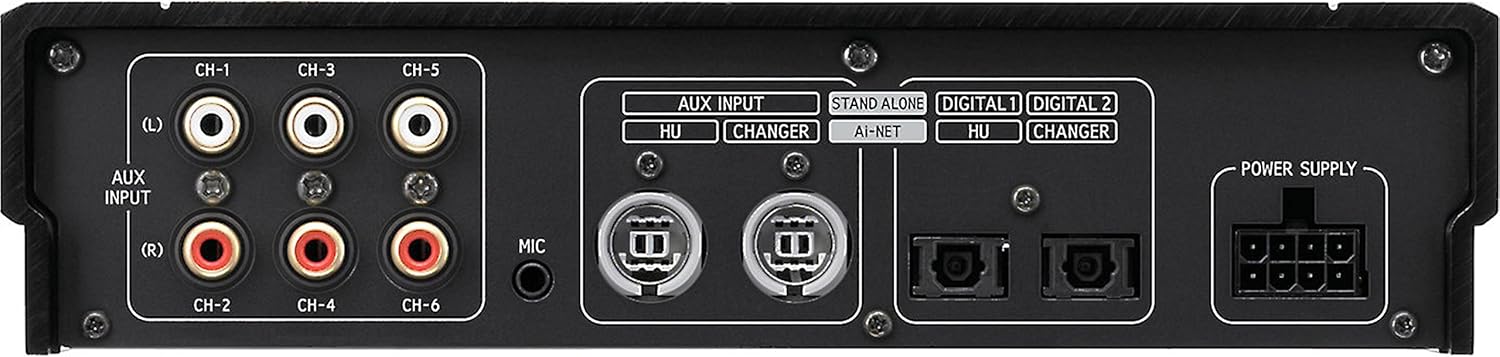
Figure 2.2: Output and Control Connections. This image shows the rear panel of the Alpine PXA-H800, detailing the 8-channel RCA outputs (OUTPUT) labeled CH-1 through CH-8 (L/R). Also visible are the PC USB port for computer connection, the COMMANDER port for the RUX-C800 controller, and a RESET button.
Output and Control Connections:
- RCA výstupy: Eight channels of 4-volt RCA pre-outs (CH-1 through CH-8) are provided for connecting to external ampzáchranáři.
- PC Port: A USB port allows connection to a computer for detailed sound tuning and system configuration using the dedicated PC software.
- COMMANDER Port: This port is for connecting the optional Alpine RUX-C800 controller. Note: The PXA-H800 requires either a compatible Alpine head unit or the RUX-C800 controller to function correctly and power on.
- Tlačítko reset: Use a pointed object to press this button to reset the unit to factory default settings.
2.2 Počáteční zapnutí a konfigurace
After all connections are made, reconnect the vehicle's battery. The PXA-H800 will require initial configuration. This is typically done via the dedicated PC software or the RUX-C800 controller. Ensure the PC software is installed on your computer before connecting the PXA-H800 via USB.
3. Provoz
The Alpine PXA-H800 offers extensive control over your audio system. Most advanced settings are accessed through the PC software or the RUX-C800 controller.
3.1 Sound Tuning with PC Software
The included PC software provides a graphical interface for precise sound tuning. Connect your computer to the PXA-H800 via the USB port.
- ImprintEQ: Utilize the automatic sound calibration feature with the included microphone to optimize sound for your vehicle's acoustics.
- Graphic Equalizers:
- 31-Band Graphic EQ for speaker channels.
- 10-Band Graphic EQ for subwoofer channels.
- Parametric Equalizers:
- 10-Band Parametric Equalizer for individual channels.
- 5-Band Parametric EQ for subwoofer channels.
- Digital Time Correction: Adjust the timing for each of the 8 channels to ensure precise sound stagzobrazování a zobrazování.
- Nastavení přechodu: Configure high-pass, low-pass, and band-pass filters for each channel.
- MediaXpander Plus: Enhance compressed audio files by restoring lost frequencies and dynamics.
- Surround Sound Settings: Configure Dolby Digital, Dolby Pro Logic II, and DTS Digital Surround Sound modes for compatible systems.
- Správa předvoleb: Save and load multiple sound presets for different listening preferences or vehicle conditions.
3.2 Using the RUX-C800 Controller (Optional)
The RUX-C800 controller provides convenient access to essential functions and preset recall without a computer. Connect it to the COMMANDER port. Refer to the RUX-C800 manual for detailed operation instructions.
3.3 Compatibility with INA-W910
The PXA-H800 is compatible with the Alpine INA-W910 head unit, allowing for integrated control and preset access directly from the head unit interface.
4. Údržba
The Alpine PXA-H800 is designed for reliable operation with minimal maintenance. Follow these guidelines to ensure longevity:
- Čištění: Use a soft, dry cloth to wipe the unit. Avoid abrasive cleaners, solvents, or harsh chemicals.
- Větrání: Ensure the unit has adequate ventilation to prevent overheating. Do not block any vents.
- Spojení: Pravidelně kontrolujte všechna kabelová připojení, abyste se ujistili, že jsou bezpečná a bez koroze.
- Aktualizace softwaru: Check the official Alpine website for any available firmware or software updates for the PXA-H800. Updates can improve performance and add new features.
5. Řešení problémů
If you encounter issues with your PXA-H800, refer to the following common troubleshooting steps:
5.1 Žádné napájení / Jednotka se nezapne
- Zkontrolujte připojení napájení: Verify that the power, ground, and remote turn-on wires are correctly connected and secure.
- Controller Requirement: The PXA-H800 requires either a compatible Alpine head unit or the RUX-C800 controller to power on. Ensure one of these is connected and functioning.
- Baterie vozidla: Confirm the vehicle battery has sufficient charge.
- Pojistky: Check the inline fuse on the power cable and any fuses in your vehicle's fuse box related to the audio system.
5.2 Žádný zvukový výstup
- Vstupní zdroj: Ensure the correct input source is selected on your head unit or controller.
- RCA připojení: Verify all RCA cables from the PXA-H800 outputs to your amplifiers are securely connected.
- AmpStav záchranáře: Zkontrolujte, zda vaše ampZáchranné přístroje jsou zapnuté a fungují správně.
- Úrovně hlasitosti: Confirm that volume levels are not set to minimum on the head unit, PXA-H800 (via software/controller), or ampzáchranáři.
- Funkce ztlumení: Check if the system is accidentally muted.
5.3 Zkreslený nebo špatná kvalita zvuku
- Nastavení zesílení: Adjust gain settings on the PXA-H800 and ampzáchranné prvky, aby se zabránilo ořezání.
- ImprintEQ Calibration: Re-run the ImprintEQ calibration process to ensure optimal acoustic correction for your vehicle.
- Nastavení EQ: Review and adjust equalizer settings in the PC software. Excessive boosting of certain frequencies can cause distortion.
- Kvalita zdroje: Ensure the audio source (e.g., head unit, media player) is providing a clean signal.
- Problémy s uzemněním: Poor grounding can introduce noise. Verify all ground connections are solid.
5.4 Problémy s připojením k počítačovému softwaru
- USB kabel: Zkuste jiný kabel USB.
- Instalace ovladače: Ensure the correct USB drivers for the PXA-H800 are installed on your computer.
- Verze softwaru: Verify you are using the latest version of the Alpine PXA-H800 PC software.
- Restartovat: Restart both the computer and the PXA-H800 unit.
If these steps do not resolve the issue, please contact Alpine customer support or consult a professional installer.
6. Specifikace
| Rozměry produktu | 9.06 x 8.66 x 11.02 palce |
| Hmotnost položky | 5.94 libry |
| Číslo modelu | PXA-H800 |
| Značka | Vysokohorský |
| UPC | 793276310293 |
| DAC | 24-Bit High-Performance |
| Analogové vstupy | 6-Channel RCA |
| Digitální vstupy | 2 Optical, 2 Ai-NET |
| Předvýstupy | 8-Channel, 4 Volt RCA |
| Vyrovnání | ImprintEQ, 31-Band Graphic (Speaker), 10-Band Graphic (Subwoofer), 10-Band Parametric (Channel), 5-Band Parametric (Subwoofer) |
| Korekce času | 8kanálový digitální |
| Podpora prostorového zvuku | Dolby Digital, Dolby Pro Logic II, DTS Digital Surround Sound |
7. Záruka a podpora
7.1 Informace o záruce
Alpine products are covered by a limited warranty. For detailed information regarding the warranty period, terms, and conditions applicable to your PXA-H800, please refer to the warranty card included with your product or visit the official Alpine webUschovejte si doklad o koupi pro případ reklamace.
7.2 Zákaznická podpora
If you require technical assistance, have questions about installation, or need to troubleshoot an issue not covered in this manual, please contact Alpine customer support. You can find contact information, FAQs, and additional resources on the official Alpine webmísto:
When contacting support, please have your product model number (PXA-H800) and serial number ready.