
InFocus IN124
DLP projektor InFocus IN124
Uživatelská příručka
1. Úvod
This manual provides comprehensive instructions for the setup, operation, and maintenance of your InFocus IN124 DLP Projector. Please read this manual thoroughly before using the projector to ensure proper functionality and to maximize its lifespan.
The InFocus IN124 is designed to deliver clear and bright projections, suitable for various environments including home cinema and business presentations. Its compact design and robust features make it a versatile display solution.
2. Komponenty produktu
Upon unboxing your InFocus IN124 DLP Projector, please verify that all the following components are included:
- InFocus IN124 DLP Projector Unit
- Dálkové ovládání
- Napájecí kabel
- VGA Cable (may vary by region/package)
- User Manual (this document, typically on CD or downloadable)
If any items are missing or damaged, please contact InFocus customer support immediately.
3. Nastavení
3.1 Fyzické umístění
Position the projector on a stable, flat surface or mount it securely to a ceiling. Ensure adequate ventilation around the unit to prevent overheating. Maintain a clear path between the projector lens and the projection surface (screen or wall).
3.2 Připojení zařízení
The InFocus IN124 supports various input sources. Connect your source device (e.g., laptop, DVD player, gaming console) to the projector using the appropriate cable.
- HDMI: For high-definition digital video and audio. Connect an HDMI cable from your source device to the HDMI port on the projector.
- VGA: For analog video input, commonly used with computers. Connect a VGA cable from your computer's VGA output to the VGA input on the projector.
- Složené video: Pro video ve standardním rozlišení. Připojte kompozitní video kabel (žlutý RCA) k odpovídajícímu portu.
- Zvukový vstup/výstup: Connect external audio devices if needed.
3.3 Zapnutí
Po připojení všech potřebných kabelů:
- Připojte napájecí kabel k projektoru a poté do elektrické zásuvky.
- Press the power button on the projector's control panel or the remote control. The power indicator light will change, and the projector lamp se rozsvítí.
- Allow a few moments for the projector to warm up and display the image.
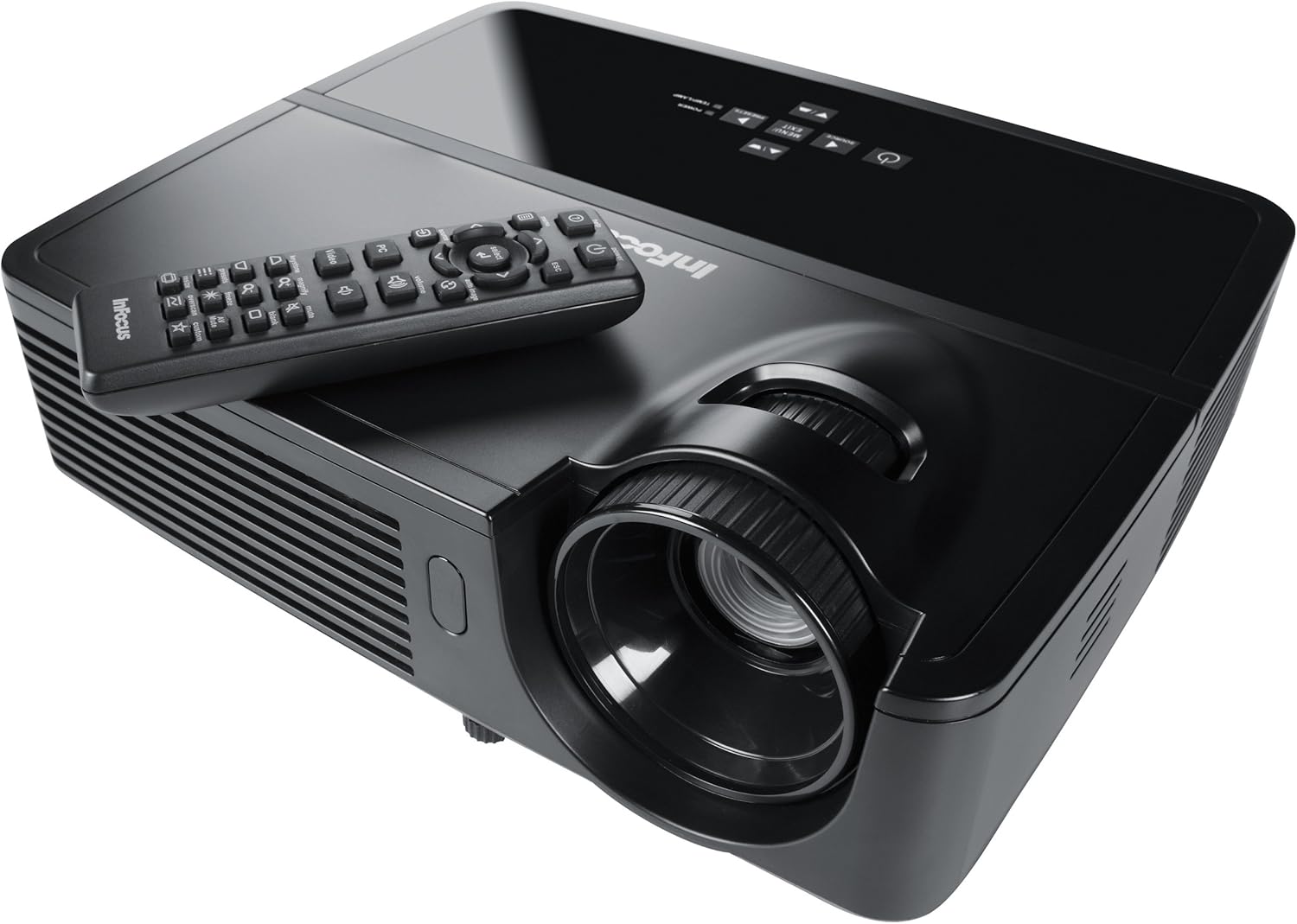
Figure 1: InFocus IN124 DLP Projector with its remote control. The image shows the top-down view of the black projector unit, highlighting the lens, ventilation grilles, and the control panel. The remote control is placed on top of the projector.
4. Ovládání projektoru
4.1 Základní ovládací prvky
The projector can be operated using the control panel on the unit or the included remote control.
- Vypínač: Slouží k zapnutí nebo vypnutí projektoru.
- Tlačítko zdroje: Cycles through available input sources (HDMI, VGA, Video).
- Tlačítko nabídky: Zpřístupňuje nabídku na obrazovce (OSD) pro úpravu nastavení.
- Tlačítka se šipkami: Procházení možností nabídky a úprava hodnot.
- Tlačítko Enter/Select: Potvrzuje výběry v nabídce.
- Tlačítka hlasitosti: Nastavuje výstupní úroveň zvuku.
- Korekce lichoběžníkového zkreslení: Adjusts the image shape to correct trapezoidal distortion.
- Zaostřovací kroužek: Manually adjust the lens to sharpen the image.
4.2 Navigace v menu a nastavení
Press the "Menu" button to open the On-Screen Display (OSD). Use the arrow keys to navigate through categories such as "Picture," "Display," "Setup," and "Advanced." Press "Enter" to select a category or option. Adjust settings like brightness, contrast, color temperature, aspect ratio, and resolution to optimize your viewzkušenosti.
4.3 3D funkce
The InFocus IN124 is 3D-ready. To experience 3D content, you will need compatible 3D source material, a 3D-capable player, and active DLP Link 3D glasses (sold separately). Refer to your 3D source device's manual for specific setup instructions.
5. Údržba
Pravidelná údržba zajišťuje optimální výkon a prodlužuje životnost projektoru.
5.1 Čištění objektivu
Use a soft, lint-free cloth specifically designed for optical lenses. Gently wipe the lens surface to remove dust or smudges. Avoid using abrasive cleaners or excessive force, which can scratch the lens.
5.2 Čištění vzduchových filtrů
The projector has air filters to prevent dust from entering the internal components. Locate the filter cover (refer to the diagram in the full manual if available) and remove it. Clean the filter using a small brush or a vacuum cleaner with a brush attachment. Replace the filter securely.
5.3 lamp Nahrazení
Projektor lamp má omezenou životnost. Když lamp indicator light illuminates or the image becomes dim, it's time to replace the lampPřed použitím nechte projektor vždy zcela vychladnout.amp replacement. Consult the full service manual or a qualified technician for detailed lamp replacement procedures specific to the IN124 model.
6. Řešení problémů
Tato část se zabývá běžnými problémy, se kterými se můžete u projektoru setkat.
| Problém | Možná příčina | Řešení |
|---|---|---|
| Není zobrazen žádný obrázek | Vybrán nesprávný vstupní zdroj; Uvolněné připojení kabelu; Projektor není zapnutý. | Press the "Source" button to cycle inputs; Check all cable connections; Ensure projector is powered on and lamp svítí. |
| Obraz je rozmazaný | Out of focus; Incorrect resolution setting. | Adjust the focus ring on the lens; Adjust the resolution setting in the OSD menu or on your source device. |
| Obrázek je lichoběžníkový | Projektor není kolmý k promítací ploše. | Use the keystone correction feature (digital or manual) to square the image. Reposition the projector if possible. |
| Žádný zvuk | Volume too low; Incorrect audio input selected; Muted. | Increase volume; Check audio cable connections; Ensure projector or source device is not muted. |
| Projektor se přehřívá a vypíná | Zablokované větrání; Znečištěný vzduchový filtr. | Ensure clear space around vents; Clean air filter as per maintenance section. |
For issues not listed here, please refer to the comprehensive online support resources or contact InFocus customer service.
7. Specifikace
Below are the key technical specifications for the InFocus IN124 DLP Projector:
| Funkce | Detail |
|---|---|
| Číslo modelu | IN124 |
| Technologie displeje | DLP |
| Nativní rozlišení | 1280x720 (HD) |
| Jas | Až 3200 světla |
| Kontrastní poměr | 3000:1 |
| Konektivita | HDMI, VGA, Composite Video |
| Speciální funkce | Připraveno pro 3D |
| Rozměry produktu (D x Š x V) | 12.99 x 12.99 x 5.9 palce |
| Hmotnost položky | 4.78 libry (2.17 kg) |
| Napájení | 100-240 Volts at 50-60 Hz |
| Doporučené použití | Domácí kino |
8. Záruka a podpora
InFocus provides a limited warranty for the IN124 DLP Projector. For detailed warranty terms and conditions, please refer to the warranty card included with your product or visit the official InFocus webUschovejte si účtenku jako doklad o koupi pro případ reklamace.
For technical support, troubleshooting assistance beyond this manual, or service requests, please contact InFocus customer support through their official website or the contact information provided in your product documentation. Online resources, including FAQs and driver downloads, may also be available.
Ask a question about this manual
Ask about setup, troubleshooting, compatibility, parts, safety, or missing instructions. Manuals+ will review the question and use this page’s manual context to help answer it.