
InFocus IN126
Uživatelská příručka k projektoru InFocus IN126 DLP
Model: IN126 | Brand: InFocus
1. Konec produktuview
The InFocus IN126 is a DLP projector designed for various projection needs, offering high brightness and a clear image. This manual provides essential information for the proper setup, operation, and maintenance of your projector.
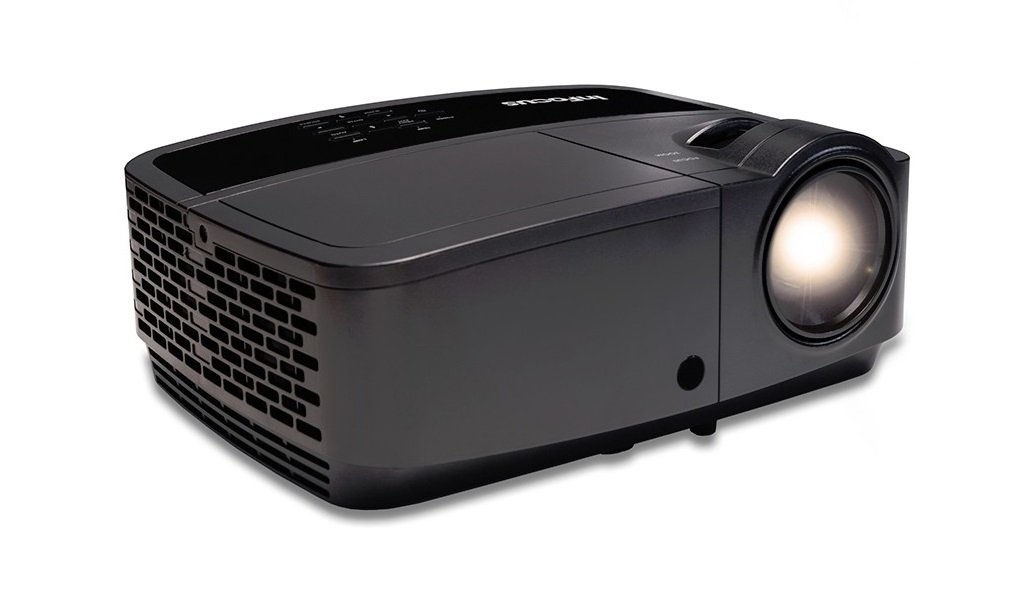
Obrázek 1.1: Přední strana view of the InFocus IN126 DLP Projector.
Klíčové vlastnosti:
- High brightness of up to 3200 lumens for clear images in various lighting conditions.
- High 3000:1 contrast ratio for sharp detail.
- Compact and portable design, weighing approximately 4.8 lbs. (2.17 kg).
- 3D-Ready capability for immersive viewzkušenosti.
- HDMI connectivity for versatile input options.
2. Nastavení a instalace
2.1 Vybalení
Carefully remove the projector and all accessories from the packaging. Verify that all components are present according to the packing list.
2.2 Umístění projektoru
Place the projector on a stable, flat surface or mount it securely. Ensure adequate ventilation around the projector to prevent overheating. Position the projector at an appropriate distance from the screen to achieve the desired image size.
2.3 Připojení zařízení
Connect your video source (e.g., laptop, gaming console) to the projector using an HDMI cable. Ensure the cable is securely plugged into both the source device and the projector's HDMI input port.

Image 2.1: An InFocus projector set up for a business presentation, demonstrating typical usage.
2.4 Zapnutí/vypnutí
- Zapnutí: Connect the power cord to the projector and a power outlet. Press the power button on the projector or remote control. The power indicator light will illuminate.
- Vypnutí: Press the power button twice. The projector will enter a cooling cycle before completely shutting down. Do not unplug the projector during the cooling cycle.
2.5 Úprava obrazu
- Soustředit: Otáčejte ostřícím kroužkem na objektivu, dokud nebude obraz ostrý a jasný.
- Korekce lichoběžníkového zkreslení: Use the keystone adjustment feature (usually found in the projector's menu or via dedicated buttons) to correct trapezoidal image distortion if the projector is not perfectly perpendicular to the screen.
3. Ovládání projektoru
3.1 Výběr vstupního zdroje
Press the 'Source' or 'Input' button on the remote control or projector control panel to cycle through available input sources (e.g., HDMI, VGA). Select the input corresponding to your connected device.
3.2 Navigace v nabídce
Use the arrow buttons on the remote or control panel to navigate the on-screen display (OSD) menu. Press 'Enter' or 'OK' to confirm selections and 'Menu' or 'Exit' to go back or close the menu.
3.3 Úpravy obrazu
V nabídce OSD můžete upravit různá nastavení obrazu:
- Jas: Upravuje celkovou světlost nebo tmavost obrazu.
- Kontrast: Řídí rozdíl mezi nejsvětlejšími a nejtmavšími částmi obrazu.
- Barva: Upravuje intenzitu barev.
- Poměr stran: Vybere formát zobrazení (např. 4:3, 16:9).
3.4 Nastavení zvuku
If your projector has built-in speakers or is connected to an external audio system, you can adjust the volume and other audio settings through the OSD menu.
3.5 3D Operation
The IN126 projector is 3D-Ready. To view 3D content, you will need compatible 3D glasses, a 3D-enabled source device, and 3D content. Refer to your 3D glasses and source device manuals for specific instructions on enabling 3D mode.
4. Údržba
4.1 Čištění objektivu
K jemnému otření čočky projektoru použijte měkký hadřík bez žmolků, speciálně určený pro optické čočky. Nepoužívejte abrazivní čisticí prostředky ani nadměrnou sílu, které by mohly čočku poškrábat.
4.2 Cleaning the Projector Casing
Otřete vnější povrch projektoruasing s měkkým, damp tkanina. Nepoužívejte agresivní chemikálie nebo rozpouštědla.
4.3 Údržba vzduchového filtru
Regularly check and clean the air filter to ensure proper airflow and prevent overheating. Refer to the full product manual for instructions on locating and cleaning or replacing the air filter.
4.4 lamp Nahrazení
Projektor lamp has an estimated operating life of up to 20,000 hours. When the lamp reaches the end of its life, a warning message may appear, or the image brightness may significantly decrease. Refer to the full product manual for detailed instructions on safe lamp replacement. Always use genuine InFocus replacement lamps.
5. Řešení problémů
This section addresses common issues you might encounter with your InFocus IN126 projector.
5.1 Žádný obraz na obrazovce
- Ujistěte se, že je projektor zapnutý a kontrolka napájení svítí nepřetržitě.
- Zkontrolujte, zda jsou všechna kabelová připojení (HDMI, napájení) bezpečná.
- Ověřte, zda je na projektoru vybrán správný vstupní zdroj.
- Confirm the source device (laptop, etc.) is powered on and outputting a signal.
5.2 Image is Distorted or Blurry
- Upravte zaostřovací kroužek na objektivu.
- Use keystone correction to fix trapezoidal distortion.
- Ensure the projector is placed on a stable surface and is not vibrating.
- Check the resolution settings of your source device; ensure it is compatible with the projector's native resolution (1280 x 720).
5.3 Žádný zvuk
- Zvyšte hlasitost na projektoru i zdrojovém zařízení.
- Pokud používáte externí reproduktory, ujistěte se, že jsou správně připojeny a zapnuté.
- Zkontrolujte nastavení zvuku v nabídce OSD projektoru.
5.4 Projector Overheating
- Ensure there is sufficient space around the projector for ventilation.
- Clean the air filter to remove any dust buildup.
- Neblokujte ventilační otvory.
6. Specifikace
The following table outlines the key technical specifications for the InFocus IN126 DLP Projector:
| Funkce | Specifikace |
|---|---|
| Značka | InFocus |
| Název modelu | IN126 DLP |
| Typ zobrazení | DLP |
| Nativní rozlišení | 1280 x 720 |
| Maximální rozlišení displeje | 1920 x 1080 |
| Jas | 3200 lumens (ANSI) |
| Kontrastní poměr | 3000:1 |
| Provozní životnost světelného zdroje | 20000 hodiny |
| Lamp Wattage | 230 wattů |
| Technologie připojení | HDMI |
| Speciální funkce | 3D-Ready |
| Form Factor | Přenosný |
| Typ montáže | Stolní držák |
| Hmotnost položky | 4.85 liber (2.2 kg) |
| Certifikace externího testování | UL, c-UL, FCC, CE |
7. Informace o záruce
The InFocus IN126 DLP Projector comes with a limited manufacturer's warranty. For specific details regarding warranty coverage, duration, and terms, please refer to the warranty card included with your product or visit the official InFocus webUschovejte si doklad o koupi pro případ reklamace.
8. Zákaznická podpora
For further assistance, technical support, or to inquire about replacement parts, please visit the official InFocus support website or contact their customer service department. Contact information can typically be found on the InFocus website or in the documentation included with your projector.
Ask a question about this manual
Ask about setup, troubleshooting, compatibility, parts, safety, or missing instructions. Manuals+ will review the question and use this page’s manual context to help answer it.