
Zavedení
This manual provides comprehensive instructions for the setup, operation, and maintenance of your AT&T 1040 Corded Four-Line Expandable Telephone. This device is designed for small business environments, offering multi-line capabilities, conferencing, and intercom features to enhance communication efficiency.
Mezi klíčové vlastnosti patří:
- Four-line operation for managing multiple calls simultaneously.
- Integrated speakerphone for hands-free communication.
- 3-party conferencing capability.
- 32-number speed dial for quick access to frequently called numbers.
- Intercom functionality for internal communication.
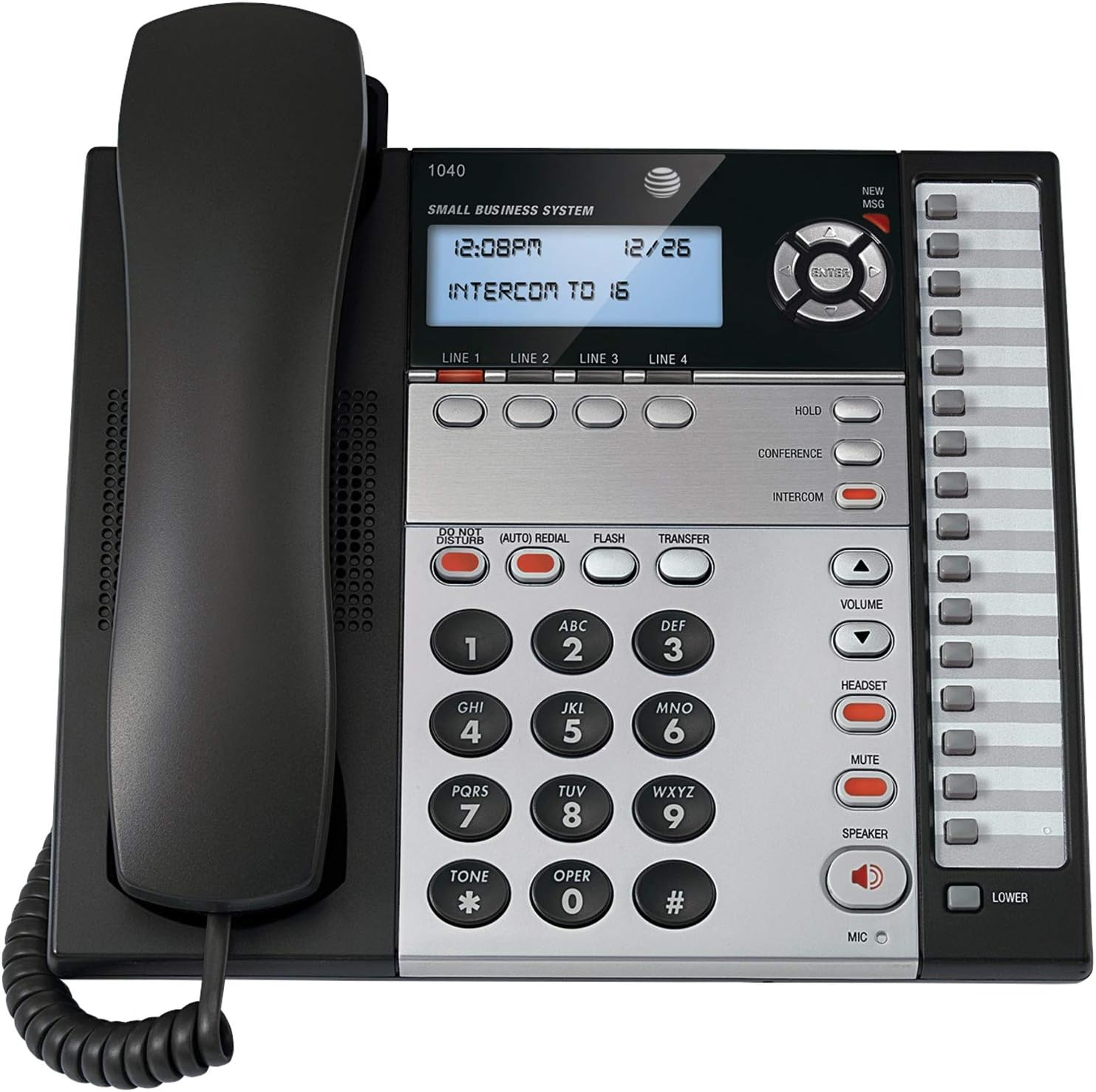
Obrázek 1: The AT&T 1040 Corded Four-Line Expandable Telephone. This image displays the main unit with its handset resting on the cradle, the digital display showing time and intercom status, the four line buttons, and the full keypad with function buttons like HOLD, CONFERENCE, INTERCOM, VOLUME, HEADSET, MUTE, and SPEAKER.
Nastavení
1. Vybalení a kontrola součástí
Před zahájením instalace se ujistěte, že jsou přítomny všechny komponenty:
- AT&T 1040 Base Unit
- Sluchátko
- Svinutý kabel sluchátka
- Line Cords (up to 4, depending on configuration)
- Napájecí adaptér
- 9V Battery (for backup, typically included or purchased separately)
2. Připojení telefonu
- Připojení sluchátka: Zapojte jeden konec spirálového kabelu sluchátka do sluchátka a druhý konec do zdířky označené SLUCHÁTKO on the side of the telephone base.
- Connect the Line Cords: For each telephone line you wish to use, plug one end of a line cord into the jack labeled ŘÁDEK 1, ŘÁDEK 2, ŘÁDEK 3nebo ŘÁDEK 4 on the back of the telephone base. Plug the other end of each line cord into a modular wall jack.
- Instalace 9V baterie: Open the battery compartment on the bottom of the telephone base. Insert a 9V battery, observing the correct polarity (+/-). This battery provides backup power for settings during power outagZavřete přihrádku.
- Connect the AC Power Adapter: Plug the small end of the AC power adapter into the MOC jack on the back of the telephone base. Plug the larger end into a standard electrical outlet.
3. Initial Configuration (Date and Time)
Při prvním zapnutí nebo po výpadku napájenítage (if battery backup is not present or depleted), you may need to set the date and time. Refer to the display and use the navigation buttons (up/down arrows and ENTER) to adjust the settings. Press ENTER pro potvrzení každého nastavení.
Návod k obsluze
1 Základní funkce volání
- Uskutečnění hovoru:
- Zvedněte sluchátko nebo stiskněte tlačítko REPRODUKTOR tlačítko.
- Select an available line by pressing one of the ŘÁDEK 1-4 tlačítka.
- Vytočte požadované telefonní číslo.
- Přijetí hovoru:
- Když telefon zvoní, zvedněte sluchátko nebo stiskněte REPRODUKTOR button. The corresponding line button will flash.
- Ukončení hovoru:
- Vložte sluchátko zpět do kolébky nebo stiskněte REPRODUKTOR Pokud používáte hlasitý odposlech, stiskněte tlačítko znovu.
2. Multi-Line Operation
- Selecting a Line: Stiskněte požadované ŘÁDEK 1-4 button to select an available line for making or receiving calls.
- Switching Between Lines: During an active call on one line, press another ČÁRA button to switch to that line or answer an incoming call on it. The first call will automatically be placed on hold.
3. Hlasitý telefon
Chcete-li použít hlasitý odposlech, stiskněte tlačítko REPRODUKTOR button. The indicator light will illuminate. You can then dial or speak hands-free. Press the REPRODUKTOR button again to end the call or switch to the handset by lifting it.
4. Interkom
The intercom feature allows internal communication between connected AT&T 1040 units. To initiate an intercom call:
- Stiskněte tlačítko INTERCOM tlačítko.
- Dial the extension number of the desired internal unit (e.g., "16" as shown on the display).
- The other unit will ring, and you can speak when answered.
5. Funkce Hold
Chcete-li aktivní hovor přidržet, stiskněte tlačítko DRŽET button. The line indicator light will flash slowly. To retrieve the call, press the flashing ČÁRA tlačítko.
6. Konferenční hovor
To establish a 3-party conference call:
- Establish a call on ŘÁDEK 1.
- Stiskněte tlačítko DRŽET button to place the first call on hold.
- Select an available line (e.g., ŘÁDEK 2) and dial the second party.
- Jakmile druhá strana odpoví, stiskněte KONFERENCE button. All three parties will now be connected.
7. Rychlá volba
The AT&T 1040 supports 32-number speed dial entries.
- Programming Speed Dial: Consult the full manual for detailed programming steps, typically involving a NAPROGRAMOVAT or OBCHOD button followed by a memory location and the number.
- Používání rychlé volby: Zvedněte sluchátko nebo stiskněte REPRODUKTOR, select a line, then press the speed dial memory location button.
8. Ovládání hlasitosti
Použijte OBJEM nahoru (▲) a dolů (▼) buttons to adjust the listening volume during a call (handset or speakerphone). Ringer volume can typically be adjusted via a switch or menu setting on the base unit.
9. Ztlumit
Během hovoru stiskněte ZTLUMIT tlačítko pro dočasné vypnutí mikrofonu. Druhá strana vás neuslyší, ale vy ji stále uslyšíte. Stiskněte ZTLUMIT znovu, abyste mohli pokračovat v mluvení.
10. Nerušit
Stiskněte tlačítko NERUŠIT button to silence incoming calls. The indicator light will illuminate. Press it again to deactivate.
11. Opakované vytáčení
Stiskněte tlačítko (AUTO) REDIAL button to automatically redial the last number called.
12. Flash / Transfer
The BLIKAT button is used for accessing network features such as call waiting or transferring calls, depending on your telephone service provider. The PŘEVOD button is typically used in conjunction with intercom or other system features to transfer an external call to another internal extension.
13. Headset Operation
To use a headset (not included), plug it into the HEADSET jack on the side of the telephone base. Press the HEADSET button to activate headset mode. The indicator light will illuminate. Press it again to deactivate or switch to handset/speakerphone.
Údržba
1. Čištění
Wipe the telephone's exterior with a soft, slightly damp cloth. Do not use cleaning sprays or abrasive cleaners, as these can damage the finish or internal components. Ensure the phone is unplugged from power before cleaning.
2. Výměna baterie
The 9V battery provides backup for settings. If the display shows incorrect time/date after a power outage, the battery may need replacement. Open the battery compartment on the bottom of the unit, remove the old battery, and insert a new 9V alkaline battery, observing polarity. Dispose of old batteries responsibly.
3. Obecná péče
Avoid exposing the telephone to extreme temperatures, direct sunlight, or moisture. Do not drop the unit or subject it to strong impacts. Keep it away from sources of electrical noise, such as motors or fluorescent lighting fixtures.
Odstraňování problémů
| Problém | Řešení |
|---|---|
| Žádný oznamovací tón. |
|
| Nelze uskutečňovat ani přijímat hovory. |
|
| Displej je prázdný nebo nečitelný. |
|
| Interkom nefunguje. |
|
Specifikace
- Rozměry produktu: 10.2 x 11.5 x 4.5 palce
- Hmotnost položky: 0.16 unce (4.54 g)
- Typ telefonu: Kabelové
- Zdroj napájení: Elektrický kabel
- Typ vytáčení: Jedna klávesnice
- Typ systému odpovědí: Digitální
- Možnost konferenčního hovoru: 3-cestný
- Víceřádkový provoz: Multi-Line Operation (Four-Line)
- Kapacita rychlé volby: 32 čísla
- Interkom: Ano
Záruka a podpora
For warranty information and technical support, please refer to the official AT&T product website or contact AT&T customer service. Keep your purchase receipt as proof of purchase for warranty claims.
Online resources may include FAQs, additional troubleshooting guides, and contact information for support.