
Zavedení
This manual provides detailed instructions for the Vivitar PZ3115 Date-A-Print AF Auto Focus 35mm Film Camera. Please read this manual thoroughly before using your camera to ensure proper operation and to achieve optimal photographic results. Keep this manual for future reference.
The Vivitar PZ3115 is a compact 35mm film camera featuring auto-focus capabilities and a versatile Vivitar Series 1 38-115mm power zoom lens. It also includes a Date-A-Print function to imprint the date onto your photographs.
Komponenty fotoaparátu
Familiarize yourself with the various parts of your Vivitar PZ3115 camera.
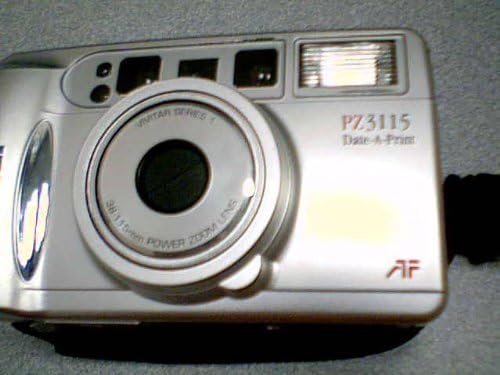
Obraz: Přední view of the Vivitar PZ3115 camera, showing the lens, flash, viewfinder, and Vivitar branding.

Obraz: Zadní view of the Vivitar PZ3115 camera, displaying the film counter, mode select, and set buttons for the Date-A-Print function.
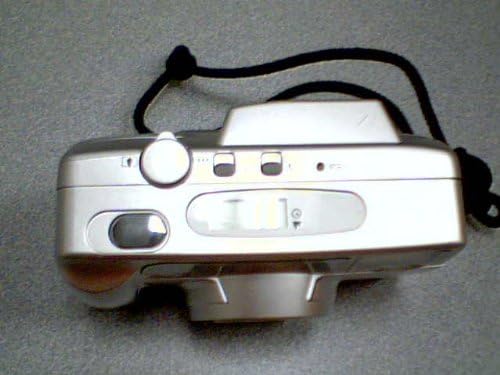
Obraz: Nahoru view of the Vivitar PZ3115 camera, showing the shutter button and film compartment release.
Klíčové komponenty:
- Čočka: Vivitar Series 1 38-115mm Power Zoom Lens.
- Blikat: Built-in automatic flash.
- Viewnálezce: Pro komponování vašich záběrů.
- Tlačítko spouště: To take photographs.
- Tlačítka zoomu: To adjust the focal length of the lens.
- Přihrádka na film: For loading 35mm film.
- Přihrádka na baterie: For power source.
- Date-A-Print Controls: Buttons for setting and displaying date/time.
Nastavení
1. Instalace baterie
The Vivitar PZ3115 requires batteries for operation. (Battery type not specified in product data, typically CR123A or AA for similar models. Refer to the battery compartment cover for specific type.)
- Vyhledejte kryt prostoru pro baterie na spodní nebo boční straně fotoaparátu.
- Open the cover by sliding or lifting it according to the indicator.
- Insert the new batteries, ensuring correct polarity (+/-) as indicated inside the compartment.
- Bezpečně zavřete kryt bateriového prostoru.
2. Vkládání filmu
Use standard 35mm film rolls.
- Open the camera back by sliding the film door latch (usually on the side or top).
- Vložte novou 35mm filmovou kazetu do filmové komory na levé straně.
- Pull the film leader across to the film take-up spool on the right side. Ensure the film perforations engage with the teeth on the take-up spool.
- Pevně zavřete fotoaparát zpět, dokud nezacvakne.
- Press the shutter button once or twice to advance the film until the film counter displays "1" or the first frame number. The camera will automatically advance the film to the first frame.
3. Setting Date and Time (Date-A-Print)
The Date-A-Print feature allows you to imprint the date or time onto your photos.
- Locate the Date-A-Print display and control buttons on the camera back (refer to the rear view obraz).
- Stiskněte tlačítko MODE button to cycle through display options (Year/Month/Day, Month/Day/Year, Day/Month/Year, Time, Off).
- When the desired format is displayed, press the SOUBOR button to adjust the blinking digit.
- Použijte VYBRAT tlačítko (resp MODE again, depending on model) to advance the blinking digit.
- Opakujte, dokud nenastavíte správné datum a čas.
- Select "Off" if you do not wish to imprint the date/time.
Obsluha fotoaparátu
1. Zapnutí/vypnutí
To power on the camera, slide the lens cover open or press the power button (if available). The lens will extend. To power off, close the lens cover or press the power button again.
2. Fotografování
- Podívejte se skrz viewhledáček pro komponování snímku.
- Use the zoom buttons (usually near the shutter button) to adjust the focal length (38mm wide-angle to 115mm telephoto).
- Gently press the shutter button halfway down. The auto-focus system will engage, and an indicator light (often green) will confirm focus.
- Stiskněte tlačítko spouště až na doraz pro pořízení snímku. Film se automaticky posune na další snímek.
3. Režimy blesku
The camera features an automatic flash. In low light conditions, the flash will typically fire automatically. Some models may offer manual flash override or red-eye reduction modes. Consult the camera's specific indicators for flash status.
4. Převíjení filmu
Once all frames on the film roll have been exposed, the camera will usually rewind the film automatically. If manual rewind is necessary (e.g., to change film mid-roll), locate the rewind button (often a small recessed button on the bottom or side) and press it. The film counter will count down as the film rewinds into the cartridge.
Once rewinding is complete, open the camera back and remove the film cartridge. Take the exposed film to a photo lab for development.
Údržba
1. Čištění fotoaparátu
- K otření těla fotoaparátu použijte měkký hadřík, který nepouští vlákna.
- For the lens, use a specialized lens cleaning cloth and lens cleaning fluid. Gently wipe in a circular motion from the center outwards. Avoid touching the lens with your fingers.
- Udržujte viewfinder clean for clear composition.
- Nepoužívejte agresivní chemikálie nebo abrazivní materiály.
2. Výměna baterie
Replace batteries promptly when the low battery indicator appears or if the camera fails to power on. Always use fresh batteries of the correct type.
3. Film Handling and Storage
- Store film in a cool, dry place, away from direct sunlight and high temperatures.
- Load and unload film in subdued light to prevent accidental exposure.
- Have exposed film developed as soon as possible for best results.
4. Camera Storage
When not in use, store the camera in its case or a protective bag, away from dust, moisture, and extreme temperatures. Remove batteries if storing for extended periods to prevent leakage.
Odstraňování problémů
| Problém | Možná příčina | Řešení |
|---|---|---|
| Fotoaparát se nezapne. | Vybité nebo nesprávně vložené baterie. | Vyměňte baterie za nové, dbejte přitom na správnou polaritu. |
| Film se neposouvá vpřed. | Film není správně vložen; zaváděcí lišta filmu není zasunuta. | Open camera back in subdued light, re-load film, ensuring leader is properly attached to take-up spool. |
| Flash does not fire in low light. | Flash mode set to "Off" or batteries are low. | Check flash mode settings; replace batteries if low. |
| Fotografie jsou rozmazané. | Camera shake; subject too close; auto-focus failed. | Hold camera steady; ensure subject is within minimum focus distance; allow auto-focus to lock before fully pressing shutter. |
| Date/Time imprint is incorrect or not appearing. | Date/Time not set correctly; Date-A-Print function turned off. | Refer to "Setting Date and Time" section to adjust settings or turn on the function. |
Specifikace
| Funkce | Popis |
|---|---|
| Značka | Vivitar |
| Název modelu | Vivitar PZ 3115 Date-A-Print |
| Typ formátu filmu | 35 mm |
| Čočka | Vivitar Series 1 38-115mm Power Zoom Lens |
| Speciální funkce | Auto Exposure, Date-A-Print |
| Kontrola expozice | Automatický |
| Automatické ostření | Ano |
| Zahrnuté komponenty | Camera Body Only (as per product listing) |