
1. Úvod a bezpečnostní informace
This manual provides essential instructions for the safe and efficient operation of your NEC NP-V300X projector. Please read this manual thoroughly before using the projector and retain it for future reference.
Důležitá bezpečnostní opatření:
- Neblokujte větrací otvory. Zajistěte dostatečný prostor kolem projektoru pro správné proudění vzduchu.
- Nedívejte se přímo do objektivu projektoru, když je lamp je zapnutý, protože jasné světlo může způsobit poškození očí.
- Neumisťujte projektor na nestabilní vozík, stojan nebo stůl.
- Disconnect the power cord from the wall outlet before cleaning.
- Veškeré opravy svěřte kvalifikovanému servisnímu personálu.
2. Projector Components Overview
Familiarize yourself with the main components of your NEC NP-V300X projector.
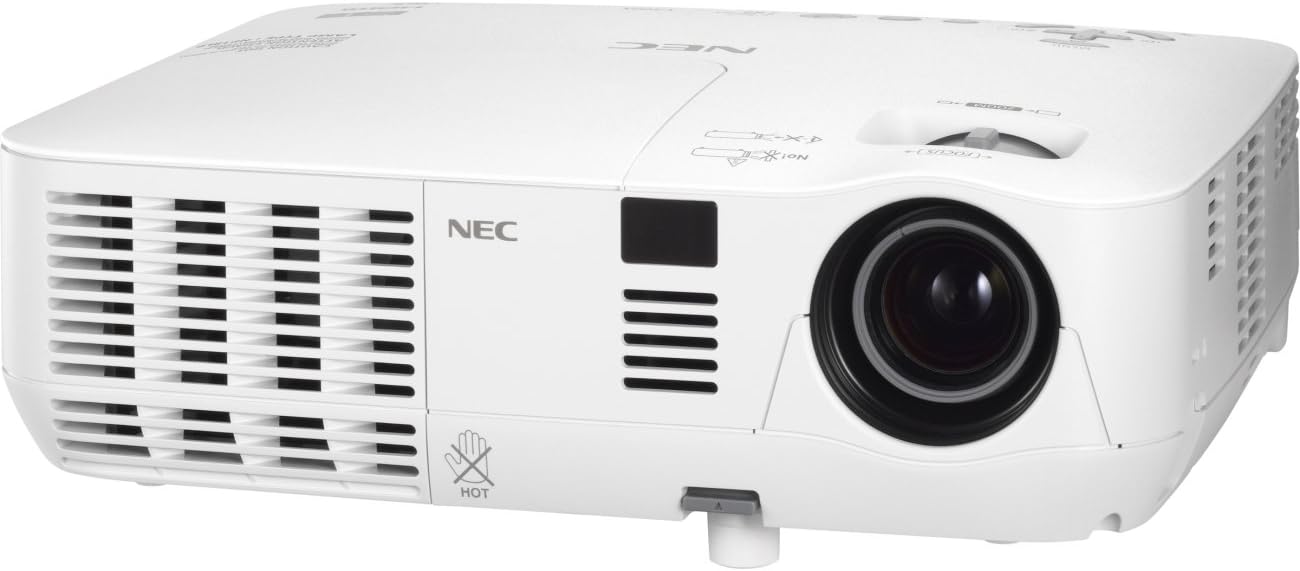
An image showing the front and left side of the white NEC NP-V300X projector, highlighting the lens, ventilation grilles, and control panel area.
Klíčové komponenty:
- Projekční čočka: Emits the image onto the screen. Features manual focus adjustment.
- Ventilační mřížky: Located on the sides, these ensure proper cooling of the projector. Do not obstruct.
- Ovládací panel: Buttons for power, menu navigation, input selection, and image adjustments.
- Vstupní terminály: Various ports for connecting external devices (e.g., HDMI, VGA).
- Nastavitelná noha: Allows for minor height adjustments to align the projected image.
3. Pokyny k nastavení
Follow these steps to set up your projector for initial use.
3.1 Umístění
- Umístěte projektor na stabilní, rovný povrch nebo jej bezpečně připevněte.
- Ensure the projector is positioned at an appropriate distance from the screen to achieve the desired image size.
- Adjust the projector's height using the adjustable foot to align the image with the screen.
3.2 Připojení napájení
- Connect the supplied power cord to the projector's power inlet.
- Zapojte druhý konec napájecího kabelu do uzemněné elektrické zásuvky.
3.3 Připojení vstupních zdrojů
The NP-V300X supports various input sources, including HDMI.
- Connect your video source (e.g., laptop, Blu-ray player) to the appropriate input terminal on the projector (e.g., HDMI port).
- Ensure the connection cables are securely fastened.
4. Ovládání projektoru
Instructions for basic operation of your NEC NP-V300X projector.
4.1 Zapnutí/vypnutí
- Zapnutí: Press the power button on the projector's control panel or remote control. The power indicator light will change.
- Vypnutí: Press the power button again. A confirmation message may appear. Press the power button a second time to confirm shutdown. Allow the projector to cool down before unplugging.
4.2 Výběr vstupního zdroje
Use the 'Input' button on the control panel or remote control to cycle through available input sources (e.g., HDMI, VGA).
4.3 Úprava obrazu
- Soustředit: Rotate the focus ring around the lens manually until the image appears sharp and clear.
- Lupa: Adjust the zoom ring (if present) to change the image size without moving the projector.
- Korekce lichoběžníkového zkreslení: If the image is trapezoidal, use the keystone correction function in the projector's menu to square the image.
- Jas/kontrast: Adjust these settings via the on-screen display (OSD) menu to optimize image quality for your viewprostředí.
5. Údržba
Pravidelná údržba zajišťuje optimální výkon a prodlužuje životnost vašeho projektoru.
5.1 Čištění projektoru
- Vnější: Otřete projektor casing with a soft, dry, lint-free cloth. Do not use abrasive cleaners or solvents.
- Čočka: Gently clean the lens with a lens cleaning cloth or lens paper. Avoid touching the lens surface with your fingers.
- Ventilační mřížky: Periodically clean the ventilation grilles to prevent dust buildup, which can lead to overheating. Use a soft brush or compressed air.
5.2 lamp Péče
Projektor lamp má omezenou životnost. Když lamp Pokud se indikátor rozsvítí nebo se obraz ztlumí, tlačítko lamp may need replacement. Refer to the on-screen display for lamp hour information. Always allow the projector to cool down completely before attempting any lamp údržba.
6. Řešení problémů
Tato část se zabývá běžnými problémy, se kterými se můžete u projektoru setkat.
Běžné problémy a řešení:
- Není zobrazen žádný obrázek:
- Ensure the projector is powered on and the power indicator is active.
- Verify the input source is correctly selected and the cable is securely connected.
- Check if the connected device (e.g., laptop) is outputting a signal.
- Tmavý nebo špatná kvalita obrazu:
- Adjust the focus and zoom settings.
- Zkontrolujte lamp hours; the lamp may be nearing the end of its life.
- Vyčistěte objektiv projektoru.
- Upravte nastavení jasu a kontrastu.
- Přehřátí projektoru:
- Ujistěte se, že větrací mřížky nejsou zablokované.
- Clean any dust from the grilles.
- Projektor používejte v dobře větraném prostoru.
Pokud problémy přetrvávají, kontaktujte zákaznickou podporu nebo kvalifikovaného servisního technika.
7. Technické specifikace
Detailed technical specifications for the NEC NP-V300X projector.
| Funkce | Specifikace |
|---|---|
| Číslo modelu | NP-V300X |
| Technologie displeje | DLP (0.55" DMD) |
| Nativní rozlišení | XGA 1024x768 |
| Maximální rozlišení | UXGA 1600 x 1200 |
| Jas | 3000 XNUMX lumenů |
| Soustředit | Manuál |
| Kompatibilita signálu PC | SVGA, XGA, WXGA, WXGA+, SXGA, SXGA+, UXGA |
| Hluk ventilátoru | 37 dB |
| Technologie připojení | HDMI |
| Speciální funkce | 3D-Ready, 3D-built-in |
| Rozměry produktu | 12.2 x 3.78 x 9.72 palce |
| Hmotnost položky | 5.51 libry |
| Výrobce | NEC |
8. Záruka a podpora
For warranty information and technical support, please refer to the documentation provided with your purchase or visit the official NEC webUschovejte si doklad o koupi pro případ reklamace.
If you require assistance with troubleshooting or repairs beyond the scope of this manual, please contact NEC customer service or an authorized service center.