
1. Úvod
The InFocus IN1112 Ultra Mobile Widescreen DLP Projector is designed for professionals requiring a portable and high-performance display solution. Its combination of high brightness, lightweight design, and compact size makes it suitable for various environments, from brightly lit rooms to limited spaces. This manual provides essential information for setting up, operating, maintaining, and troubleshooting your projector.
Klíčové vlastnosti:
- Compact and lightweight (approximately 2.7 lbs / 1.2 kg) for easy portability.
- 2200 lumens of brightness for clear projection in various lighting conditions.
- HDMI input for versatile connectivity with modern devices including laptops, smartphones, and gaming consoles.
- Durable design built for frequent travel.
- Widescreen (WXGA) resolution to match contemporary laptop displays.
2. Bezpečnostní informace
Please read all safety instructions before operating the projector to prevent injury or damage to the unit.
- Do not look directly into the projector lens když lamp svítí. Intenzivní světlo může způsobit poškození očí.
- Ensure proper ventilation. Do not block ventilation openings, as this can lead to overheating and damage.
- Umístěte projektor na stabilní a rovný povrch, aby nedošlo k jeho pádu.
- Používejte pouze napájecí kabel dodaný s projektorem.
- Nevystavujte projektor dešti, vlhkosti ani nadměrné vlhkosti.
- Veškerý servis svěřte kvalifikovanému servisnímu personálu. Nepokoušejte se projektor sami otevírat ani opravovat.
- Uchovávejte projektor mimo dosah zdrojů tepla a přímého slunečního záření.
3. Obsah balení
Ověřte, zda jsou v balení přítomny všechny položky:
- InFocus IN1112 Projector
- Napájecí kabel
- Dálkové ovládání (s bateriemi)
- VGA kabel
- HDMI kabel
- Uživatelská příručka (tento dokument)
- Carrying Case (may vary by region)
4. Konec produktuview
Familiarize yourself with the main components of your InFocus IN1112 projector.
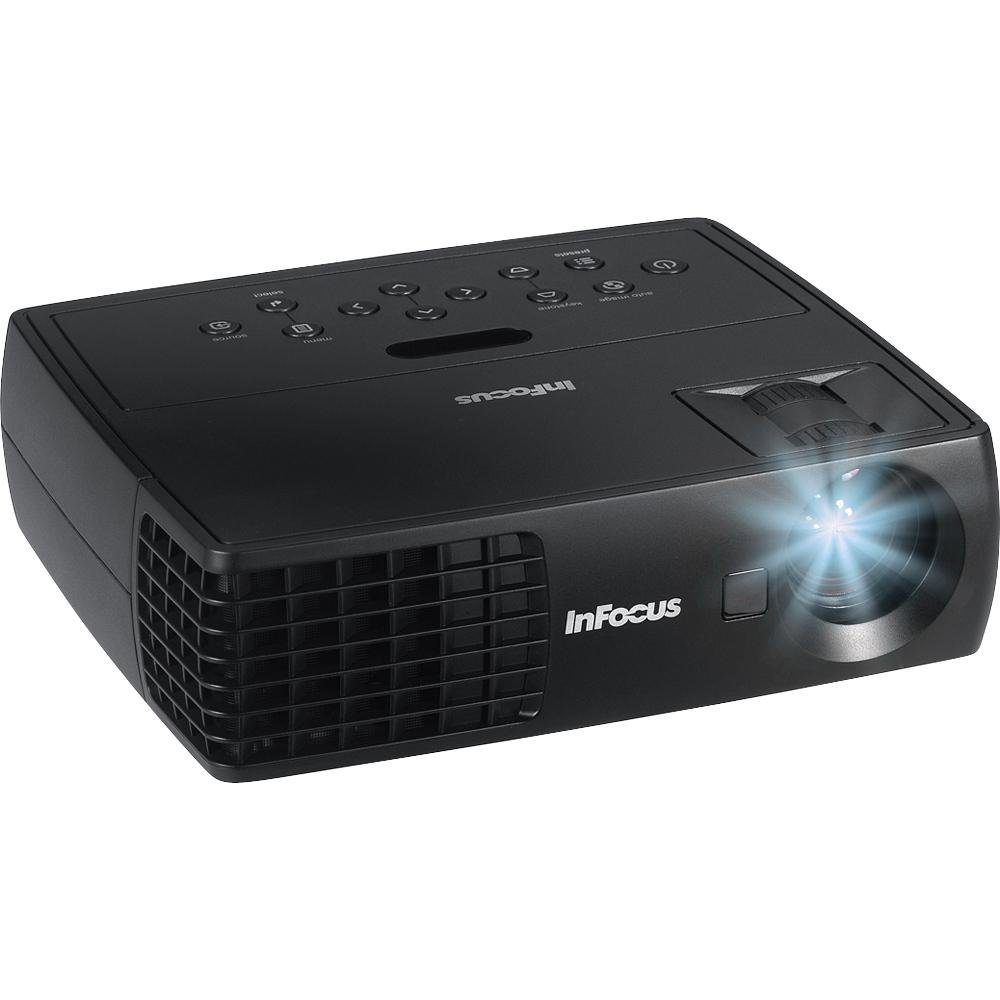
Obrázek 4.1: Přední strana view of the InFocus IN1112 Projector. This image displays the projector's lens, ventilation, and part of the control panel.

Obrázek 4.2: Strana view of an InFocus projector, illustrating typical connectivity ports such as HDMI and VGA.
4.1. Přední panel
- Projekční čočka: Vysílá obraz na obrazovku.
- Zaostřovací kroužek: Upravuje ostrost promítaného obrazu.
- Páčka zoomu: Upravuje velikost promítaného obrazu.
4.2. Top Panel (Control Panel)
- Vypínač: Slouží k zapnutí nebo vypnutí projektoru.
- Tlačítko nabídky: Přístup k nabídce na obrazovce (OSD).
- Navigační tlačítka (nahoru/dolů/vlevo/vpravo): Prochází možnostmi nabídky.
- Tlačítko Enter: Potvrzuje výběry v nabídce.
- Tlačítko zdroje: Selects the input source (HDMI, VGA, USB).
4.3. Rear Panel (Connectivity)
- Port HDMI: Connects to devices with HDMI output (laptops, media players).
- VGA port: Připojuje se k počítačům s VGA výstupem.
- USB port: For service or connecting compatible USB devices.
- Příkon: Připojuje napájecí kabel.
5. Nastavení
5.1. Umístění
- Umístěte projektor na rovný a stabilní povrch.
- Ensure there is adequate space around the projector for ventilation (at least 30 cm / 12 inches).
- Position the projector at an appropriate distance from the screen to achieve the desired image size.
5.2. Připojení napájení
- Připojte napájecí kabel ke vstupnímu portu projektoru.
- Zapojte druhý konec napájecího kabelu do uzemněné elektrické zásuvky.
5.3. Connecting a Source Device
Choose the appropriate cable for your source device:
- HDMI: Connect one end of the HDMI cable to the projector's HDMI port and the other end to your laptop, media player, or other HDMI-enabled device.
- VGA: Connect one end of the VGA cable to the projector's VGA port and the other end to your computer's VGA output. Secure the screws on the VGA connector if available.
6. Provoz
6.1. Zapnutí/vypnutí
- Zapnutí: Press the Power button on the projector's control panel or the remote control. The power indicator light will turn steady blue.
- Vypnutí: Press the Power button again. A confirmation message may appear. Press Power again to confirm shutdown. The projector will enter a cooling cycle, and the power indicator will flash before turning off.
6.2. Výběr vstupního zdroje
Stiskněte tlačítko Zdroj button on the projector or remote control repeatedly to cycle through available input sources (e.g., HDMI, VGA). The projector will automatically detect an active signal if connected.
6.3. Adjusting the Image
- Soustředit: Rotate the focus ring on the lens until the image appears sharp and clear.
- Lupa: Use the zoom lever on the lens to adjust the size of the projected image.
- Korekce lichoběžníkového zkreslení: If the image appears trapezoidal, use the Keystone Correction function in the OSD menu to square the image.
6.4. Používání nabídky na obrazovce (OSD)
- Stiskněte tlačítko Menu button on the projector or remote control to open the OSD menu.
- Použijte Navigace buttons (Up/Down/Left/Right) to move through menu options.
- Stiskněte tlačítko Vstupte tlačítko pro výběr možnosti nebo potvrzení nastavení.
- Použijte Navigace tlačítka pro úpravu hodnot nebo výběr dílčích možností.
- Stiskněte tlačítko Menu button again to exit the OSD menu.
Common OSD settings include Brightness, Contrast, Color Temperature, Aspect Ratio, and Advanced Settings.
7. Údržba
7.1. Čištění projektoru
- Casing: Použijte měkký hadřík, který nepouští vlákna dampened with water or a mild cleaner. Do not use abrasive cleaners or solvents.
- Čočka: Use a professional lens cleaning cloth and lens cleaning solution. Gently wipe the lens in a circular motion. Avoid touching the lens with your fingers.
- Větrací otvory: Periodically clean the ventilation openings with a soft brush or compressed air to prevent dust buildup.
7.2. Lamp Péče
Projektor lamp has an operating life of approximately 5000 hours. When the lamp reaches the end of its life, the image brightness may decrease, or the lamp indicator may illuminate. Refer to the full service manual for lamp replacement procedures, which should be performed by qualified personnel.
8. Řešení problémů
Tato část se zabývá běžnými problémy, se kterými se můžete u projektoru setkat.
| Problém | Možná příčina | Řešení |
|---|---|---|
| Žádný promítaný obraz | Power cable loose; Source not selected; Input device off; Lamp problém. | Check power connection; Select correct input source; Ensure input device is on; Contact support if lamp indicator is active. |
| Obraz je rozmazaný | Objektiv rozostřený; Projektor je příliš blízko/daleko od promítací plochy. | Adjust the focus ring on the lens; Adjust projector distance or zoom. |
| Obrázek je lichoběžníkový | Projektor není kolmý k promítací ploše. | Use Keystone Correction in the OSD menu; Reposition the projector. |
| Dálkové ovládání nefunguje | Batteries dead; Obstruction between remote and projector; Remote sensor blocked. | Replace batteries; Remove obstructions; Ensure remote is pointed at the projector's sensor. |
| Projektor se přehřívá a vypíná | Zablokované větrání; Vysoká okolní teplota. | Ensure ventilation openings are clear; Operate in a well-ventilated area. |
9. Specifikace
Detailed technical specifications for the InFocus IN1112 Projector.
| Funkce | Specifikace |
|---|---|
| Značka | InFocus |
| Název modelu | IN1112 Ultra |
| Typ zobrazení | DLP |
| Jas | 35 000 lumenů (1 600 ANSI lumenů) |
| Nativní rozlišení | 1920 x 1080 (Full HD, though WXGA is mentioned in title, 1920x1080 is in specs) |
| Maximální rozlišení displeje | 1920 x 1080 |
| Kontrastní poměr | 2600:1 |
| Technologie připojení | HDMI, VGA, USB |
| Provozní životnost světelného zdroje | 5000 hodin |
| Hmotnost položky | 1.2 kg (2.65 lb) |
| Wattage | 185 watts (Lamp Wattage: 165 wattů) |
| Barva | Black (Note: Product images may show white units for illustration) |
| Doporučená použití | Business, Traveling |
| Typ montáže | Stolní držák |
| Kontrolní metoda | Remote, Button Control |
10. Záruka a podpora
10.1. Informace o záruce
The InFocus IN1112 Projector typically comes with a manufacturer's limited warranty. Please refer to the warranty card included with your product or visit the official InFocus webKonkrétní záruční podmínky, včetně doby trvání a rozsahu krytí, naleznete na webových stránkách. Uschovejte si doklad o koupi pro případ reklamace.
10.2. Zákaznická podpora
For technical assistance, troubleshooting beyond this manual, or service inquiries, please contact InFocus customer support. You can find contact information, FAQs, and additional resources on the official InFocus webmísto: www.infocus.com