
Zavedení
The ALINCO EDC-182 is a single charging stand designed specifically for ALINCO EBP-80 battery packs, which are compatible with radio models such as the DJ-CH20 and DJ-CH27. This charging stand requires the ALINCO EDC-139 AC adapter (sold separately) for operation. The EDC-182 is designed to charge the battery pack only, not the radio unit itself.
Please read this manual thoroughly before using the charging stand to ensure proper and safe operation.
Obsah balení
- ALINCO EDC-182 Single Charging Stand
- Návod k použití (tento dokument)
Poznámka: The ALINCO EDC-139 AC adapter and compatible battery packs (e.g., EBP-80) are sold separately and are required for the operation of this charging stand.
Nastavení
- Unpack the Charging Stand: Carefully remove the EDC-182 charging stand from its packaging. Inspect for any signs of damage.
- Připojte AC adaptér: Take your ALINCO EDC-139 AC adapter. Insert the DC plug of the EDC-139 into the DC input jack located on the rear of the EDC-182 charging stand.
- Připojení k napájení: Plug the EDC-139 AC adapter into a standard wall outlet. Ensure the outlet provides the correct voltage as specified on the AC adapter.
- Připravte se na nabíjení: The charging stand is now ready to accept a compatible battery pack for charging.
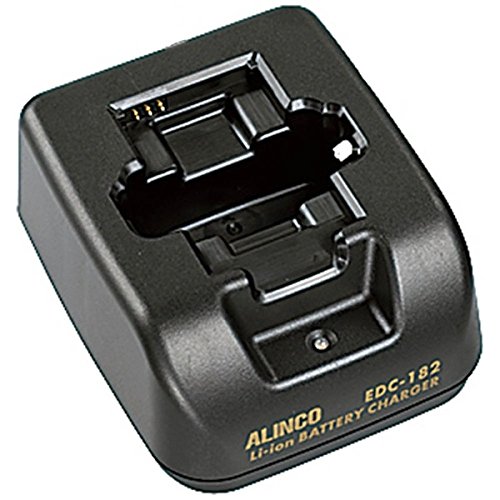
Image: ALINCO EDC-182 Single Charging Stand. This image shows the charging stand, illustrating its compact design and the input port for the AC adapter.
Návod k obsluze
- Vložení bateriového bloku: Carefully slide a compatible ALINCO EBP-80 battery pack into the charging slot of the EDC-182 stand. Ensure the battery is seated firmly and correctly, aligning the contacts.
- Indikátor nabíjení: Once the battery is properly inserted, the charging indicator light on the stand will illuminate. The color or state of the light indicates the charging status (e.g., red for charging, green for fully charged, or off when charging is complete). Refer to the specific indicator behavior for your model, usually detailed on the stand itself or in the battery pack's manual.
- Dokončení nabíjení: Allow the battery to charge until the indicator light signals completion. Charging times may vary depending on the battery's remaining capacity and condition.
- Vyjměte baterii: Once charging is complete, gently remove the battery pack from the stand. The battery is now ready for use.

Image: Battery Placement Diagram. This diagram illustrates the correct orientation and method for inserting a compatible battery pack into the EDC-182 charging stand.
Údržba
- Čištění: Keep the charging stand clean and free from dust. Use a soft, dry cloth to wipe the exterior. Do not use liquid cleaners, solvents, or abrasive materials, as these can damage the unit.
- Skladování: When not in use, store the charging stand in a dry, cool place away from direct sunlight and extreme temperatures.
- Zacházení: Avoid dropping the unit or subjecting it to strong impacts. This can damage internal components.
- Kontakty: Periodically check the charging contacts on both the stand and the battery pack for dirt or corrosion. Clean gently with a dry cotton swab if necessary.
Odstraňování problémů
| Problém | Možná příčina | Řešení |
|---|---|---|
| Battery does not charge / Indicator light does not illuminate. |
|
|
| Nabíjení trvá příliš dlouho. |
|
|
If the problem persists after attempting these solutions, please contact your ALINCO dealer or an authorized service center for assistance.
Specifikace
- Značka: ALINCO
- Model: EDC-182
- Funkce: Single Charging Stand (Battery Only)
- Required AC Adapter: ALINCO EDC-139 (sold separately)
- Kompatibilní baterie: ALINCO EBP-80
- Kompatibilní rádia: DJ-CH20, DJ-CH27 (when using EBP-80 battery)
- Barva: Černý
- Rozměry produktu (H x Š x V): 5 x 5 x 5 centimetrů
- Hmotnost položky: 106 gramů
Záruka a podpora
For detailed warranty information regarding your ALINCO EDC-182 Single Charging Stand, please refer to the warranty card or documentation included with your original product purchase. You may also visit the official ALINCO website or contact your local ALINCO dealer for specific warranty terms and conditions in your region.
For technical support, service, or inquiries about replacement parts, please contact your authorized ALINCO dealer or an ALINCO service center. Please have your product model number (EDC-182) and purchase information ready when contacting support.