
Zavedení
This manual provides comprehensive instructions for the Logilink UA0107 HDD Enclosure, designed to house a 3.5-inch SATA hard disk drive and connect it to your computer via USB 3.0. Its robust aluminum casing ensures durability and efficient heat dissipation, protecting your valuable data.

Image: The Logilink UA0107 HDD Enclosure, showcasing its sleek black aluminum design.
The UA0107 supports hot-swap functionality and offers high-speed data transfer rates up to 5 Gbit/s, making it an ideal solution for external storage, data backups, and efficient data transfer between systems.
Obsah balení
Please verify that all items listed below are included in your package. If any items are missing or damaged, please contact your retailer immediately.
- Logilink UA0107 3.5" HDD Enclosure
- Kabel USB 3.0
- Napájecí adaptér
- Screws for HDD mounting
- Mini šroubovák

Image: The Logilink UA0107 HDD Enclosure alongside its retail box, indicating included accessories.
Pokyny pro nastavení
- Připravte si kryt: Carefully slide open the enclosure casing. The aluminum cover should slide off to reveal the internal tray.
- Nainstalujte pevný disk: Connect your 3.5-inch SATA hard disk drive to the SATA data and power connectors on the internal circuit board. Ensure a firm connection. Secure the HDD to the tray using the provided screws and screwdriver.
- Zavřete kryt: Slide the aluminum casing back onto the internal tray until it clicks securely into place.
- Připojení k napájení: Plug the power adapter into the enclosure's DC input port, then connect the adapter to a wall outlet.
- Připojení k počítači: Connect one end of the supplied USB 3.0 cable to the enclosure's USB 3.0 port and the other end to an available USB 3.0 port on your computer. For optimal performance, use a USB 3.0 port.
The enclosure is typically plug-and-play, and your operating system should automatically detect and install the necessary drivers. If the drive is new, it may need to be initialized and formatted through your operating system's Disk Management utility (Windows) or Disk Utility (macOS) before use.
Obsluha krytu
- Zapnutí: Once connected to power and your computer, the enclosure will power on. An LED indicator (if present) will typically illuminate.
- Přístup k datům: The hard drive will appear as a removable disk drive in "My Computer" (Windows) or "Finder" (macOS). You can now access, transfer, and store filestejně jako u jakéhokoli jiného disku.
- Funkce výměny za provozu: The UA0107 supports hot-swapping, meaning you can connect or disconnect the enclosure while your computer is running. However, always ensure data transfer is complete and safely eject the drive before disconnecting to prevent data corruption.
- Bezpečné odstranění: Before disconnecting the enclosure, always use the "Safely Remove Hardware and Eject Media" option in Windows or drag the drive icon to the Trash/Eject icon in macOS to ensure all data operations are finalized.
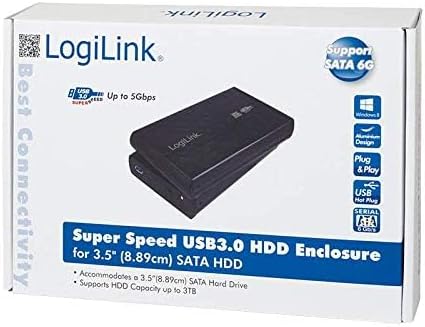
Image: The product packaging, emphasizing its Super Speed USB 3.0 and SATA 6G capabilities.
Údržba
- Čištění: K čištění vnější strany krytu použijte měkký, suchý hadřík. Nepoužívejte tekuté čisticí prostředky ani rozpouštědla.
- Skladování: Kryt skladujte na chladném a suchém místě mimo dosah přímého slunečního záření a extrémních teplot.
- Zacházení: Avoid dropping or subjecting the enclosure to strong impacts, as this can damage the internal hard drive.
- Větrání: Ensure the enclosure has adequate ventilation during operation to prevent overheating, especially during prolonged use.
Odstraňování problémů
- Problem: Drive not detected by computer.
- Řešení:
- Ensure the power adapter is securely connected to the enclosure and a working power outlet.
- Verify the USB cable is firmly connected to both the enclosure and your computer's USB port. Try a different USB port.
- Check the internal SATA connection of the hard drive within the enclosure.
- For new drives, ensure they are initialized and formatted in your operating system's Disk Management (Windows) or Disk Utility (macOS).
- Test the enclosure with a different hard drive, or test the hard drive in another enclosure/system to isolate the issue.
- Problem: Slow data transfer speeds.
- Řešení:
- Ujistěte se, že jste připojeni k portu USB 3.0 na počítači. Porty USB 2.0 budou mít za následek výrazně nižší rychlost.
- Verify the USB 3.0 cable is not damaged.
- Výkon samotného pevného disku může ovlivnit přenosové rychlosti.
- Problem: Enclosure disconnects randomly.
- Řešení:
- Ujistěte se, že je napájecí zdroj stabilní.
- Check for loose USB cable connections.
- Disable USB selective suspend settings in your computer's power options (Windows).
Specifikace
| Funkce | Detail |
|---|---|
| Číslo modelu | UA0107 |
| Kompatibilní zařízení | Laptop (and Desktop PCs) |
| Pevný disk Form Factor | 3.5 palce |
| Max Supported Capacity | 6 TB |
| Rychlost přenosu dat | 6 gigabitů za sekundu (USB 3.0) |
| Hardwarové rozhraní | USB 3.0, SATA |
| Materiál | Hliník |
| Barva | Černý |
| Rozměry položky (DxŠxV) | 10.43 x 7.09 x 2.05 palce |
| Hmotnost položky | 10.6 unce (0.3 kilogramů) |
Záruka a podpora
Logilink products are designed for reliability and performance. For specific warranty information or technical support, please refer to the documentation included with your purchase or visit the official Logilink webDoporučuje se uschovat si doklad o koupi pro případné reklamace.