
1. Úvod
This manual provides detailed instructions for the installation, operation, and maintenance of your Comelit HFX700M Color Hands Free Video Intercom Kit. This system is designed to enhance security by allowing visual and audio communication with visitors at your door or gate before granting access. It is suitable for both residential and commercial applications requiring reliable access control.
2. Konec produktuview
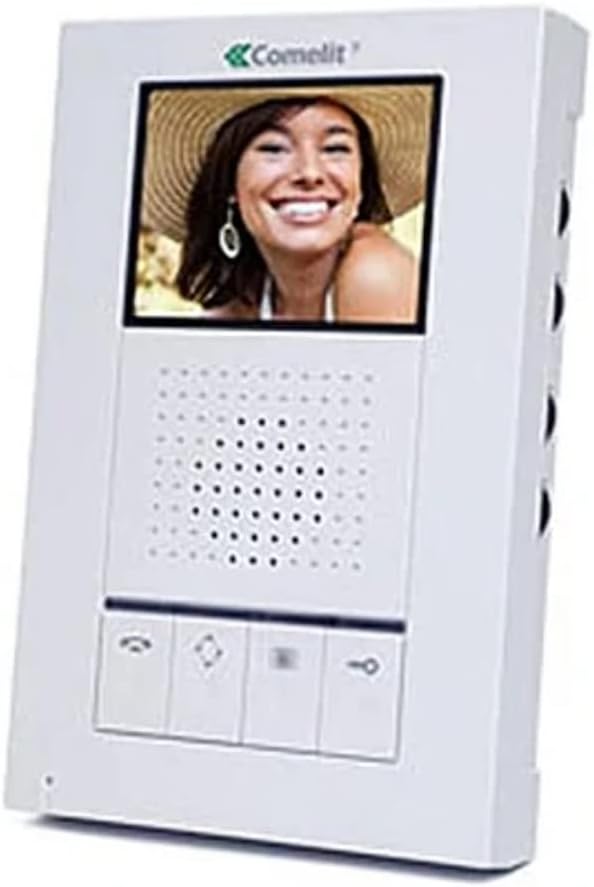
The Comelit HFX700M system includes a hands-free indoor monitor and an outdoor doorbell station. The indoor monitor features a 3.5-inch LCD screen for clear video display, while the outdoor unit is equipped with a 3.6mm wide-angle lens for comprehensive viewIng.

Obrázek 2.1: Comelit HFX700M Indoor Monitor Unit. This image shows the white indoor monitor with a color display at the top, a speaker grille in the middle, and control buttons at the bottom.
Obrázek 2.2: Comelit HFX700M Outdoor Doorbell Station. This image displays the bronze-colored outdoor unit with a camera lens at the top, a speaker/microphone grille, and a doorbell button with an illuminated bell icon.
3. Bezpečnostní informace
- Před instalací a provozem si pečlivě přečtěte všechny pokyny.
- Před zahájením jakékoli kabeláže nebo údržby se ujistěte, že je odpojeno napájení.
- Pokud si nejste jisti elektrickým zapojením, měl by instalaci provést kvalifikovaný odborník.
- Do not expose the outdoor unit to extreme temperatures or direct water spray beyond its IP54 rating.
- Chraňte vnitřní monitor před vlhkostí a přímým slunečním zářením.
4. Obsah balení
Ověřte, zda jsou ve vaší sadě přítomny všechny komponenty:
- 1 x Comelit HFX700M Indoor Monitor Unit
- 1 x Outdoor Doorbell Station with 3.6mm Wide-Angle Lens
- Montážní konzoly a šrouby
- Power Supply Unit (AC/DC adapter)
- Uživatelská příručka (tento dokument)
5. Nastavení a instalace
The Comelit HFX700M system features a simple 2-wire installation, compatible with Cat 5e or 18/2 multi-conductor cable. You may be able to utilize existing doorbell wiring.
5.1 Zapojení
- Ensure all power to the installation area is turned off at the circuit breaker.
- Connect the two main wires from the outdoor doorbell station to the designated terminals on the indoor monitor. Refer to the wiring diagram provided in the separate installation guide for specific terminal assignments.
- Connect the power supply to the indoor monitor and a suitable power outlet.
5.2 Montáž
- Mount the outdoor doorbell station at a height that allows for optimal viewing of visitors (typically chest height for adults).
- Secure the indoor monitor to a wall using the provided mounting bracket and screws.
5.3 Rozšíření systému
The HFX700M system is expandable. You can add up to 4 total indoor stations (monitors or audio stations) and 2 outdoor camera units to your system. Consult your dealer for compatible expansion units and their specific installation instructions.
6. Návod k obsluze
The Comelit HFX700M provides hands-free communication and video monitoring capabilities.
6.1 Přijetí hovoru
- When a visitor presses the doorbell button, the indoor monitor will chime and display live video from the outdoor station.
- Stiskněte tlačítko Odpověď button (typically a telephone icon) on the monitor to establish two-way, hands-free audio communication.
- Chcete-li konverzaci ukončit, stiskněte tlačítko Ukončit hovor button (often a red telephone icon or similar).
6.2 Initiating Live ViewIng
Můžete view the outdoor area at any time, even without a doorbell press.
- Stiskněte tlačítko Monitor button (often an eye or camera icon) on the indoor unit to activate live video feed from the outdoor station.
- Press the button again to cycle through multiple outdoor stations if installed, or to turn off the live view.
6.3 Remote Door/Gate Release
If connected to an electronic door strike or gate opener, you can remotely grant access.
- During an active call or live viewing, stiskněte tlačítko Odemknout button (often a key icon) on the indoor monitor.
- The door or gate will momentarily unlock.
6.4 Volume and Brightness Adjustment
The indoor monitor typically includes controls for adjusting speaker volume, chime volume, and screen brightness. Refer to the specific buttons or menu options on your monitor for these adjustments.
7. Údržba
- Čištění: Use a soft, dry cloth to clean the indoor monitor and outdoor station. Do not use abrasive cleaners or solvents.
- Spojení: Pravidelně kontrolujte všechna kabelová připojení, abyste se ujistili, že jsou bezpečná.
- Venkovní jednotka: Ensure the camera lens on the outdoor unit is clean and free from obstructions for optimal video quality.
8. Řešení problémů
| Problém | Možná příčina | Řešení |
|---|---|---|
| Žádné video ani zvuk na monitoru | Power supply disconnected; loose wiring; faulty unit. | Check power connection; verify all wiring is secure; contact support if issue persists. |
| Doorbell rings constantly or randomly | Wiring issue; interference; faulty doorbell button. | Inspect doorbell wiring for shorts or damage; ensure proper grounding; if problem continues, disconnect the unit and contact technical support. |
| Špatná kvalita videa | Dirty camera lens; insufficient lighting; wiring issue. | Clean camera lens; ensure adequate lighting at the outdoor station; check wiring connections. |
| No remote door/gate release | Incorrect wiring to door strike/gate opener; incompatible strike/opener. | Verify wiring to the door strike/gate opener according to installation guide; ensure the strike/opener is compatible with the system. |
9. Specifikace
- Číslo modelu: HFX-700M
- Technologie připojení: Wired (2-wire installation)
- Rozšiřitelnost: Up to 4 indoor monitors/audio stations, 2 outdoor camera units
- Vnitřní monitor: 3.5palcový LCD displej
- Outdoor Doorbell Lens: 3.6mm wide-angle
- Zdroj napájení: AC/DC, 9 watts
- Noční vidění: Night Color capability
- Hodnocení voděodolnosti: IP54 (Outdoor Unit)
- Rozměry položky: 18 x 12 x 6 palce (obal/celková sada)
- Hmotnost položky: 0.01 Ounces (individual component, refer to packaging for total weight)
10. Záruka a podpora
For warranty information and technical support, please refer to the documentation provided with your purchase or contact Comelit customer service directly. Keep your purchase receipt as proof of purchase for warranty claims.
Comelit Contact Information: Please visit the official Comelit webweb, kde najdete nejaktuálnější kontaktní údaje podpory.