
1. Úvod
Thank you for choosing the LTC 3-Channel 60W Public Address Amplifier with USB/SD-MP3. This manual provides essential information for the safe and efficient operation of your new amplifier. Please read it thoroughly before use and keep it for future reference. This amplifier is designed for public address applications, offering versatile input options including microphones, auxiliary devices, and integrated USB/SD card playback.
2. Bezpečnostní pokyny
Pro zajištění bezpečného provozu a prevenci poškození dodržujte prosím následující bezpečnostní opatření:
- Zdroj napájení: Připojte amplifier only to the specified power sources (12V DC or 220V AC) as indicated on the unit. Ensure the voltage odpovídá místnímu napájení.
- Větrání: Neblokujte žádné větrací otvory. Zajistěte dostatečné proudění vzduchu kolem jednotky, abyste zabránili přehřátí.
- vlhkost: Nevystavujte ampChraňte před deštěm, vlhkostí nebo nadměrnou vlhkostí. Uchovávejte mimo dosah kapalin.
- Čištění: Před čištěním odpojte napájení. Použijte suchý, měkký hadřík. Nepoužívejte tekuté čisticí prostředky ani aerosoly.
- Servis: Nepokoušejte se tento výrobek opravovat sami. Veškerý servis svěřte kvalifikovanému servisnímu personálu. Otevření jednotky vás může vystavit nebezpečnému teplu.tages nebo jiná nebezpečí.
- Umístění: Umístěte amplifier on a stable, flat surface. Avoid placing it near heat sources or in direct sunlight.
- Přetížení: Nepřetěžujte amplifier. Ujistěte se, že připojené reproduktory odpovídají ampimpedance a jmenovitý výkon zhášeče.
3. Konec produktuview
The LTC 3-Channel 60W Public Address Amplifier is a versatile audio solution designed for various PA applications. It features multiple input options and an integrated MP3 player for convenience.
3.1 Ovládací prvky a připojení na předním panelu
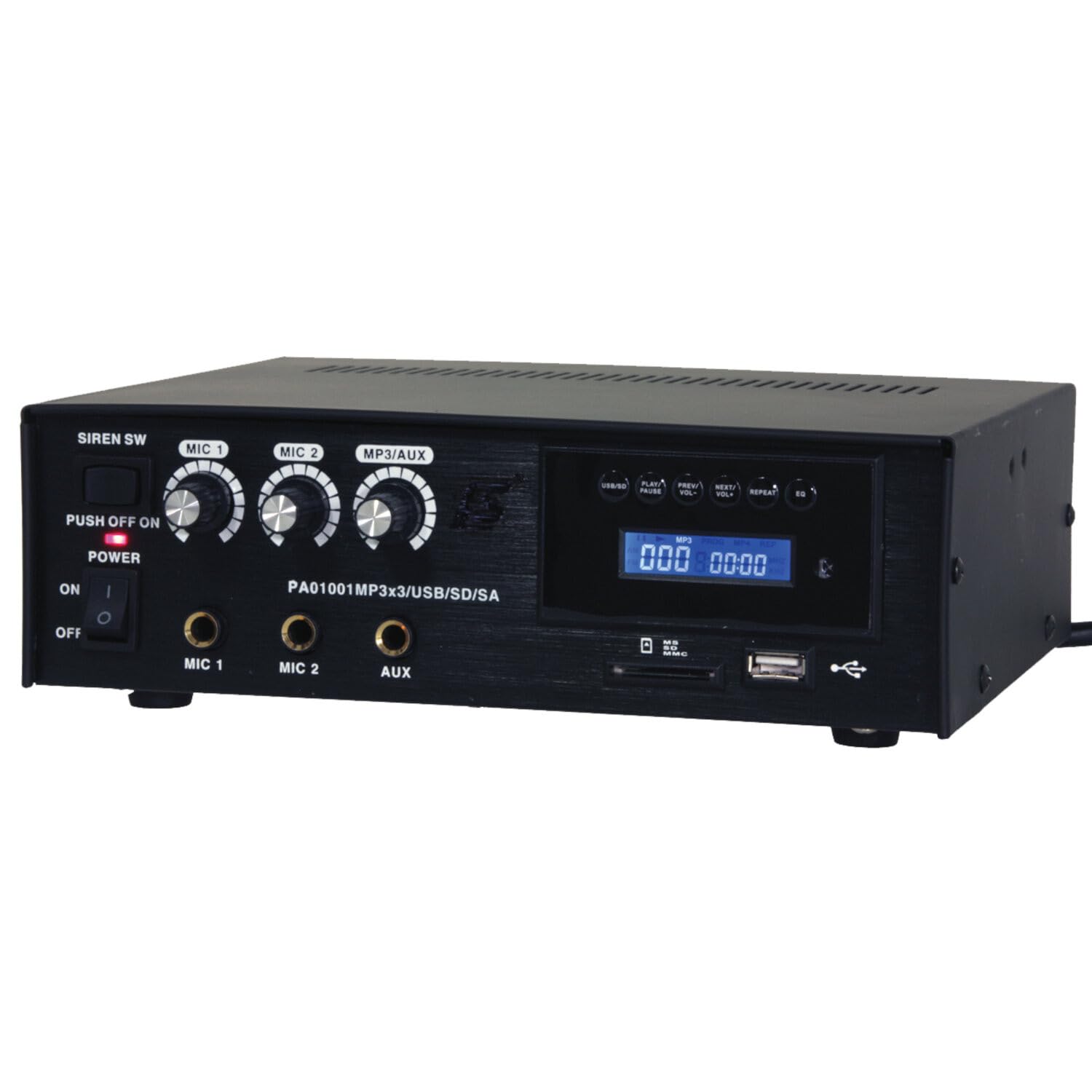
Image: Front panel of the LTC 3-Channel 60W Public Address Amplifier. Visible controls include volume knobs for MIC1, MIC2, and MP3/AUX, a Master volume knob, a Power switch, a Siren switch, and input jacks for MIC1, MIC2, and AUX. The MP3 player section features a display, USB port, and SD card slot.
- SIREN SW: Switch to activate the built-in siren sound.
- PUSH OFF / ON / OF Power Switch: Hlavní vypínač pro ampživější.
- MIC 1 Volume: Rotary knob to adjust the volume level for Microphone Input 1.
- MIC 2 Volume: Rotary knob to adjust the volume level for Microphone Input 2.
- MP3/AUX Volume: Rotary knob to adjust the volume level for the MP3 player and Auxiliary input.
- HLAVNÍ hlasitost: Rotary knob to control the overall output volume of the ampživější.
- Vstup MIC 1: 6.3mm jack for connecting Microphone 1.
- Vstup MIC 2: 6.3mm jack for connecting Microphone 2.
- Vstup AUX: 6.3mm jack for connecting external audio sources (e.g., CD player, smartphone).
- USB/SD MP3 Player: Integrated player with USB port and SD card slot for direct playback of audio files. Includes control buttons (Play/Pause, Prev/Vol-, Next/Vol+, Repeat, EQ) and an LCD display.
3.2 Klíčové vlastnosti
- Mobile or fixed amplifier with 12V battery (car, boat) or 220V mains power supply.
- Integrated MP3 player with USB and SD ports for music playback.
- Includes a siren for powerful sound and an MP3 control screen with a blue LCD display.
4. Nastavení
Postupujte podle těchto kroků k nastavení ampživější:
4.1 Připojení napájení
- For 220V AC Operation: Připojte dodaný napájecí kabel ke vstupu střídavého proudu na zadním panelu amplifier and then to a standard 220V AC wall outlet.
- Pro 12V DC provoz: Connect a 12V DC power source (e.g., car battery) to the 12V DC input terminals on the rear panel. Ensure correct polarity (+ to + and - to -).
- Zajistěte ampPřed připojením k napájení se ujistěte, že je vypínač zařízení Liferier v poloze „VYPNUTO“.
4.2 Připojení reproduktoru
- Locate the speaker output terminals on the rear panel of the ampživější.
- Connect your speakers to these terminals, ensuring correct polarity (positive to positive, negative to negative).
- Verify that the total impedance of the connected speakers is compatible with the amplifier's output specifications to prevent damage.
4.3 Připojení audio vstupu
- Mikrofony: Insert your microphones into the MIC 1 and/or MIC 2 input jacks on the front panel.
- Pomocná zařízení: Connect external audio sources (e.g., smartphone, laptop, CD player) to the AUX input jack on the front panel using an appropriate 6.3mm audio cable.
- USB/SD média: Insert a USB flash drive into the USB port or an SD card into the SD card slot on the front panel for MP3 playback.
5. Návod k obsluze
Jednou ampPo nastavení záchranného systému postupujte podle těchto kroků:
5.1 Zapnutí/vypnutí
- Ujistěte se, že jsou všechna připojení bezpečná.
- Turn the MASTER volume knob to its minimum position.
- Přepněte vypínač POWER do polohy „ON“. Rozsvítí se kontrolka napájení.
- To power off, turn the MASTER volume to minimum and then flip the POWER switch to 'OFF'.
5.2 Použití mikrofonu
- Connect your microphone(s) to the MIC 1 and/or MIC 2 inputs.
- Slowly increase the MIC 1 and/or MIC 2 volume knob(s) to the desired level.
- Adjust the MASTER volume for overall output.
- Avoid pointing microphones directly at speakers to prevent feedback (howling).
5.3 Použití AUX vstupu
- Connect your external audio device to the AUX input.
- Ensure the volume on your external device is set to a moderate level.
- Slowly increase the MP3/AUX volume knob to the desired level.
- Adjust the MASTER volume for overall output.
5.4 MP3/USB/SD Playback
- Insert a USB flash drive into the USB port or an SD card into the SD card slot. The amplifier will automatically detect the media and begin playback.
- Tlačítkem „PLAY/PAUSE“ spustíte nebo pozastavíte přehrávání.
- Use the 'PREV/VOL-' button to go to the previous track or press and hold to decrease volume.
- Use the 'NEXT/VOL+' button to go to the next track or press and hold to increase volume.
- Use the 'REPEAT' button to cycle through repeat modes (e.g., repeat one, repeat all).
- Use the 'EQ' button to cycle through equalizer presets.
- Adjust the MP3/AUX volume knob and MASTER volume for desired output.
5.5 Siren Function
- To activate the siren, flip the SIREN SW to the 'ON' position.
- To deactivate, flip the SIREN SW back to the 'OFF' position.
- Use the MASTER volume to control the siren's output level.
6. Údržba
Proper maintenance ensures the longevity of your ampživější:
- Čištění: Pravidelně otírejte přístroj měkkým, suchým hadříkem. Nepoužívejte abrazivní čisticí prostředky, vosky ani rozpouštědla.
- Větrání: Ensure that the ventilation grilles are free from dust and debris. Use a soft brush or vacuum cleaner to clear them if necessary.
- Skladování: Pokud uchováváte ampPokud přístroj nepoužíváte delší dobu, odpojte jej od napájení a skladujte jej na chladném a suchém místě mimo dosah přímého slunečního záření a extrémních teplot.
- Spojení: Pravidelně kontrolujte všechny kabelové spoje, zda nejsou pevně utažené a zda nevykazují známky opotřebení.
7. Řešení problémů
Pokud narazíte na problémy s vaším amplifier, refer to the table below for common problems and solutions:
| Problém | Možná příčina | Řešení |
|---|---|---|
| Žádná síla | Power cable not connected; Power outlet faulty; Power switch off; 12V DC battery depleted or incorrectly connected. | Check power cable connection; Try a different outlet; Ensure power switch is ON; Check 12V DC battery charge and polarity. |
| Žádný zvukový výstup | Master volume too low; Input volume too low; Speakers not connected or faulty; Incorrect input selected (for MP3/AUX); Mute activated. | Increase Master and input volumes; Check speaker connections and functionality; Ensure correct input source is active; Check if any mute function is engaged. |
| Zkreslený zvuk | Volume too high (clipping); Speaker impedance mismatch; Faulty cables or connections. | Reduce volume; Verify speaker impedance compatibility; Check and replace faulty cables. |
| MP3/USB/SD not playing | Nesprávný file format; USB drive/SD card faulty or not inserted correctly; MP3/AUX volume too low. | Zajistit files are MP3 format; Reinsert USB/SD card; Try a different USB/SD card; Increase MP3/AUX volume. |
| Feedback (howling) from microphones | Microphone too close to speakers; Microphone volume too high. | Reposition microphones away from speakers; Reduce microphone volume. |
Pokud problém přetrvává i po vyzkoušení těchto řešení, kontaktujte zákaznickou podporu.
8. Specifikace
Technical specifications for the LTC 3-Channel 60W Public Address Ampživější:
| Funkce | Specifikace |
|---|---|
| Číslo modelu | LTCAUDIO95-1000 |
| Výstupní výkon (12V) | RMS 35W, Max. 45W |
| Výstupní výkon (220V) | RMS 45W, Max. 60W |
| Počet kanálů | 3 (MIC1, MIC2, AUX/MP3) |
| svtage | 220 voltů (stř. proud), 12 voltů (stejnosměrný proud) |
| Maximální objem dodávkytage | 240 voltů |
| Minimální zásoba svtage | 220 voltů (AC) |
| Rozměry produktu (D x Š x V) | 48 x 9 x 35 cm (18.9 x 3.5 x 13.8 palce) |
| Hmotnost produktu | 3.26 kilogramů (7.19 lb) |
| Typ montáže | Stolní držák |
| Integrované funkce | USB/SD MP3 Player, Siren |
9. Záruka a podpora
This product is manufactured by Ibiza and sold under the LTC brand. Spare parts availability is indicated for 2 years from the date of purchase. For technical support, troubleshooting assistance beyond what is provided in this manual, or warranty claims, please contact your retailer or the authorized service center. Keep your proof of purchase for warranty validation.