
Zavedení
Thank you for choosing the Casio G-Shock GW-M5600A-7ER. This watch combines robust G-Shock durability with advanced radio-controlled timekeeping and solar power technology. This manual provides essential information for proper setup, operation, and maintenance of your watch. Please read it carefully to ensure optimal performance and longevity.
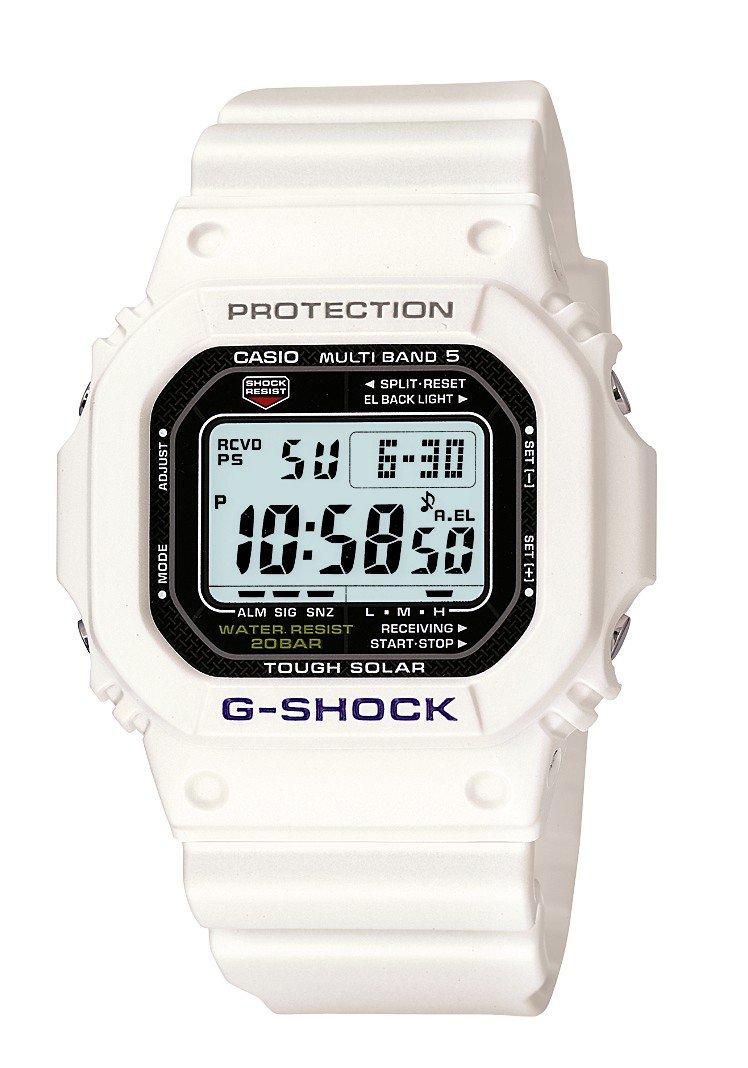
Obrázek: Přední strana view of the Casio G-Shock GW-M5600A-7ER watch, showcasing its digital display and resin strap.
Klíčové vlastnosti
- Rádiem řízené měření času: Automatically receives time calibration signals for accurate timekeeping.
- Solární napájení: Equipped with a solar panel that converts light into electrical power, eliminating the need for battery replacement.
- Vodotěsnost 200 metrů: Suitable for swimming, snorkeling, and diving (excluding saturation diving).
- Odolnost proti otřesům: Designed to withstand impacts and vibrations.
- Digitální displej: Clear and easy-to-read digital time and function display.
- Funkce stopek: Measures elapsed time, split time, and 1st-2nd place times.
- Funkce alarmu: Multiple daily alarms and an hourly časový signál.
- světový čas: Displays current time in major cities and specific areas around the world.
- Minerální sklo: Protective, scratch-resistant hard mineral lens.
- Odolná pryskyřicová konstrukce: High-performance and durable resin case and strap.
Nastavení
1. Počáteční nabíjení
Your watch is powered by a solar cell. Before initial use, expose the watch face to bright light for several hours to ensure it is sufficiently charged. The watch may arrive with a low charge, indicated by a flashing 'CHG' or 'LOW' indicator on the display. Avoid prolonged storage in dark places.
2. Setting Your Home City
The Home City setting is crucial for correct time calibration and World Time functionality. Refer to the detailed instructions in the full manual for specific button operations to set your Home City. This setting determines which time calibration signal the watch attempts to receive.
3. Time Calibration Signal Reception
The watch automatically attempts to receive a time calibration signal up to six times a day (or five times a day for the Chinese calibration signal). For optimal reception, place the watch near a window at night, away from metal objects and electronic devices. Manual reception can also be initiated:
- In Timekeeping Mode, hold down the 'A' button (top left) for several seconds until the current time calibration status appears.
- Press the 'D' button (bottom right) to initiate manual reception.
- The watch will display 'RCVD' upon successful reception.
Návod k obsluze
Navigace v režimu
Press the 'C' button (bottom left) to cycle through the different modes:
- Režim měření času: Zobrazuje aktuální čas a datum.
- Režim světového času: Zobrazuje aktuální čas v různých časových pásmech.
- Režim alarmu: Nastavte a aktivujte denní budíky.
- Režim stopek: Změřte uplynulý čas.
- Režim odpočítávacího časovače: Set a countdown from a specified time.
Používání stopek
- Navigate to Stopwatch Mode using the 'C' button.
- Press the 'D' button (bottom right) to start/stop the stopwatch.
- Press the 'B' button (top right) to record split times or reset the stopwatch when stopped.
Nastavení budíků
- Navigate to Alarm Mode using the 'C' button.
- Hold down the 'A' button (top left) until the alarm time starts flashing.
- Use the 'B' and 'D' buttons to adjust the hour and minute settings.
- Press 'A' to confirm and exit the setting screen.
- Press 'D' to toggle the alarm ON/OFF.
Osvětlení
Press the 'B' button (top right) to illuminate the display for easy viewing in low light conditions. The duration of illumination can be adjusted in the watch settings.
Údržba
Nabíjení hodinek
To maintain optimal performance, ensure your watch is regularly exposed to light. The power indicator on the display shows the current charge level. If the charge level is low, expose the watch to direct sunlight or strong artificial light. Avoid covering the watch face when charging.
Čištění
Otřete hodinky měkkým, suchým hadříkem, abyste odstranili nečistoty a vlhkost. Na odolnou špínu použijte měkký hadřík.ampOpláchněte vodou a jemným neutrálním čisticím prostředkem a poté otřete do sucha. Nepoužívejte těkavé látky, jako je ředidlo nebo benzín, protože by mohly poškodit pryskyřičné součásti.
Opatření proti vodě
While your watch is water-resistant to 200 meters, it is important to observe the following:
- Nepoužívejte tlačítka, pokud jsou hodinky mokré nebo ponořené.
- Avoid exposing the watch to hot water or steam (e.g., in showers, saunas) as this can compromise seals.
- After exposure to saltwater, rinse the watch thoroughly with fresh water and wipe dry.
Odstraňování problémů
Time Not Syncing
- Check Home City Setting: Ensure your Home City is correctly set to a region that receives time calibration signals.
- Reception Environment: Move the watch to a location with better signal reception, ideally near a window, away from electronic interference.
- Ruční příjem: Attempt a manual time calibration signal reception (refer to Setup section).
- Úroveň nabití: Ensure the watch has sufficient charge. Low power can affect signal reception.
Displej je prázdný nebo tmavý
- Úroveň nabití: The watch may be in power-saving mode or have a very low charge. Expose it to bright light for an extended period.
- Šetření energie: The watch enters power-saving mode when left in the dark for a certain period. Press any button or expose it to light to reactivate the display.
Tlačítka nereagují
- Resetovat: In rare cases, a full reset might be necessary. Consult the full Casio manual for your specific module number (usually found on the watch's case back) for detailed reset procedures.
- Voda: Ensure the watch is completely dry if it has been exposed to water.
Specifikace
| Číslo modelu | GW-M5600A-7ER |
| Výrobce | G-SHOCK |
| Typ zobrazení | Digitální |
| Hnutí | Křemen |
| Zdroj napájení | Solární napájení |
| Hloubka vodotěsnosti | 200 metrů |
| Typ materiálu pouzdra | Pryskyřice |
| Typ materiálu pásku | Pryskyřice |
| Typ materiálu okénka číselníku | Minerální |
| Průměr pouzdra | 49 mm |
| Tloušťka pouzdra | 17 mm |
| Šířka pásma | 25 mm |
| Typ spony | Tang spona |
| Tvar položky | Náměstí |
| Barva pásu | Bílý |
| Barva číselníku | Šedá |
Záruka a podpora
Your Casio G-Shock GW-M5600A-7ER watch comes with a 2letá záruka výrobceTato záruka se vztahuje na vady materiálu a zpracování při běžném používání. Uschovejte si prosím doklad o koupi pro případ uplatnění záruky.
For detailed warranty terms, service, or technical support, please refer to the official Casio website or contact your local authorized Casio service center. Contact information can typically be found in the full product manual or on the manufacturer's webmísto.