
Zavedení
This manual provides comprehensive instructions for the safe and efficient use of your BlackBerry HS-300 Wireless Bluetooth Headset. Please read this manual thoroughly before operating the device and retain it for future reference. The BlackBerry HS-300 is designed for hands-free communication with compatible Bluetooth-enabled devices.
Obsah balení
Ověřte, zda váš balíček obsahuje následující položky:
- BlackBerry HS-300 Wireless Bluetooth Headset
- Ear hook (optional, for secure fit)
- Ear gels/tips (various sizes for comfort)
- Nabíjecí kabel
- Uživatelská příručka (tento dokument)
Zařízení skončiloview
Familiarize yourself with the components of your BlackBerry HS-300 headset.
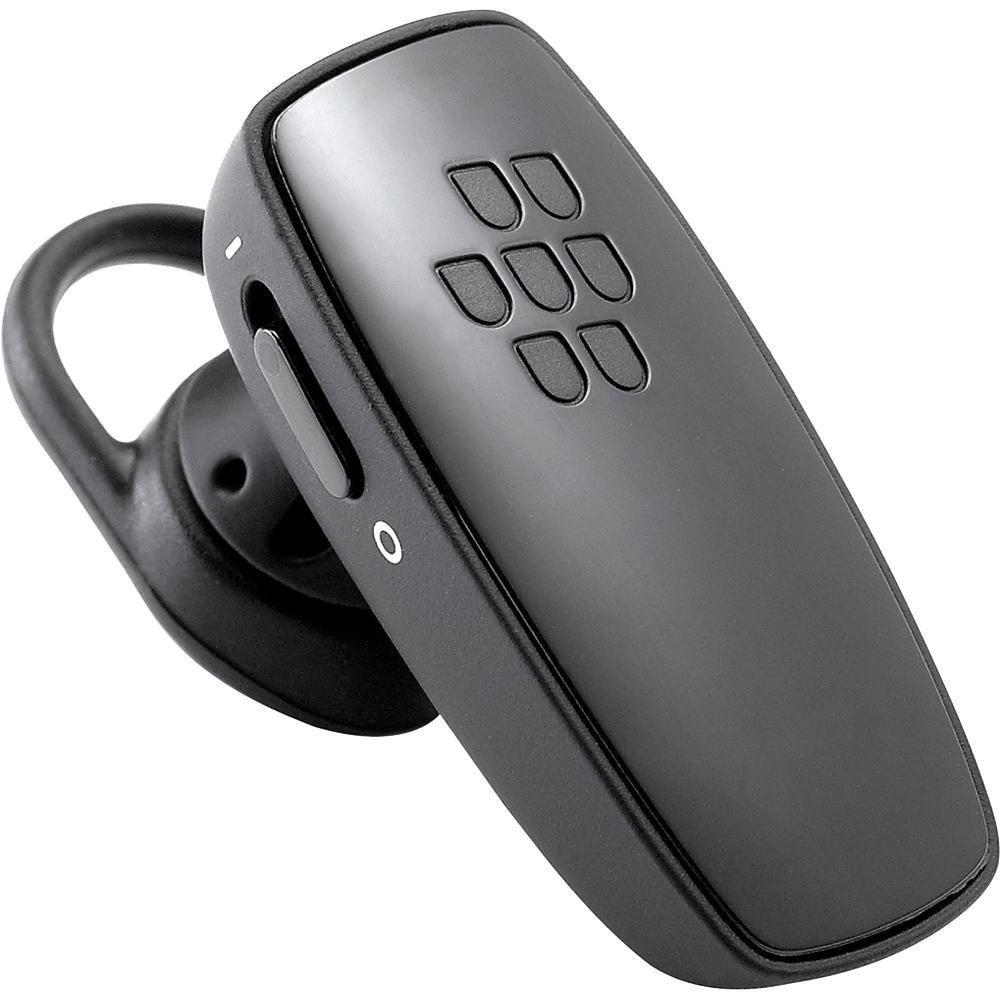
Obrázek 1: Přední view of the BlackBerry HS-300 Wireless Bluetooth Headset. The image displays the main body of the headset, featuring the BlackBerry logo (seven-dot pattern) on the front surface. A slender button, likely for volume control or multi-function, is visible on the side. An ear hook is attached, designed to secure the headset over the ear. A small indicator light is also present near the button.
- Multifunkční tlačítko: Used for answering/ending calls, voice commands, and pairing.
- Tlačítka ovládání hlasitosti: Adjusts call and media volume.
- Kontrolka LED: Zobrazuje stav (napájení, párování, nabíjení).
- Mikrofon: Captures your voice during calls.
- Vypínač: Zapne nebo vypne náhlavní soupravu.
- Nabíjecí port: Připojuje se k nabíjecímu kabelu.
Nastavení
1. Nabíjení náhlavní soupravy
Before initial use, fully charge your headset. The HS-300 features rapid charge capabilities.
- Connect the charging cable to the headset's charging port and to a compatible USB power source.
- The LED indicator will show the charging status (e.g., solid red for charging, solid blue for fully charged).
- Plné nabití poskytuje až 4 hodin hovoru.
2. Spárování se zařízením Bluetooth
To use your headset, it must be paired with a Bluetooth-enabled phone or device.
- Zkontrolujte, zda je náhlavní souprava vypnutá.
- Press and hold the Multi-function Button until the LED indicator flashes blue and red alternately. This indicates pairing mode.
- On your phone, enable Bluetooth and search for new devices.
- Select "BlackBerry HS-300" from the list of available devices.
- Pokud se zobrazí výzva k zadání hesla, zadejte „0000“ (čtyři nuly).
- Po spárování bude LED indikátor pravidelně modře blikat.
Návod k obsluze
Zapnutí/vypnutí
- Zapnutí: Slide the Power Switch to the 'On' position. The LED indicator will flash blue.
- Vypnutí: Slide the Power Switch to the 'Off' position. The LED indicator will turn off.
Uskutečňování a přijímání hovorů
- Přijetí hovoru: Stiskněte jednou multifunkční tlačítko.
- Ukončení hovoru: Během hovoru stiskněte jednou multifunkční tlačítko.
- Odmítnutí hovoru: Stiskněte a podržte multifunkční tlačítko přibližně 2 sekundy.
- Uskutečnění hovoru: Dial the number on your phone. The call will automatically transfer to the headset if connected.
- Hlasové vytáčení (pokud je telefonem podporováno): Press the Multi-function Button once when not on a call.
Ovládání hlasitosti
- Use the Volume Control Buttons on the headset to adjust the call or media volume.
Údržba
- Pravidelně čistěte sluchátka s mikrofonem měkkým, suchým hadříkem.
- Avoid exposing the headset to extreme temperatures, moisture, or corrosive substances.
- Pokud sluchátka nepoužíváte, skladujte je na chladném a suchém místě.
- Do not attempt to disassemble or modify the headset, as this will void the warranty and may cause damage.
Odstraňování problémů
| Problém | Řešení |
|---|---|
| Sluchátka se nezapínají. | Ensure the headset is charged. Connect it to a power source using the charging cable. |
| Nemohu spárovat sluchátka s telefonem. |
|
| Žádný zvuk nebo špatná kvalita zvuku. |
|
| Sluchátka se často odpojují. |
|
Specifikace
| Funkce | Detail |
|---|---|
| Číslo modelu | HS-300 |
| Konektivita | Bluetooth Wireless (Version 2.1) |
| Doba hovoru | Až 4 hodin |
| Nabíjení | Rapid charge capable |
| Ovládací prvky | Volume control, Multi-function button |
| Mikrofon | Integrovaný |
| Form Factor | On-ear (single ear) |
| Hmotnost | Přibližně 3.2 unce |
| Rozměry | 2.5 x 2 x 6.5 palce (přibližně) |
Záruka a podpora
For warranty information and technical support, please refer to the documentation provided at the time of purchase or visit the official BlackBerry support webUschovejte si doklad o koupi pro případ reklamace.
Online podpora: www.blackberry.com/support