
Lexmark E360H11A
Lexmark E360, E460, E462 Series High Yield Return Program Toner Cartridge User Manual
Značka: Lexmark | Model: E360H11A
Zavedení
This manual provides essential information for the safe and effective use of your Lexmark E360, E460, E462 Series High Yield Return Program Toner Cartridge (Part Number E360H11A). This genuine Lexmark product is designed to deliver consistent, high-quality monochrome laser prints with an estimated yield of 9,000 pages. Please read this manual thoroughly before installation and use.
Bezpečnostní informace
- Uchovávejte tonerové kazety mimo dosah dětí.
- Do not incinerate toner cartridges. Residual toner dust can ignite.
- Avoid inhaling toner dust. If toner gets on your skin or clothing, wash it off immediately with soap and cold water.
- Nepokoušejte se rozebírat tonerovou kazetu.
- Store cartridges in their original packaging in a cool, dry place away from direct sunlight.
Co je v krabici
Váš balíček by měl obsahovat následující položku:
- One (1) Lexmark E360, E460, E462 Series High Yield Return Program Toner Cartridge (Part Number E360H11A)
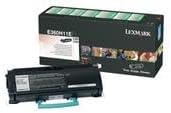
This image displays the Lexmark E360H11A High Yield Return Program Toner Cartridge alongside its retail packaging. The cartridge is black with a light blue handle, and the box features Lexmark branding and product details.
Nastavení a instalace
Follow these steps to properly install the toner cartridge in your Lexmark E360, E460, or E462 series printer:
- Vypnutí tiskárny: Ensure your printer is turned off and unplugged from the power outlet before beginning the installation process.
- Otevřít přední obálku: Open the front cover of your Lexmark printer to access the toner cartridge compartment.
- Vyjměte starou kazetu (pokud je to relevantní): If replacing an old cartridge, carefully pull it straight out of the printer. Place it in a protective bag for recycling.
- Rozbalte novou kazetu: Remove the new Lexmark E360H11A toner cartridge from its packaging. Avoid touching the green drum surface.
- Protřepejte kazetu: Gently shake the new cartridge horizontally 5-6 times to distribute the toner evenly.
- Odstraňte ochranné plomby: Carefully remove any protective tapes or seals from the cartridge as indicated in your printer's specific manual.
- Vložte novou kazetu: Align the new cartridge with the guides inside the printer and push it firmly until it clicks into place.
- Zavřít přední obálku: Zavřete přední kryt tiskárny.
- Zapnutí tiskárny: Plug in and turn on your printer. The printer will typically perform a self-test and recognize the new cartridge.
Refer to your specific Lexmark printer's user manual for detailed instructions and illustrations.
Návod k obsluze
Once the Lexmark E360H11A toner cartridge is installed, your printer is ready for operation. The cartridge functions automatically as part of the printing process.
- Tisk: Initiate print jobs from your computer or device as you normally would. The printer will draw toner from the cartridge to create monochrome prints.
- Monitorování hladiny toneru: Most Lexmark printers provide a way to monitor toner levels through the printer's control panel or software utility. Monitor these levels to know when a replacement cartridge will be needed.
- Kvalita tisku: If print quality degrades (e.g., faded prints, streaks), it may indicate a low toner level or an issue with the cartridge. Refer to the Troubleshooting section.
Údržba
Správná manipulace a skladování mohou prodloužit životnost a výkon vaší tonerové kazety:
- Skladování: Store unused cartridges in their original sealed packaging in a cool, dry environment, away from direct sunlight and extreme temperatures.
- Zacházení: Always handle the cartridge by its designated handles or edges. Avoid touching the imaging drum.
- Likvidace/recyklace: This is a Lexmark Return Program Toner Cartridge. Please return the empty cartridge to Lexmark for proper recycling. Instructions for return are typically included with the new cartridge or can be found on the official Lexmark website. Do not dispose of cartridges in regular waste.
Odstraňování problémů
Pokud narazíte na problémy s tonerovou kazetou, zvažte následující běžná řešení:
| Problém | Možná příčina | Řešení |
|---|---|---|
| Vybledlé nebo světlé výtisky | Nízká hladina toneru; nerovnoměrné rozložení toneru. | Jemně zatřepejte kazetou vodorovně. Pokud problém přetrvává, vyměňte ji. |
| Pruhy nebo čáry na výtiscích | Dirty imaging drum; damaged cartridge. | Do not touch the drum. If the cartridge is new, ensure all seals are removed. If problem persists, replace the cartridge. |
| "Toner Low" or "Replace Cartridge" Message | Toner is genuinely low; cartridge not seated correctly. | Reseat the cartridge firmly. If message persists, replace with a new cartridge. |
| Kazeta nebyla rozpoznána | Nesprávná instalace; vadná kazeta. | Remove and reinsert the cartridge, ensuring it clicks into place. Restart the printer. If issue continues, contact Lexmark support. |
For more complex issues, consult your printer's specific user manual or the Lexmark support webmísto.
Specifikace
| Funkce | Detail |
|---|---|
| Typ produktu | Tonerová kazeta |
| Značka | Lexmark |
| Číslo dílu | E360H11A |
| Kompatibilita | Lexmark E360, E460, E462 Series Monochrome Laser Printers |
| Technologie tisku | Monochromatický laser |
| Výtěžnost stránky | Až 13 000 stran (ISO/IEC 19752) |
| Speciální funkce | High Yield, Return Program Cartridge |
| Zahrnuté komponenty | Tonerová kazeta |
| ASIN | B00434R3GI |
| Datum první dostupnosti | 15. září 2010 |
Informace o záruce
Lexmark toner cartridges are manufactured to high quality standards. For specific warranty terms and conditions applicable to your Lexmark E360H11A toner cartridge, please refer to the documentation included with your printer or visit the official Lexmark webZáruka se obvykle vztahuje na vady materiálu a zpracování při běžném používání.
Podpora
If you require further assistance or have questions regarding your Lexmark E360, E460, E462 Series High Yield Return Program Toner Cartridge, please contact Lexmark Customer Support:
- Lexmark Official Webmísto: www.lexmark.com/support
- Online zdroje: Access FAQs, drivers, and troubleshooting guides.
- Kontaktní údaje: Find phone numbers or chat options for direct support on the Lexmark support webmísto.
When contacting support, please have your printer model and toner cartridge part number (E360H11A) ready.
Ask a question about this manual
Ask about setup, troubleshooting, compatibility, parts, safety, or missing instructions. Manuals+ will review the question and use this page’s manual context to help answer it.