
Zavedení
The GIGABYTE GM-M7600 is a wireless precision optical mouse designed for comfortable and reliable use. This manual provides instructions for setting up, operating, maintaining, and troubleshooting your device.
Obsah balení
Zkontrolujte prosím obsah balení, abyste se ujistili, že jsou přítomny všechny položky:
- GIGABYTE GM-M7600 Wireless Optical Mouse
- Portable Nano USB Receiver
- 2 x AAA baterie
Nastavení
1. Instalace baterií
The GM-M7600 mouse requires two AAA batteries for operation. The batteries are included in the package.
- Najděte kryt přihrádky na baterie na spodní straně myši.
- Jemně posuňte nebo zvedněte kryt a otevřete přihrádku.
- Insert the two AAA batteries, ensuring the positive (+) and negative (-) terminals align correctly with the markings inside the compartment.
- Bezpečně zavřete kryt bateriového prostoru.
2. Připojení USB přijímače
The mouse connects to your computer via a portable Nano USB receiver.
- Locate the Nano USB receiver. It may be stored inside the mouse's battery compartment or packaged separately.
- Plug the Nano USB receiver into an available USB port on your computer (Laptop or Personal Computer).
- Your operating system (e.g., Windows XP, Linux) should automatically detect and install the necessary drivers. This process may take a few moments.
- Po instalaci ovladačů je myš připravena k použití.
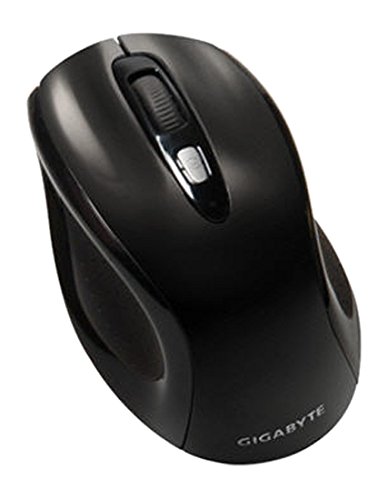
Obrázek 1: GIGABYTE GM-M7600 Wireless Optical Mouse. This image displays the ergonomic design of the mouse, highlighting its form factor and the location of its buttons. The Nano USB receiver is typically stored within the mouse or connected to a computer's USB port.
Návod k obsluze
1. Zapnutí/vypnutí
The mouse typically has a power switch on its underside. Slide the switch to the 'ON' position to activate the mouse. Slide it to 'OFF' when not in use to conserve battery life.
2. Nastavení DPI (citlivosti)
The GM-M7600 features an adjustable DPI switch, allowing you to change the mouse sensitivity between 800 DPI and 1600 DPI. This switch is usually located near the scroll wheel. Press the DPI button to toggle between the two sensitivity settings.
3. Základní funkce myši
- Levé kliknutí: Hlavní tlačítko pro výběr položek, otevírání filea interakce se softwarem.
- Klikněte pravým tlačítkem myši: Sekundární tlačítko pro přístup k kontextovým nabídkám a dalším možnostem.
- Rolovací kolečko: Používá se k procházení dokumentů a web stránky. Může také fungovat jako tlačítko pro kliknutí prostředním tlačítkem myši.
Údržba
1. Čištění
Pro udržení optimálního výkonu a vzhledu:
- Disconnect the mouse from your computer and turn off the power switch.
- Použijte měkký hadřík, který nepouští vlákna dampPovrch myši otřete vodou nebo jemným čisticím roztokem.
- Nepoužívejte agresivní chemikálie, abrazivní čisticí prostředky ani nestříkejte tekutiny přímo na myš.
- Clean the optical sensor area on the underside of the mouse with a dry cotton swab to remove any dust or debris.
2. Výměna baterie
When the mouse performance degrades or it stops responding, it may be time to replace the batteries.
- Vypněte myš pomocí vypínače.
- Open the battery compartment as described in the 'Installing Batteries' section.
- Vyjměte staré baterie AAA.
- Vložte dvě nové baterie AAA a dbejte na správnou polaritu (+/-).
- Zavřete kryt baterie a myš znovu zapněte.
Odstraňování problémů
If you encounter issues with your GIGABYTE GM-M7600 mouse, try the following solutions:
- Myš nereaguje:
- Ujistěte se, že je myš zapnutá.
- Zkontrolujte, zda jsou baterie správně vloženy a zda jsou dostatečně nabité. V případě potřeby je vyměňte.
- Ensure the Nano USB receiver is securely plugged into a working USB port on your computer. Try a different USB port.
- Restartujte počítač.
- Nepravidelný pohyb kurzoru:
- Vyčistěte optický senzor na spodní straně myši.
- Ujistěte se, že myš používáte na vhodném povrchu. Vyhněte se vysoce reflexním nebo průhledným povrchům.
- Check for any wireless interference. Move the mouse closer to the receiver or away from other wireless devices.
- DPI switch not working:
- Ujistěte se, že je myš zapnutá a připojená.
- Pevně stiskněte tlačítko DPI.
Specifikace
| Název modelu | GM-M7600 |
| Značka | GIGABYTE |
| Technologie připojení | 2.4GHz Radio Frequency Wireless |
| Detekce pohybu | Optický |
| Nastavitelný DPI | 800/1600 DPI |
| Počet tlačítek | 3 (Levé, Pravé, Kolečko pro rolování/Kliknutí prostředním tlačítkem) |
| Zdroj napájení | 2 x AAA baterie (součástí balení) |
| Typ přijímače | Portable Nano USB Receiver |
| Kompatibilní zařízení | Přenosný počítač, osobní počítač |
| Podpora operačního systému | Linux, Windows XP |
| Materiál pouzdra | Plastic with Rubberized Finish |
| Barva | Černý |
Záruka a podpora
For warranty information and technical support, please refer to the warranty card included with your product or visit the official GIGABYTE webmísto. Uschovejte si doklad o koupi pro případ záručních reklamací.