
1. Úvod
Thank you for choosing the Takstar E 340 Karaoke Microphone. This manual provides essential information for the proper setup, operation, and maintenance of your microphone. Please read this manual thoroughly before using the product to ensure optimal performance and longevity.
2. Konec produktuview
The Takstar E 340 is a high-quality unidirectional handheld dynamic microphone designed for clear vocal reproduction, ideal for karaoke and general speech applications. It features a robust construction and a design focused on user comfort and sound clarity.
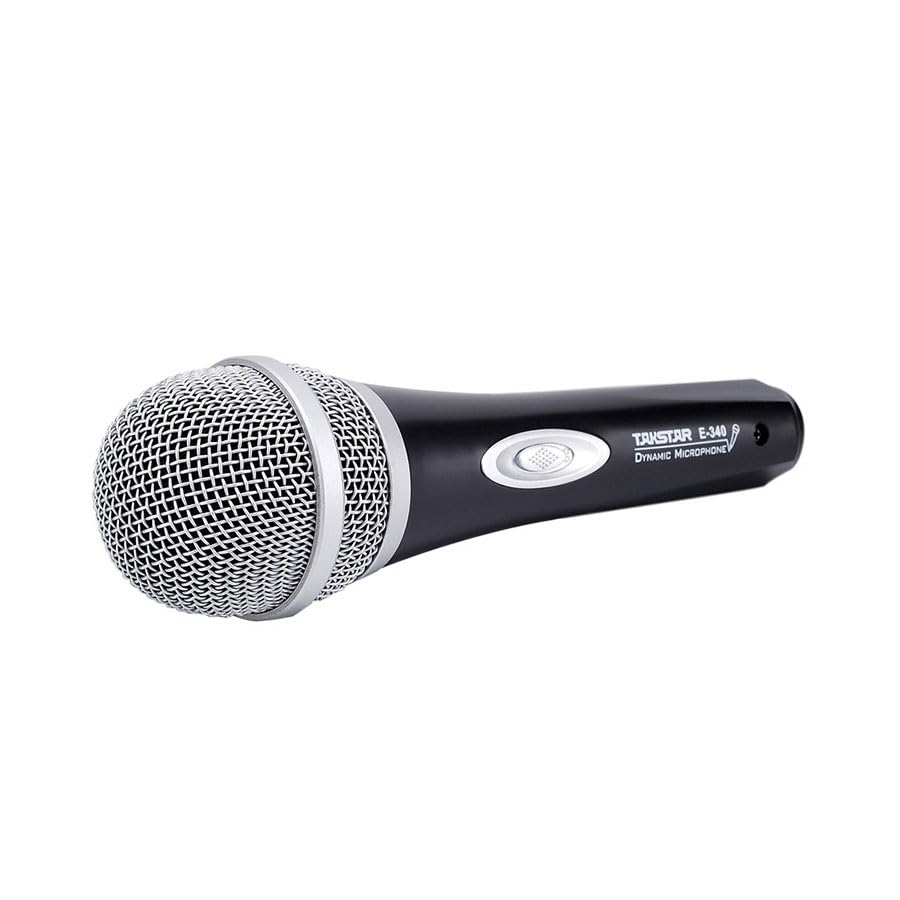
Figure 2.1: Takstar E 340 Handheld Dynamic Microphone. This image shows the full view of the microphone, highlighting its black body and silver grille.
Klíčové vlastnosti:
- Jednosměrný polární vzor: Zaostří na zvuk zepředu a sníží hluk na pozadí.
- Dynamická kapsle: Provides clear and powerful sound reproduction.
- Odolná konstrukce: Plastic housing with a paint finish for comfortable handling and durability.
- XLR konektivita: Utilizes a dual-core XLR cable for clear signal transmission and noise interference shielding.
- Lehký design: Ensures ease of use and portability.

Obrázek 2.2: Detailní view of the Takstar E 340 microphone highlighting its internal dynamic capsule and the robust construction. This image illustrates the quality components and design features.
Identifikace součásti:
- Mřížka mikrofonu: Protects the microphone capsule and helps shape the sound.
- Tělo mikrofonu: Houses the internal components and provides a comfortable grip.
- Vypínač: Controls the microphone's power.
- XLR Output Connector: For connecting the microphone to an audio interface or karaoke machine.
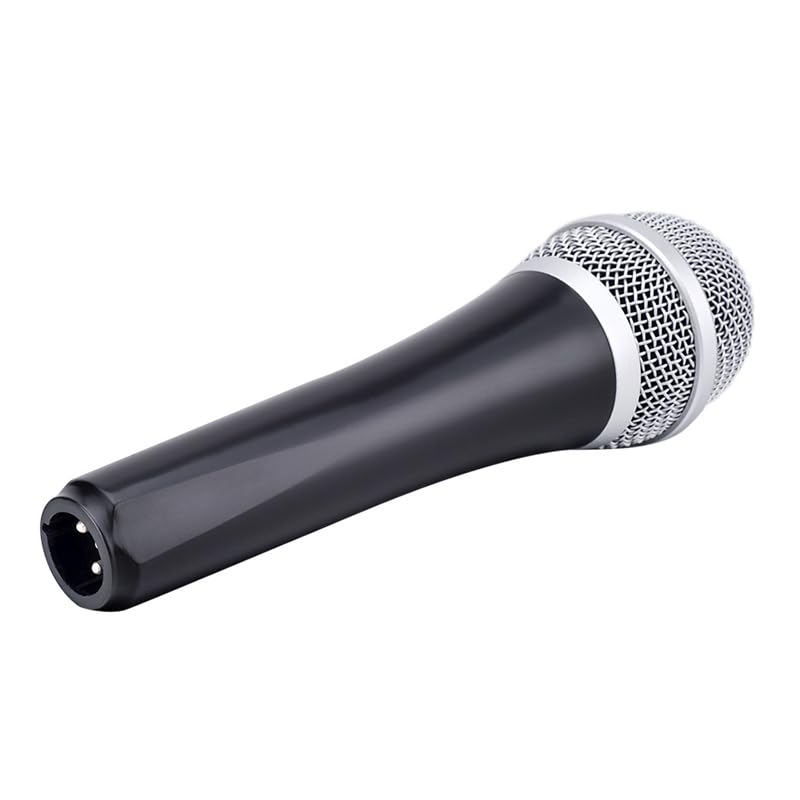
Figure 2.3: The XLR output connector located at the base of the Takstar E 340 microphone. This is where the microphone cable connects.
3. Pokyny k nastavení
- Vybalte mikrofon: Carefully remove the Takstar E 340 microphone and any included accessories from its packaging.
- Připojte kabel: Insert the XLR end of your microphone cable into the XLR output connector at the base of the microphone. Ensure it clicks securely into place.
- Připojení k audio zařízení: Connect the other end of the microphone cable (e.g., 1/4-inch jack or USB Type-C, depending on your cable) to the microphone input of your karaoke machine, mixer, or audio interface.
- Zapnutí: Ensure your audio device is powered on and its volume is set to a low level before activating the microphone.
4. Návod k obsluze
- Turn On the Microphone: Locate the On/Off switch on the microphone body and slide it to the 'ON' position.
- Umístění: Hold the microphone approximately 2-6 inches (5-15 cm) from your mouth for optimal sound pickup. Experiment with distance to find the best sound for your voice and environment.
- Nastavení hlasitosti: Gradually increase the volume on your connected audio device until the desired sound level is achieved. Avoid setting the volume too high to prevent feedback or distortion.
- Jednosměrné vyzvednutí: The E 340 is a unidirectional microphone, meaning it primarily picks up sound from the front. Point the top of the microphone directly towards the sound source (your mouth) for the clearest audio.
- Vypínání: When finished, slide the On/Off switch to the 'OFF' position and then turn off your audio device.
5. Péče a údržba
- Čištění: Use a soft, dry cloth to clean the microphone body. For the grille, a soft brush can be used to gently remove dust or debris. Do not use liquid cleaners or solvents.
- Skladování: Store the microphone in a dry, cool place away from direct sunlight and extreme temperatures. If possible, use a protective case to prevent physical damage.
- Zacházení: Zabraňte pádu mikrofonu ani jeho vystavování silným nárazům, mohlo by dojít k poškození vnitřních součástí.
- Péče o kabely: Always grasp the connector, not the cable, when plugging or unplugging. Avoid bending or kinking the cable excessively.
6. Řešení problémů
| Problém | Možná příčina | Řešení |
|---|---|---|
| Žádný zvukový výstup | Vypínač mikrofonu je VYPNUTÝ Kabel není správně připojen Audio device input volume too low Faulty cable or audio device input | Slide switch to 'ON' Ujistěte se, že je kabel bezpečně připojen na obou koncích Increase input volume on audio device Test with a different cable or audio input |
| Nízký nebo zkreslený zvuk | Microphone too far from sound source Input volume too high (distortion) Poškozená mikrofonní kapsle | Hold microphone closer to mouth Reduce input volume on audio device Contact customer support if damage is suspected |
| Zpětná vazba (vytí) | Microphone too close to speakers Hlasitost příliš vysoká Microphone pointed at speakers | Increase distance between microphone and speakers Reduce overall volume Ensure microphone is not pointed directly at speakers |
7. Technické specifikace
| Funkce | Specifikace |
|---|---|
| Model | E340 |
| Polární vzor | Jednosměrný |
| Tvarový faktor mikrofonu | Ruční |
| Impedance | 600 ohmů |
| Poměr signálu k šumu (SNR) | 72 dB |
| Frekvenční odezva | 16 kHz |
| Audio Citlivost | 54 decibelů |
| Technologie připojení | UHF (via cable) |
| Typ konektoru | USB Type-C (implied for cable connection, typically XLR on mic) |
| Kompatibilní zařízení | Karaoke stroj |
| Zdroj napájení | Elektrický kabel |
| Hmotnost položky | 580 g |
| Rozměry balení | 24.8 x 12.6 x 8 cm |
| Speciální funkce | Adjustable Headband (Note: This feature is typically associated with headsets, but listed in product specifications.) |
8. Záruka a podpora
For warranty information and customer support, please refer to the documentation provided at the time of purchase or visit the official Takstar webUschovejte si doklad o koupi pro případné reklamace.