
Zavedení
Welcome to the Greenlee DM-810A True RMS Digital Multimeter user manual. This document provides essential information for the safe and effective operation, maintenance, and troubleshooting of your device. The DM-810A is designed for accurate measurement of AC/DC voltage, AC/DC current, resistance, capacitance, frequency, and continuity, making it a versatile tool for electrical professionals.
Bezpečnostní informace
Pro zajištění bezpečného provozu a servisu měřiče postupujte podle těchto pokynů. Nedodržení těchto varování může mít za následek vážné zranění nebo smrt.
- Always read and understand the entire instruction manual before using the meter.
- Nepřekračujte maximální vstupní limity pro žádnou funkci.
- Buďte opatrní při práci s objtagnad 30 V AC RMS, 42 V peak nebo 60 V DC. Tyto objemytages představují nebezpečí úrazu elektrickým proudem.
- Always use the proper terminals, function, and range for your measurements. The DM-810A features a Beep-Jack audible and visible warning to guard against improper A and mA terminal plug-in.
- Inspect test leads for damaged insulation or exposed metal before each use. Replace if damaged.
- Nepoužívejte měřič, pokud se jeví poškozený nebo pokud je jeho pouzdro otevřené.
- Před použitím se ujistěte, že je kryt baterie bezpečně uzavřen.
- Adhere to local and national safety codes. Use personal protective equipment (PPE) such as approved safety glasses and electrically insulated gloves when necessary.
Konec produktuview
This section identifies the key parts and controls of your Greenlee DM-810A multimeter.

Obrázek 1: Přední view of the Greenlee DM-810A Digital Multimeter, showing the display, function selector dial, and input jacks.
- Zobrazit: Large LCD for clear readings, often with dual display capability.
- Volič funkcí: Used to select the desired measurement function (e.g., V~, V-, A~, A-, Ω, CAP, Hz, Continuity).
- Vstupní konektory:
- COM: Společný (záporný) vstup pro všechna měření.
- VΩHz: Kladný vstup pro objemtage, měření odporu, frekvence a kapacity.
- mAμA: Positive input for milliampzde a mikroampaktuální měření.
- A: Positive input for ampaktuální měření.
- tlačítka:
- VYBRAT: Toggles between functions on a single dial position (e.g., AC/DC voltagnapř. dioda/kontrola kontinuity).
- ROZSAH: Manually selects measurement range or returns to auto-ranging.
- △: Delta function for relative measurements.
- DRŽET: Zmrazí aktuální údaj na displeji.
Nastavení
Instalace baterie
The Greenlee DM-810A requires batteries for operation. Refer to the back of the meter for the battery compartment. Use a screwdriver to open the compartment, insert the specified batteries (typically AA or 9V, check the compartment label), observing correct polarity, and then securely close the cover.
Připojení testovacích vodičů
Always ensure test leads are properly connected before taking measurements.
- Vložte černý testovací vodič do COM (společný) vstupní konektor.
- Insert the red test lead into the appropriate positive input jack based on the measurement you intend to make:
- Za svtage, resistance, capacitance, or frequency, use the VΩHz zvedák.
- Pro miliampzde nebo mikroampere current, use the mAμA zvedák.
- Pro ampere current, use the A zvedák.
- The meter's Beep-Jack feature will provide an audible and visible alert if the function selector is set to a current measurement (A or mA) but the test lead is incorrectly plugged into a voltage/resistance jack, or vice-versa. This helps prevent damage to the meter and ensures correct setup.
Návod k obsluze
This section details how to perform various measurements with your DM-810A multimeter.
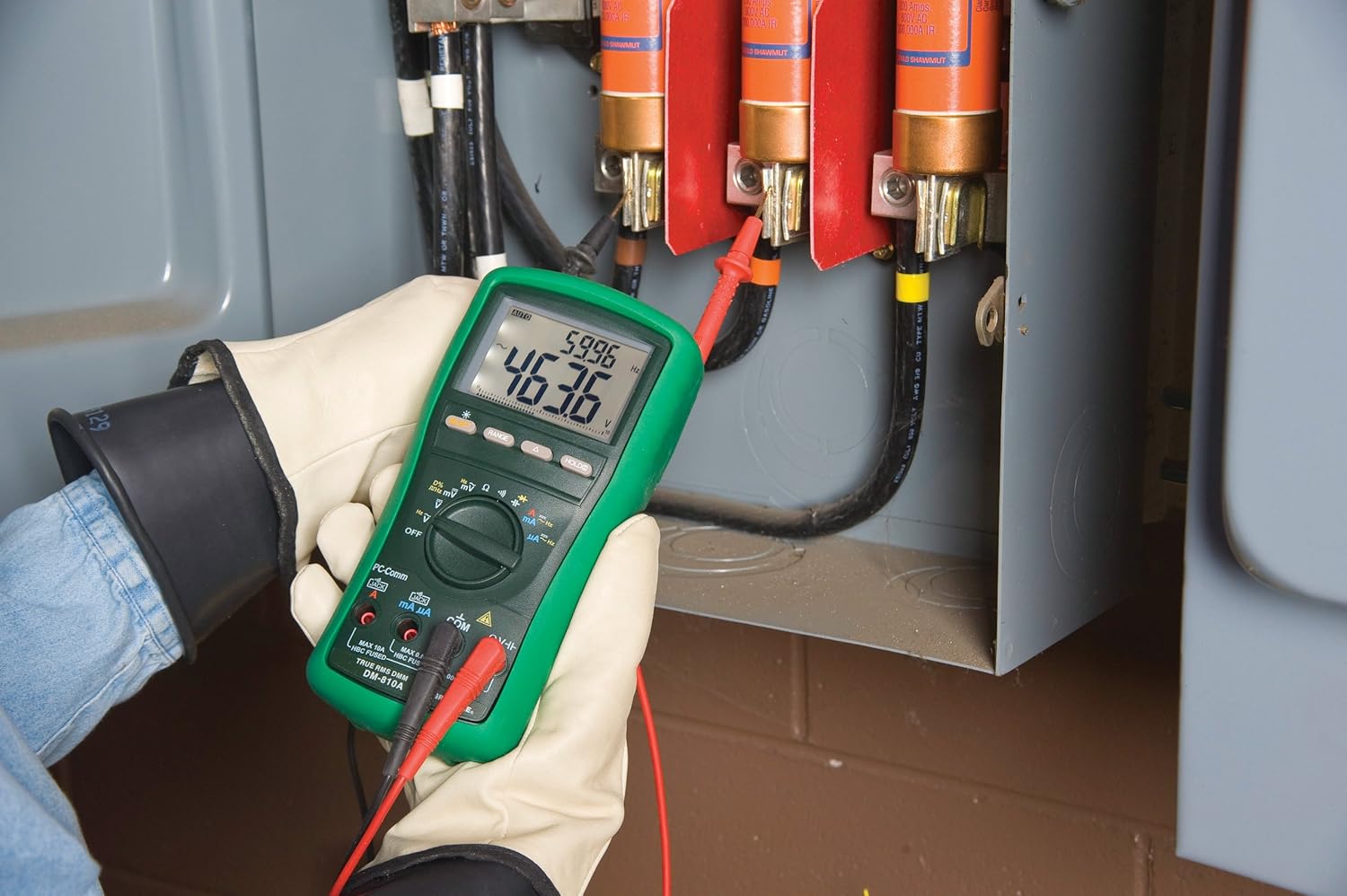
Obrázek 2: The Greenlee DM-810A Digital Multimeter being used to take measurements within an electrical panel, demonstrating practical application.
Měření AC/DC Voltage
- Set the function selector to V~ (AC Voltage) nebo V- (DC Voltage). Use the SELECT button to toggle if both are on one position.
- Připojte černý testovací vodič k COM a červený testovací vodič k VΩHz.
- Zapojte měřicí sondy paralelně k měřenému obvodu nebo součástce.
- Přečtěte si svtage hodnota na displeji.
Měření AC/DC proudu
Důležité: Current measurements require the meter to be connected in series with the circuit. Ensure the circuit is de-energized before connecting the meter.
- Deaktivujte obvod.
- Set the function selector to A~ (AC Current) or A- (DC Current), or mA~ / mA-.
- Připojte černý testovací vodič k COM. Connect the red test lead to mAμA for small currents or A for larger currents (up to 10A). The Beep-Jack warning will activate if leads are in the wrong jacks for the selected function.
- Open the circuit where the current is to be measured and connect the meter in series.
- Znovu zapněte obvod a odečtěte hodnotu proudu.
- De-energize the circuit before disconnecting the meter.
Measuring Resistance (Ω)
- De-energize the circuit or component.
- Set the function selector to Ω.
- Připojte černý testovací vodič k COM a červený testovací vodič k VΩHz.
- Připojte měřicí sondy napříč součástkou.
- Odečtěte hodnotu odporu.
Measuring Capacitance (CAP)
- Před měřením se ujistěte, že je kondenzátor zcela vybitý.
- Set the function selector to CAP.
- Připojte černý testovací vodič k COM a červený testovací vodič k VΩHz.
- Připojte měřicí sondy na svorky kondenzátoru.
- Odečtěte hodnotu kapacity.
Measuring Frequency (Hz)
- Set the function selector to Hz.
- Připojte černý testovací vodič k COM a červený testovací vodič k VΩHz.
- Připojte měřicí sondy ke zdroji signálu.
- Odečtěte hodnotu frekvence.
Test kontinuity
- De-energize the circuit or component.
- Set the function selector to the continuity symbol (often shared with diode test, use SELECT to toggle).
- Připojte černý testovací vodič k COM a červený testovací vodič k VΩHz.
- Connect the test probes across the circuit path or component.
- Zvukový signál signalizuje propojení (nízký odpor). Na displeji se zobrazí hodnota odporu.
Údržba
Čištění
Otřete měřič reklamouamp hadříkem a jemným čisticím prostředkem. Nepoužívejte abrazivní prostředky ani rozpouštědla. Před použitím se ujistěte, že je měřič zcela suchý.
Výměna baterie
When the battery indicator appears on the display, replace the batteries immediately to ensure accurate readings. Follow the battery installation steps outlined in the Setup section.
Výměna pojistky
If the current measurement functions cease to work, the internal fuses may need replacement. Refer to the meter's internal diagram (usually accessible by opening the battery compartment or back casing) for fuse specifications and replacement instructions. Always replace fuses with those of the specified type and rating to maintain safety and performance.
Odstraňování problémů
This section provides solutions for common issues encountered during the operation of your DM-810A multimeter.
| Problém | Možná příčina | Řešení |
|---|---|---|
| Žádný displej nebo tlumený displej | Vybité nebo vybité baterie | Vyměňte baterie. |
| Nesprávné údaje | Incorrect function/range selected; Damaged test leads; External interference | Verify function and range; Inspect and replace test leads; Move away from strong electromagnetic fields. |
| Měření proudu nefunguje | Blown fuse; Incorrect lead connection | Check and replace fuses; Ensure leads are in the correct A or mA jacks. |
| Beep-Jack warning active | Test leads connected to incorrect input jacks for the selected function | Adjust test lead connections to match the selected function on the dial. |
| Continuity test not beeping | Open circuit; High resistance | Ensure the circuit is closed; Check for breaks in the circuit or component. |
Technické specifikace
The following table outlines the key technical specifications for the Greenlee DM-810A Digital Multimeter.
| Funkce | Hodnota |
|---|---|
| Značka | Greenlee |
| Model | DM-810A |
| Typ měření | Digitální multimetr True RMS |
| Zdroj napájení | Napájení z baterie |
| Styl | Digitální |
| Hmotnost položky | 16 uncí (1 libra) |
| Rozměry produktu (D x Š x V) | 10 x 10 x 12 palce |
| Certifikace | CE, CSA, UL |
| UPC | 783310087434 |
Záruka a podpora
Informace o záruce
Digitální multimetr Greenlee DM-810A je dodáván s 1letá záruka výrobceTato záruka se vztahuje na vady materiálu a zpracování při běžném používání. Uschovejte si prosím doklad o koupi pro případ uplatnění záruky.
Zákaznická podpora
For technical assistance, warranty service, or to inquire about replacement parts, please contact Greenlee customer support. Refer to the official Greenlee webNejnovější kontaktní informace naleznete na webu nebo na obalu produktu.