
Packard Bell PX.T190W.006
Packard Bell Studio ST 500GB Multimedia Player and Recorder User Manual
Model: Studio ST 500GB (PX.T190W.006)
1. Úvod
This manual provides detailed instructions for the setup, operation, maintenance, and troubleshooting of your Packard Bell Studio ST 500GB Multimedia Player and Recorder. Please read this manual thoroughly before using the device to ensure proper functionality and to prevent damage.
The Packard Bell Studio ST 500GB is a versatile multimedia device designed to store and play various media files directly on your television or other display devices. It features a 500GB hard drive, HDMI and composite video outputs, USB 2.0 connectivity, and supports a wide range of audio, video, and image formats.
2. Důležité bezpečnostní informace
- Nevystavujte zařízení dešti nebo vlhkosti.
- Neotevírejte casing. Veškerý servis svěřte kvalifikovanému personálu.
- Zajistěte dostatečné větrání kolem zařízení, aby nedošlo k přehřátí.
- Používejte pouze napájecí adaptér dodaný se zařízením.
- Chraňte zařízení před přímým slunečním zářením, zdroji tepla a silnými magnetickými poli.
- Zařízení čistěte měkkým, suchým hadříkem. Nepoužívejte tekuté čisticí prostředky.
3. Obsah balení
Ověřte, zda jsou v balení přítomny všechny položky:
- Packard Bell Studio ST 500GB Multimedia Player
- Dálkové ovládání
- Napájecí adaptér
- USB kabel
- Kabel HDMI (může se lišit v závislosti na regionu)
- Uživatelská příručka (tento dokument)
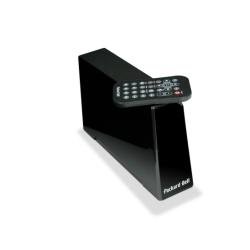
Image 1: Packard Bell Studio ST 500GB Multimedia Player and included accessories.
4. Nastavení
4.1 Připojení k napájení
- Connect the power adapter to the DC IN port on the back of the Studio ST.
- Zapojte napájecí adaptér do elektrické zásuvky.
- Rozsvítí se kontrolka napájení na přední straně zařízení.
4.2 Connecting to a TV or Display
The Studio ST offers multiple video output options:
- Připojení HDMI (doporučeno): For the best video and audio quality, connect an HDMI cable from the HDMI OUT port on the Studio ST to an HDMI IN port on your TV.
- Připojení kompozitního videa: For older TVs, connect a composite video cable (yellow, red, white) from the AV OUT ports on the Studio ST to the corresponding AV IN ports on your TV.
Image 2: Rear panel connections including HDMI and composite video ports.
4.3 Connecting to a Computer (Optional)
K převodu files to the internal 500GB hard drive:
- Ensure the Studio ST is powered off.
- Connect the USB cable from the USB 2.0 port on the Studio ST to a USB port on your computer.
- Power on the Studio ST. It will appear as an external hard drive on your computer.
- Transfer your media files to the appropriate folders on the Studio ST.
- Před odpojením kabelu USB bezpečně vyjměte zařízení z počítače.
5. Návod k obsluze
5.1 Zapnutí/vypnutí
Stiskněte tlačítko MOC button on the remote control or the device's front panel to turn the Studio ST on or off.
5.2 Funkce dálkového ovládání
The remote control allows full navigation and control of the device. Key functions include:
- Navigační tlačítka: Up, Down, Left, Right, OK (Enter) for menu navigation.
- JÍDELNÍ LÍSTEK: Vstupte do hlavní nabídky.
- NÁVRAT/ZPĚT: Vraťte se na předchozí obrazovku.
- PLAY/PAUSE, STOP, FWD, REV: Ovládací prvky přehrávání médií.
- VOLUME +/-: Upravte hlasitost zvuku.
- TITULEK: Select subtitle tracks (if available).
- AUDIO: Select audio tracks (if available).
Image 3: Layout of the remote control for the Studio ST.
5.3 Přehrávání médií
- Navigate to the desired media category (Video, Music, Photo) from the main menu.
- Browse through the folders and select the file chcete hrát.
- Stiskněte OK pro spuštění přehrávání.
- Use the playback control buttons on the remote for functions like play, pause, stop, fast forward, and rewind.
Podporované formáty:
- Video: AVI, VOB, XVID
- Obraz: BMP, GIF, JPG, PNG, TIF
- Titulky: SMI, SRT, SUB
- Zvuk: (Common audio formats supported for video playback)
6. Údržba
6.1 Čištění zařízení
To clean the exterior of the Studio ST:
- Ensure the device is powered off and unplugged from the power outlet.
- K otření povrchů použijte měkký, suchý hadřík, který nepouští vlákna.
- Do not use liquid cleaners, aerosols, or abrasive cleaning agents, as these can damage the casing nebo vnitřních součástí.
6.2 Správa pevných disků
The internal 500GB hard drive requires no special maintenance under normal use. However, it is recommended to:
- Regularly back up important data to another storage device to prevent data loss.
- Avoid sudden power interruptions during file transfers or playback, which could corrupt data.
7. Řešení problémů
| Problém | Možná příčina | Řešení |
|---|---|---|
| Žádná síla | Napájecí kabel není připojen; zásuvka nefunguje. | Zkontrolujte připojení napájecího kabelu; zkuste jinou zásuvku. |
| Žádný video výstup | Incorrect video cable connection; TV input not selected correctly. | Ensure HDMI or AV cables are securely connected; Select the correct HDMI/AV input on your TV. |
| Žádný audio výstup | Volume too low; Audio cable not connected; TV muted. | Increase volume on Studio ST and TV; Check audio cable connections; Unmute TV. |
| Dálkové ovládání nefunguje | Batteries depleted; Obstruction between remote and device. | Replace remote control batteries; Ensure clear line of sight to the device's IR receiver. |
| Cannot play certain media files | File formát není podporován; poškozený file. | Refer to the "Supported Formats" section; Try playing a different file; Re-encode the file v případě potřeby. |
8. Specifikace
| Název modelu | Studio ST 500GB |
| Číslo modelu | PX.T190W.006 |
| Značka | Packard Bell (Manufactured by Acer) |
| Kapacita úložiště | 500 GB (3.5" SATAII Hard Drive) |
| Velikost vyrovnávací paměti | 8 MB |
| Technologie připojení | Wired (USB, SATA) |
| USB porty | 1x USB 2.0 |
| HDMI porty | 2 x HDMI |
| Video výstup | HDMI, Composite Video (1) |
| Zvukový výstup | S/PDIF, Composite Audio (2) |
| Podporované video formáty | AVI, VOB, XVID |
| Podporované formáty obrázků | BMP, GIF, JPG, PNG, TIF |
| Podporované formáty titulků | SMI, SRT, SUB |
| Kompatibilní operační systémy | Windows XP, Vista, Windows 7, Mac 9X - 10X |
| Požadavky na napájení | 100-240V, 50-60Hz, 0.65A |
| Rozměry (V x Š x H) | 216 mm x 98 mm x 294 mm |
| Hmotnost | 1.33 kg |
| Barva | Černý |
9. Informace o záruce
Packard Bell products are covered by a limited warranty. Please refer to the warranty card included in your product package or visit the official Packard Bell (Acer) webPodrobné záruční podmínky platné pro váš region naleznete na webových stránkách. Uschovejte si doklad o koupi pro případ reklamace.
The warranty typically covers manufacturing defects for a specified period from the date of purchase. It does not cover damage caused by misuse, accidents, unauthorized modifications, or normal wear and tear.
10. Zákaznická podpora
For technical assistance, product inquiries, or service requests, please contact Packard Bell (Acer) customer support:
- Online podpora: Navštivte oficiální podporu Aceru webweb s nejčastějšími dotazy, ovladači a kontaktními informacemi. www.acer.com/support
- Telefonická podpora: Refer to your product documentation or the Acer support website for local telephone numbers.
When contacting support, please have your product model number (PX.T190W.006) and serial number ready.
Ask a question about this manual
Ask about setup, troubleshooting, compatibility, parts, safety, or missing instructions. Manuals+ will review the question and use this page’s manual context to help answer it.