
1. Úvod
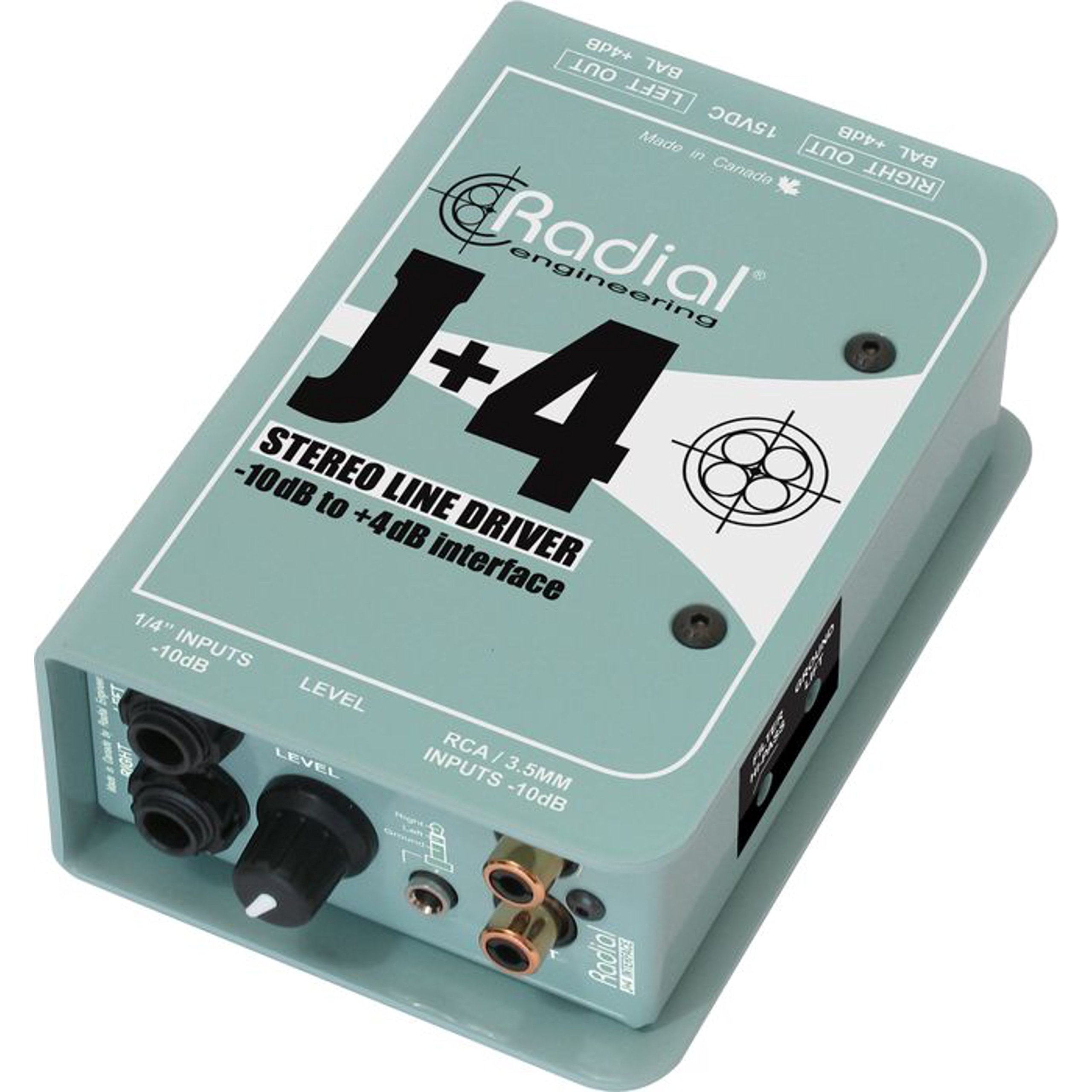
The Radial J+4 is a 2-channel signal level driver designed to interface professional audio equipment with consumer-level or low-output devices. It effectively boosts incoming signals from -10dB to a professional +4dB line level, ensuring optimal signal integrity and compatibility within recording studios, broadcast environments, and live sound applications. Its robust construction and active circuitry provide reliable performance and noise reduction.
2. Důležité bezpečnostní informace
- Zdroj napájení: Use only the specified power adapter for this unit. Incorrect voltage can damage the device and void the warranty.
- vlhkost: Nevystavujte jednotku dešti, vlhkosti ani nadměrné vlhkosti.
- Teplo: Avoid placing the unit near heat sources such as radiators, heat registers, stoves, or other heat-producing apparatus.
- Větrání: Zajistěte dostatečné větrání. Neblokujte žádné větrací otvory.
- Servis: Veškerý servis svěřte kvalifikovanému servisnímu personálu. Nepokoušejte se tento výrobek opravovat sami.
- Kabely: Ensure all cables are securely connected and free from damage to prevent signal loss or electrical hazards.
3. Klíčové vlastnosti
- Provoz se 2 kanály: Processes two independent audio channels.
- Signal Level Matching: Boosts -10dB consumer-level signals to +4dB professional line level.
- Discrete Circuitry: 100% discrete signal path for optimal audio fidelity.
- Active Buffering: Maintains signal integrity over long cable runs.
- Transformer Isolation: Helps eliminate ground loop hum and noise.
- Stereo Gain Control: Allows precise level adjustment for both channels.
- Highpass Filter: Reduces unwanted low-frequency rumble and noise.
- Spínač zemního zdvihu: Breaks the ground connection to further combat hum.
- Všestranné vstupy: Features dual 1/4" TRS, RCA, and a stereo 1/8" TRS input.
- Odolná konstrukce: Built with 14-gauge steel for roadworthy reliability.
4. Ovládací prvky a připojení
The Radial J+4 features a straightforward layout for easy integration into any audio setup.
Přední panel
The front panel provides access to input connections and primary controls.
- INPUTS (1/4" TRS, RCA, 1/8" TRS): Connect your low-level audio sources here. The 1/4" and RCA jacks are typically for stereo pairs, while the 1/8" TRS is for portable devices.
- Získat kontrolu: A rotary knob to adjust the output level of the boosted signal.
- HIGHPASS Filter Switch: Engages a filter to remove low-frequency content.
- Spínač GROUND LIFT: Odpojuje uzemnění audio od uzemnění šasi, aby se eliminoval brum a bzučení způsobené zemními smyčkami.
Zadní panel
The rear panel houses the output connections and power input.
- OUTPUTS (XLR): Balanced XLR outputs for connecting to professional audio equipment such as mixers, audio interfaces, or power ampzáchranáři.
- NAPÁJENÍ: Connection point for the external power supply.
5. Průvodce nastavením
Follow these steps for initial setup of your Radial J+4:
- Power Off All Equipment: Before making any connections, ensure all audio equipment (source devices, mixers, amplifiers) are powered off.
- Připojit vstupní zdroj: Connect your low-level audio source (e.g., MP3 player, computer, instrument output) to the appropriate input jacks on the front panel of the J+4 (1/4" TRS, RCA, or 1/8" TRS).
- Připojení výstupů: Connect the XLR outputs of the J+4 to the line-level inputs of your professional audio equipment (e.g., mixer, audio interface). Use balanced XLR cables for optimal performance.
- Připojte napájení: Connect the provided power adapter to the POWER INPUT on the rear panel of the J+4, then plug the adapter into an appropriate power outlet.
- Zapnutí: Power on your professional audio equipment first, then power on your source device. The J+4 will power on automatically when connected to its power supply.
- Initial Gain Setting: Set the GAIN control on the J+4 to its minimum position before playing audio.
6. Provoz
Once connected, operating the J+4 is straightforward:
- Úprava zisku: Play audio from your source device. Slowly increase the GAIN control on the J+4 until the desired output level is achieved at your professional audio equipment. Monitor the input levels on your mixer or interface to avoid clipping.
- Using the Highpass Filter: If you notice excessive low-frequency rumble or unwanted bass content, engage the HIGHPASS filter switch. This can help clean up the signal, especially with vocal or acoustic instrument sources.
- Addressing Hum and Buzz: If you experience a persistent hum or buzz, try engaging the GROUND LIFT switch. This can often resolve ground loop issues by breaking the electrical ground connection between the J+4 and other equipment. If the hum persists, check all cable connections and try different power outlets.
7. Údržba
The Radial J+4 is designed for durability and requires minimal maintenance.
- Čištění: K čištění vnější strany jednotky používejte měkký, suchý hadřík. Nepoužívejte abrazivní čisticí prostředky, rozpouštědla ani vosky.
- Inspekce: Pravidelně kontrolujte kabely a spoje, zda nevykazují známky opotřebení nebo poškození.
- Skladování: Pokud přístroj delší dobu nepoužíváte, skladujte jej v suchém a bezprašném prostředí.
8. Řešení problémů
If you encounter issues with your Radial J+4, refer to the following common problems and solutions:
| Problém | Možná příčina | Řešení |
|---|---|---|
| Žádný zvukový výstup |
|
|
| Hum nebo Buzz |
|
|
| Zkreslený zvuk |
|
|
9. Specifikace
- Model: R800 8015
- Počet kanálů: 2
- Technologie připojení: 1/4" TRS, 1/8" TRS, RCA (inputs), XLR (outputs)
- Signal Level Conversion: -10 dB až +4 dB
- Typ materiálu: Nerez
- Rozměry produktu: 10.8 x 4.9 x 2.8 palce
- Hmotnost položky: 0.01 unce
- Kompatibilní zařízení: Personal Computer, various audio sources
- Podporovaný software: Pro Tools, Logic Pro, Ableton Live, FL Studio, Cubase (when used with compatible audio interfaces)
10. Záruka a podpora
For warranty information and technical support, please refer to the official Radial Engineering webnebo se obraťte na jejich zákaznický servis. Uschovejte si účtenku jako doklad o koupi pro případné reklamace.