
1. Úvod
This manual provides detailed instructions for the installation, operation, and maintenance of your Chacon 54311 Digital Thermostat. This device is designed to help you manage your heating system efficiently, allowing for energy savings through precise temperature control and programming.
Mezi klíčové vlastnosti patří:
- Hourly and daily programming for optimal use.
- Two temperature levels: Day (presence) and ECO (night or absence).
- Seven distinct programming schedules.
- Indikátor slabé baterie.
2. Konec produktuview
The Chacon 54311 Digital Thermostat features a clear digital display and intuitive buttons for setting and programming your heating preferences.
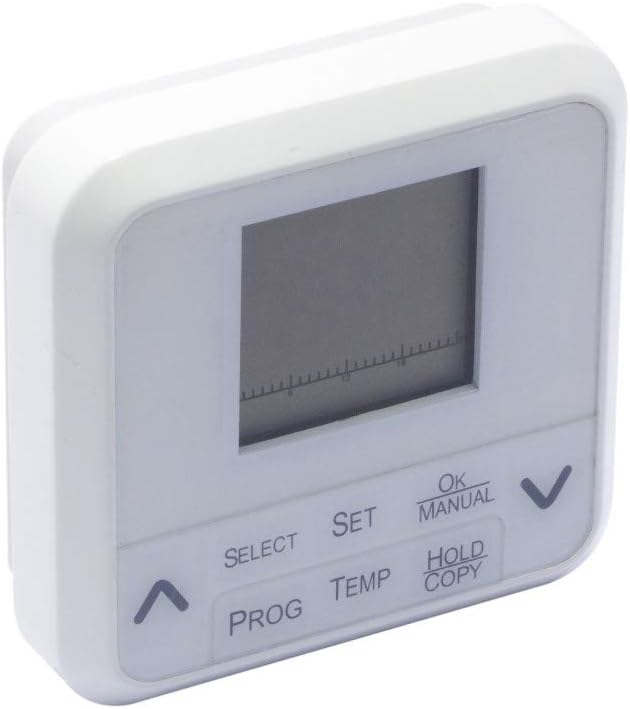
Obrázek 1: Přední view of the Chacon 54311 Digital Thermostat, showing the digital display and control buttons.
Ovládací panel obsahuje:
- Digitální displej: Shows current temperature, time, day, and program status.
- Tlačítko VYBRAT: Používá se k navigaci v možnostech nabídky.
- Tlačítko SET: Potvrzuje výběry nebo vstupuje do režimů nastavení.
- Tlačítko OK/MANUAL: Confirms settings or switches to manual operation mode.
- HOLD/COPY Button: Used to hold a temperature or copy program settings.
- Tlačítko PROG: Vstoupí do programovacího režimu.
- Tlačítko TEMP: Upravuje nastavení teploty.
- Šipky nahoru (▲) / dolů (▼): Upravte hodnoty nebo procházejte možnosti.

Obrázek 2: Detailní záběr view of the Chacon 54311 Digital Thermostat's control buttons for detailed reference.
3. Nastavení
3.1 Vybalení
Carefully remove the thermostat from its packaging. Ensure all components are present: the digital thermostat unit and this instruction manual.
3.2 Instalace baterie
The thermostat is powered by batteries (not included). Locate the battery compartment on the back of the unit. Insert the required batteries, ensuring correct polarity (+/-). The display should activate. If not, recheck battery placement or replace with new batteries.
3.3 Montáž
The Chacon 54311 is designed for wall mounting. Choose a suitable location away from direct sunlight, drafts, or heat sources that could affect temperature readings. Mount the thermostat at an appropriate height, typically 1.5 meters (5 feet) from the floor, for accurate room temperature sensing.
3.4 Zapojení
Důležité: Wiring should only be performed by a qualified electrician to ensure safety and proper functionality. Incorrect wiring can damage the thermostat or your heating system.
Connect the thermostat to your heating system according to the wiring diagram provided with your heating appliance or by a professional. The thermostat supports common 2-wire or 3-wire heating system connections.
4. Návod k obsluze
4.1 Initial Setup: Time and Day
- Stiskněte tlačítko SOUBOR tlačítko. Zobrazení času bude blikat.
- Použijte Nahoru (▲) or Dolů (▼) šipkami nastavte hodinu. Stiskněte SOUBOR potvrdit.
- Upravte minuty pomocí Nahoru (▲) or Dolů (▼) šipky. lis SOUBOR potvrdit.
- Bude blikat den v týdnu. Použijte Nahoru (▲) or Dolů (▼) arrows to select the current day (e.g., 1 for Monday, 2 for Tuesday, etc.). Press SOUBOR pro potvrzení a ukončení nastavení času/dne.
4.2 Nastavení požadované teploty
V normálním provozním režimu stiskněte tlačítko TEPL button. The target temperature will flash. Use the Nahoru (▲) or Dolů (▼) arrows to adjust the desired temperature. The thermostat will automatically save the setting after a few seconds or by pressing SOUBOR.
4.3 Programming Schedules (7 Programs)
The thermostat allows for 7 programmable schedules, offering two temperature levels: Day (comfort) and ECO (economy). Programming can be complex; follow these steps carefully.
- Stiskněte tlačítko PROG button to enter programming mode. The day of the week (e.g., '1' for Monday) and a program number will flash.
- Použijte Nahoru (▲) or Dolů (▼) arrows to select the day or group of days you wish to program. Press SOUBOR potvrdit.
- The first program period (e.g., P1) will flash. Use the Nahoru (▲) or Dolů (▼) arrows to set the start time for this period. Press SOUBOR.
- Použijte Nahoru (▲) or Dolů (▼) arrows to set the desired temperature for this period (Day or ECO). Press SOUBOR.
- Repeat steps 3 and 4 for all program periods (P1-P7) for the selected day(s).
- After setting all programs for the current day(s), press PROG again to move to the next day or group of days, or press OK/MANUÁLNĚ pro ukončení programovacího režimu.
4.4 Manual Mode (Temporary Override)
To temporarily override the current program, press the OK/MANUÁLNĚ button. The thermostat will switch to manual mode, indicated on the display. You can then use the Nahoru (▲) or Dolů (▼) arrows to set a desired temperature. This manual setting will remain active until the next programmed period or until you press OK/MANUÁLNĚ again to return to program mode.
4.5 Funkce Hold
To maintain a specific temperature indefinitely, press the HOLD/COPY button. Set your desired temperature using the Nahoru (▲) or Dolů (▼) arrows. The thermostat will maintain this temperature until the HOLD function is cancelled by pressing HOLD/COPY znovu.
5. Údržba
5.1 Výměna baterie
When the low battery indicator appears on the display, it is time to replace the batteries. Open the battery compartment on the back of the unit, remove the old batteries, and insert new ones, ensuring correct polarity. The thermostat is designed for a minimum of 1 year of normal use on a fresh set of batteries.
5.2 Čištění
Clean the thermostat's exterior with a soft, dry cloth. Do not use abrasive cleaners, solvents, or chemical sprays, as these can damage the unit.
6. Řešení problémů
- Thermostat not turning on / Display blank: Zkontrolujte instalaci baterií a ujistěte se, že jsou nové. V případě potřeby je vyměňte.
- Topný systém nereaguje: Verify that the thermostat is correctly wired to the heating system. Check the set temperature and ensure it is above the current room temperature if heating is desired. Ensure the thermostat is not in an unintended manual or hold mode.
- Potíže s programováním: Refer to section 4.3 and follow the steps precisely. Programming can be intricate; take your time and re-read instructions if needed.
- Nepřesné údaje o teplotě: Ensure the thermostat is not exposed to direct sunlight, drafts, or heat sources. Its placement significantly impacts accuracy.
- Thermostat overheating / Burning smell: Immediately remove batteries and disconnect from the heating system. This indicates a serious malfunction. Do not attempt to use the device again and contact customer support.
7. Specifikace
| Funkce | Specifikace |
|---|---|
| Číslo modelu | 54311 |
| Značka | Chacon |
| Materiál | PVC |
| Barva | Bílý |
| Styl zobrazení | Digitální |
| Zdroj napájení | Napájeno bateriemi (baterie nejsou součástí balení) |
| Max Wattage | 1150 wattů |
| Typ montáže | Držák na zeď |
| Speciální funkce | Hourly and daily programming, 7 programs |
| Zamýšlené použití | Topení Control |
8. Záruka a podpora
Specific warranty details for the Chacon 54311 Digital Thermostat are not provided in the product information. For warranty claims, technical support, or further assistance, please contact Chacon customer service directly. Keep your purchase receipt as proof of purchase.