
1. Úvod
The D-Link DES-1210-52 is a 48-port Fast Ethernet Smart Switch designed for small to medium-sized businesses. It features 48 10/100Mbps ports, two 10/100/1000Mbps Gigabit ports, and two combo SFP Gigabit uplinks, providing flexible connectivity options. This switch offers advanced management functions, including VLANs, QoS, and security features, to enhance network performance and security. This manual provides essential information for the proper installation, configuration, and operation of your DES-1210-52 switch.
2. Obsah balení
Verify the contents of your DES-1210-52 package. If any item is missing or damaged, please contact your local D-Link reseller for assistance.
- D-Link DES-1210-52 Smart Switch
- Napájecí kabel
- Rack Mount Kit (two brackets and screws)
- Gumové nožičky (pro stolní instalaci)
- CD-ROM (containing documentation and utility software)
- Průvodce rychlou instalací
3. Fyzický popis
The DES-1210-52 switch features a standard 1U rack-mountable design. Understanding the front and rear panel components is crucial for proper installation and operation.
3.1. Přední panel
The front panel includes all network ports, LED indicators, and a console port for management.
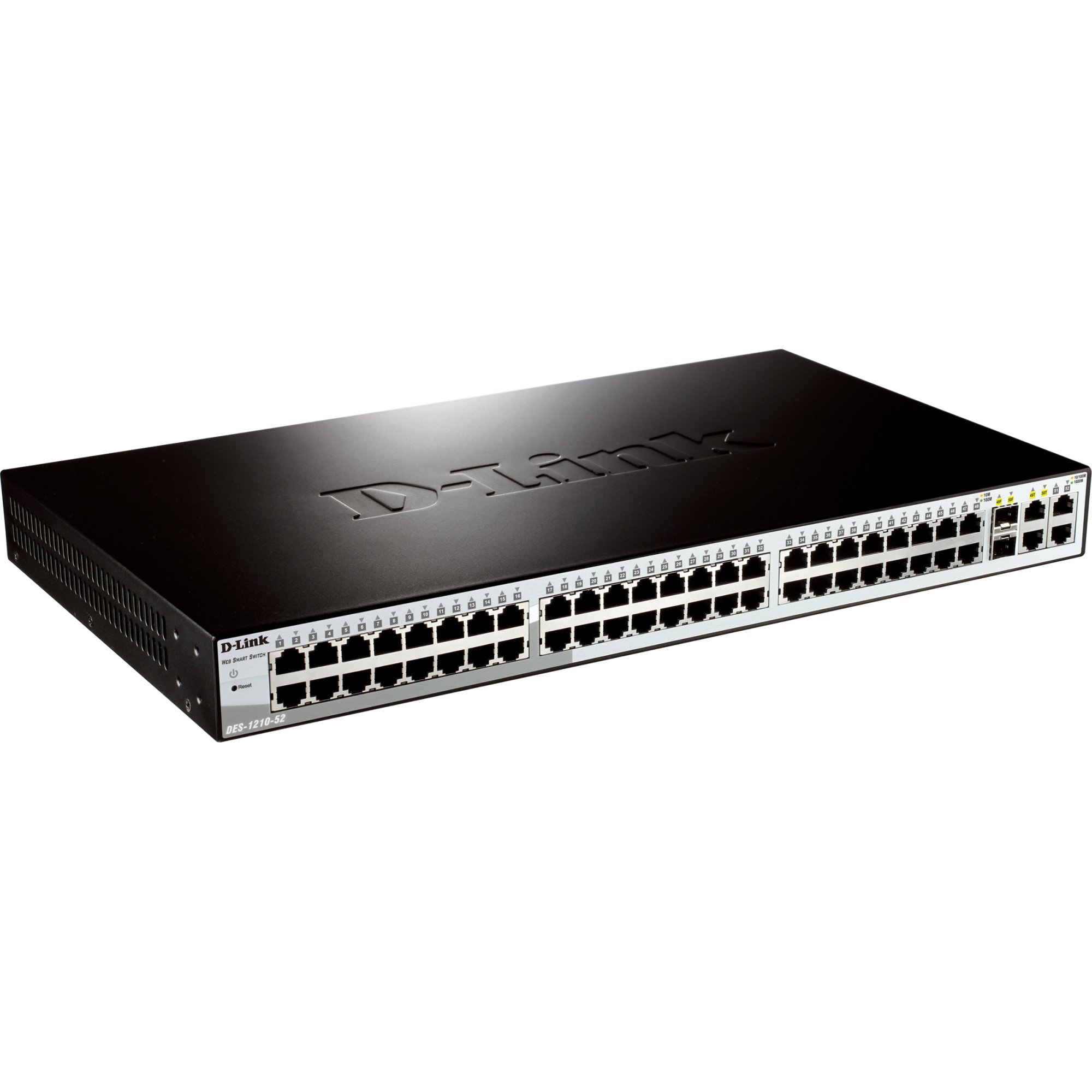
Obrázek 1: Přední view of the D-Link DES-1210-52 Smart Switch, showing 48 Fast Ethernet ports, 2 Gigabit Ethernet ports, and 2 SFP combo ports, along with LED indicators for power, link/activity, and speed.
- LED indikátory: Power, Link/Act (per port), Speed (per port).
- 10/100BASE-TX Ports (1-48): RJ-45 ports for Fast Ethernet connections.
- 10/100/1000BASE-T Ports (49-50): RJ-45 ports for Gigabit Ethernet connections.
- Combo SFP Ports (51-52): SFP slots that share bandwidth with Gigabit ports 49-50. When an SFP module is inserted, the corresponding Gigabit RJ-45 port is disabled.
- Port konzoly: RJ-45 port for command-line interface (CLI) access.
3.2. Zadní panel
The rear panel contains the power input and grounding screw.
- Napájecí zásuvka: Connects to the provided AC power cord.
- Zemnící šroub: Provides an optional connection for grounding the device.
4. Nastavení
This section outlines the steps for physically installing and connecting your D-Link DES-1210-52 Smart Switch.
4.1. Příprava místa
- Ensure the installation site is well-ventilated and within the recommended operating temperature and humidity ranges.
- Place the switch on a sturdy, level surface or in a standard 19-inch equipment rack.
- Ensure a stable power source is available.
4.2. Instalace na plochu
For desktop use, attach the included rubber feet to the bottom of the switch to prevent scratching and provide stability.
4.3. Instalace do stojanu
To install the switch in a standard 19-inch equipment rack:
- Attach the two rack-mounting brackets to the sides of the switch using the provided screws.
- Secure the switch in the rack using the screws provided with the rack.
4.4. Připojení napájení
Connect the supplied AC power cord to the power receptacle on the rear panel of the switch and then to a suitable power outlet. The Power LED on the front panel will illuminate.
4.5. Connecting Network Devices
Connect network devices (e.g., computers, servers, other switches) to the 10/100BASE-TX or 10/100/1000BASE-T ports using standard Ethernet cables. For fiber optic connections, insert compatible SFP transceivers into the SFP slots and connect fiber optic cables.
5. Provoz
The DES-1210-52 is a Smart Switch, offering various management options for configuration and monitoring.
5.1. Počáteční přístup
Přepínač lze spravovat pomocí Web-based GUI, a Command Line Interface (CLI) through the console port, or SNMP.
- Webmanagement založený na: By default, the switch obtains an IP address via DHCP. If no DHCP server is present, it will use a default IP address (refer to the Quick Installation Guide or CD-ROM documentation for the specific default IP). Connect a computer to any switch port and configure its IP address to be in the same subnet as the switch. Open a web prohlížeč a zadejte IP adresu přepínače.
- Správa CLI: Connect a console cable (RJ-45 to DB-9) from the switch's console port to a serial port on a computer. Use a terminal emulation program (e.g., PuTTY, Tera Term) with appropriate settings (e.g., 115200 baud, 8 data bits, no parity, 1 stop bit, no flow control).
5.2. Základní konfigurace
After initial access, it is recommended to:
- Change the default administrator password.
- Configure a static IP address for the switch if a DHCP server is not consistently available or preferred.
- Nastavte systémový čas a datum.
- Save the configuration to prevent loss upon reboot.
6. Údržba
Regular maintenance ensures optimal performance and longevity of your D-Link DES-1210-52 Smart Switch.
- Aktualizace firmwaru: Pravidelně kontrolujte podporu D-Link website for the latest firmware versions. Updating firmware can provide new features, performance improvements, and security patches. Follow the instructions provided with the firmware update package carefully.
- Čištění: Keep the switch free from dust and debris. Use a soft, dry cloth to clean the exterior. Ensure ventilation openings are clear. Do not use liquid or aerosol cleaners directly on the switch.
- Záloha konfigurace: Pravidelně zálohujte konfiguraci přepínače na externí zařízení. To umožňuje rychlé obnovení v případě selhání zařízení nebo nesprávné konfigurace.
- Monitorování životního prostředí: Ensure the operating environment remains within specified temperature and humidity limits to prevent overheating or moisture damage.
7. Řešení problémů
This section provides solutions to common issues you might encounter with your DES-1210-52 Smart Switch.
7.1. Power LED is Off
- Ujistěte se, že je napájecí kabel bezpečně připojen k přepínači i k funkční zásuvce.
- Verify the power outlet is supplying power by testing it with another device.
7.2. No Link/Activity LED on a Connected Port
- Check that the Ethernet cable is properly connected at both ends.
- Ujistěte se, že připojené zařízení je zapnuté a funguje správně.
- Zkuste jiný ethernetový kabel.
- Verify that the port on the connected device is active.
7.3. Nelze přistupovat Web-rozhraní pro správu
- Ujistěte se, že IP adresa vašeho počítače je ve stejné podsíti jako IP adresa přepínače.
- Verify the switch's IP address. If unknown, you may need to reset the switch to factory defaults (refer to the full manual for instructions, as this will erase all configurations).
- Dočasně vypněte veškerý firewall nebo antivirový software v počítači, abyste zabránili rušení.
- Zkuste se k rozhraní připojit z jiného web prohlížeč nebo počítač.
8. Specifikace
| Funkce | Popis |
|---|---|
| Číslo modelu | DES-1210-52 |
| Značka | D-Link |
| Počet portů | 48 (10/100Mbps) + 2 (10/100/1000Mbps) + 2 (Combo SFP) |
| Typ rozhraní | RJ-45, SFP |
| Rychlost přenosu dat | 10/100 Mbps (Fast Ethernet), 1 Gbps (Gigabit Ethernet) |
| Hmotnost položky | 4.08 kg |
| Kompatibilní zařízení | Desktop (and other network devices) |
| Platforma | Není specifické pro stroj |
9. Záruka a podpora
D-Link provides a limited warranty for its products. The specific terms and conditions of the warranty may vary by region. Please refer to the warranty information included with your product or visit the official D-Link website for detailed warranty statements.
For technical support, product documentation, firmware updates, and FAQs, please visit the D-Link support portal. You can typically find support resources by searching for your product model (DES-1210-52) on the D-Link webmísto.
Podpora D-Link Webmísto: www.dlink.com/support