
Zavedení
This manual provides detailed instructions for the operation and maintenance of your Samsung HT-TZ225 remote control. This remote is specifically designed to control compatible Samsung Home Cinema DVD Players, offering convenient access to various functions from a distance.
Bezpečnostní informace
Bezpečnost baterie: Vždy vkládejte baterie se správnou polaritou (+/-). Nekombinujte staré a nové baterie ani různé typy baterií. Pokud dálkový ovladač nebudete delší dobu používat, vyjměte baterie, abyste zabránili vytečení.
Likvidace: Použité baterie zlikvidujte v souladu s místními předpisy. Nevhazujte baterie do ohně.
Prostředí: Keep the remote control away from direct sunlight, heat sources, and moisture. Avoid dropping the remote or subjecting it to strong impacts.
Obsah balení
Please check that the following item is included in your package:
Samsung HT-TZ225 Remote Control (1 unit)
Poznámka: Baterie obvykle nejsou součástí balení a je nutné je zakoupit samostatně.
Konec produktuview
The Samsung HT-TZ225 remote control features an ergonomic design for comfortable handling and intuitive button placement for easy operation of your Home Cinema DVD Player.
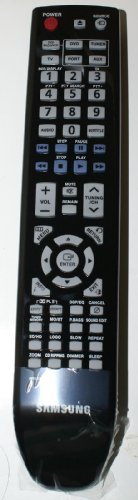
Obrázek: Přední strana view of the Samsung HT-TZ225 remote control, showing various function buttons.
Funkce tlačítek
While the exact layout may vary slightly, typical buttons on the HT-TZ225 remote control include:
Vypínač: Turns the Home Cinema system on or off.
Tlačítko Zdroj/Funkce: Selects input sources (e.g., DVD, AUX, TV).
Zvýšení/Snížení hlasitosti: Nastavuje hlasitost zvuku.
Tlačítko ztlumení: Ztiší zvukový výstup.
Numerická klávesnice (0-9): Pro přímý výběr skladby nebo zadávání čísel.
Navigační tlačítka (nahoru, dolů, vlevo, vpravo): Používá se k navigaci v nabídkách a výběru.
Tlačítko Enter/OK: Potvrzuje výběr nebo vstupuje do nabídky.
Return/Exit Button: Návrat do předchozí nabídky nebo opuštění aktuální nabídky.
Ovládání přehrávání (Přehrát, Pozastavit, Zastavit, Rychle vpřed, Přetočit zpět, Přeskočit): Controls DVD playback.
Menu/Title Button: Accesses the DVD menu or title menu.
Audio/Subtitle Button: Výběr jazyka zvukových stop nebo titulků.
Nastavení
Instalace baterie
Najděte kryt prostoru pro baterie na zadní straně dálkového ovladače.
Posuňte kryt dolů nebo stiskněte západku a zvedněte jej, abyste přihrádku otevřeli.
Insert two AA batteries (not included) into the compartment, ensuring the positive (+) and negative (-) terminals align correctly with the indicators inside the compartment.
Nasaďte kryt přihrádky na baterie tak, že jej zasunete zpět na místo, dokud bezpečně nezacvakne.
Note: For optimal performance, use high-quality alkaline batteries.
Návod k obsluze
Ensure your Samsung Home Cinema DVD Player is powered on and connected to your display device before using the remote control.
Základní funkce
Zapnutí/vypnutí: Point the remote at the Home Cinema system and press the Moc button once to turn it on or off.
Výběr zdroje: Stiskněte tlačítko Zdroj or Funkce button repeatedly to cycle through available input sources (e.g., DVD, AUX, TV).
Nastavení hlasitosti: Stiskněte tlačítko Zvýšení hlasitosti or Snížit hlasitost tlačítky pro zvýšení nebo snížení hlasitosti.
Muting Audio: Stiskněte tlačítko Ztlumit button to temporarily silence the audio. Press it again to restore sound.
DVD Playback Functions
Hrát: Stiskněte tlačítko Hrát button to start DVD playback.
Pauza: Stiskněte tlačítko Pauza pro dočasné zastavení přehrávání. Stiskněte tlačítko Hrát znovu pokračovat.
Stop: Stiskněte tlačítko Zastávka button to end playback and return to the DVD menu or beginning.
Rychlé převíjení vpřed/vzad: Stiskněte tlačítko Rychle vpřed or Přetočit zpět buttons to scan through the content. Press Hrát to resume normal speed.
Skip Track/Chapter: Použijte Přeskočit vpřed or Přeskočit zpět buttons to jump to the next or previous track/chapter.
Navigace v nabídce: Použijte Up, Dolů, Vlevo, Právo arrow buttons to navigate through DVD menus. Press Enter/OK provést výběr.
Accessing DVD Menu: Stiskněte tlačítko Menu or Titul button to access the main DVD menu.
Údržba
Čištění dálkového ovladače
Wipe the surface with a soft, dry cloth. For stubborn dirt, slightly dampnavlhčete hadřík vodou nebo jemným neabrazivním čisticím prostředkem.
Nepoužívejte agresivní chemikálie, rozpouštědla ani abrazivní čisticí houbičky, protože by mohly poškodit povrchovou úpravu dálkového ovladače nebo jeho vnitřní součásti.
Zajistěte, aby se do dálkového ovladače nedostala žádná kapalina skrz mezery mezi tlačítky nebo skrz přihrádku na baterie.
Výměna baterie
Replace the batteries when the remote control's range decreases significantly or if it stops responding. Follow the battery installation steps outlined in the "Setup" section.
Odstraňování problémů
| Problém | Možná příčina | Řešení |
|---|---|---|
| Dálkové ovládání nefunguje. | Batteries are depleted or inserted incorrectly. Obstruction between remote and Home Cinema system. Remote is out of range. | Replace batteries with new ones, ensuring correct polarity. Remove any objects blocking the signal path. Move closer to the Home Cinema system (within 10 meters). |
| Dálkové ovládání funguje přerušovaně. | Weak batteries. Infrared sensor on Home Cinema system is dirty or obstructed. | Replace batteries. Clean the infrared sensor on your Home Cinema system. Ensure no strong light sources are interfering with the signal. |
| Konkrétní tlačítka nereagují. | Tlačítko může být zaseknuté nebo poškozené. | Gently press the button multiple times. If the issue persists, the remote may require service or replacement. |
Specifikace
Název modelu: HT-TZ225
Značka: Samsung
Kompatibilní zařízení: Home Cinema DVD Player
Technologie připojení: Infračervený
Typ ovladače: Ovládání tlačítkem
Maximální rozsah: 10 metrů
Popis baterie: AA (x2, not included)
Barva: Černý
Záruka a podpora
This remote control is an authentic Samsung part. For specific warranty information, please refer to the documentation provided with your original Samsung Home Cinema DVD Player or visit the official Samsung support webmísto.
For technical assistance or further inquiries, please contact Samsung customer support through their official channels.
Note: Warranty terms may vary by region and retailer. Keep your purchase receipt for warranty claims.


