
1. Konec produktuview
The HP 41B PCIe 4GB FC Single Port HBA (Host Bus Adapter) is designed to provide high-performance Fibre Channel connectivity for servers and storage systems. This adapter facilitates reliable data transfer between servers and Fibre Channel storage arrays, supporting critical enterprise applications.
It features a single LC port and utilizes the PCI Express 2.0 interface, delivering a data transfer rate of 4Gbps. This manual provides instructions for the proper installation, operation, and maintenance of your HP 41B HBA.
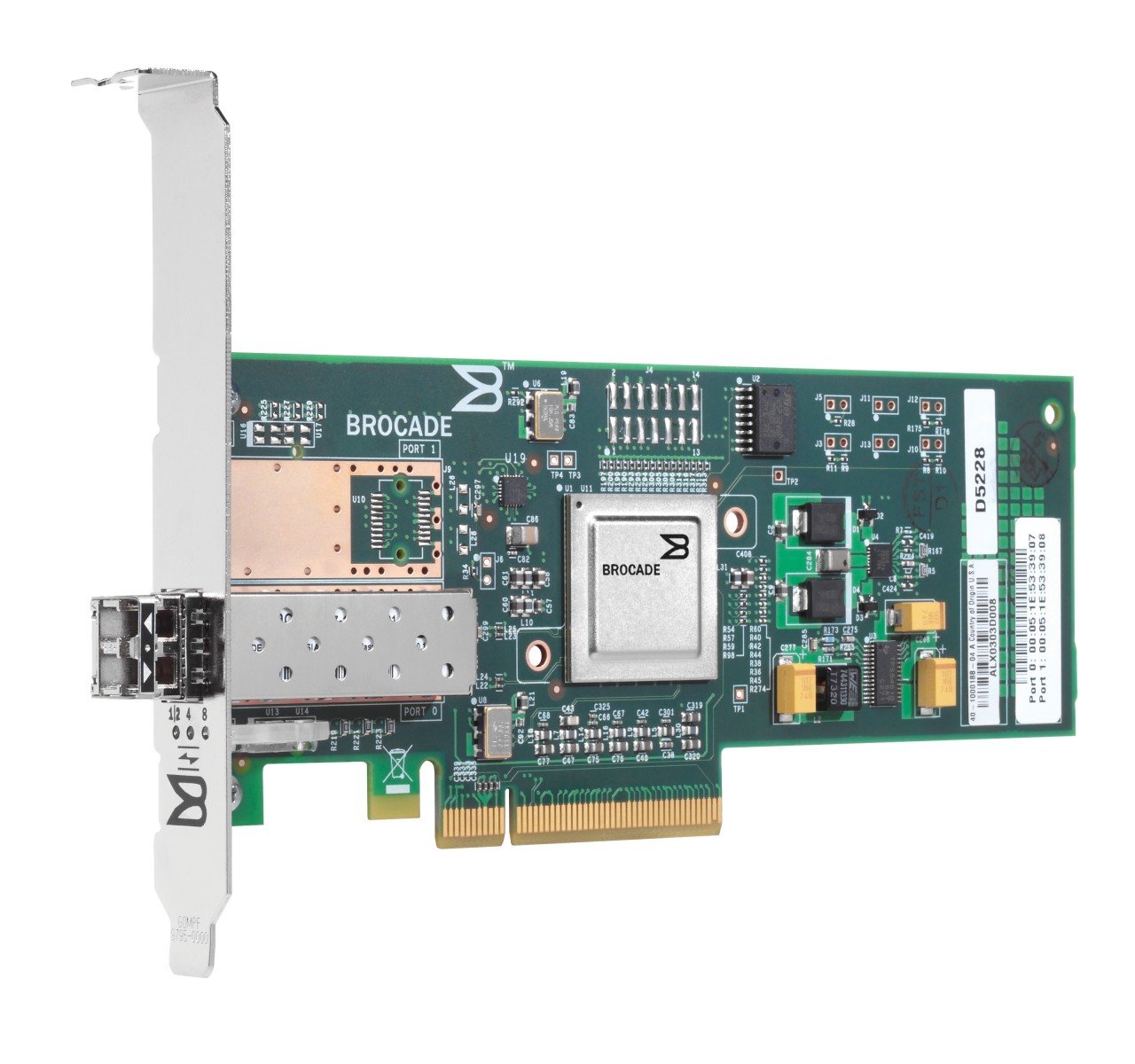
Obrázek 1.1: Přední strana view of the HP 41B PCIe 4GB FC Single Port HBA. This image displays the physical card with its single LC Fibre Channel port and PCIe connector.
2. Bezpečnostní informace
Please read all safety instructions carefully before installing or operating the HP 41B HBA. Failure to follow these instructions may result in injury, damage to the product, or damage to other components.
- Opatření proti elektrostatickému výboji (ESD): Always wear an ESD wrist strap and work on an ESD-safe surface when handling the HBA. ESD can damage sensitive electronic components.
- Vypnout: Ensure the server or workstation is completely powered off and disconnected from the power source before installing or removing the HBA.
- Správná manipulace: Hold the HBA by its edges. Avoid touching the gold connector pins or any components on the circuit board.
- Větrání: Ensure adequate airflow within the server chassis to prevent overheating.
- Kvalifikovaný personál: Installation and maintenance should only be performed by qualified service personnel.
3. Obsah balení
Ověřte, zda jsou v balení přítomny všechny položky. Pokud některé položky chybí nebo jsou poškozené, ihned kontaktujte svého prodejce.
- HP 41B PCIe 4GB FC Single Port HBA (Model AP767A)
- Low-profile bracket (if applicable, may be pre-installed or included separately)
- Documentation (e.g., Quick Start Guide, Driver CD/URL - Note: Drivers are typically downloaded from the manufacturer's webmísto)
4. Nastavení a instalace
Follow these steps to install the HP 41B HBA into your server or workstation.
4.1. Instalace hardwaru
- Připravte systém: Vypněte server a odpojte všechny napájecí kabely. Otevřete šasi serveru podle pokynů výrobce.
- ESD ochrana: Put on an ESD wrist strap and attach it to a grounded metal surface on the server chassis.
- Select a PCIe Slot: Locate an available PCI Express 2.0 (or higher) slot on the motherboard. Ensure it is compatible with the HBA's form factor.
- Odstraňte kryt slotu: Sejměte příslušný kryt rozšiřujícího slotu ze šasi serveru.
- Install the HBA: Carefully align the HBA with the PCIe slot. Apply even pressure to both ends of the card until it is firmly seated in the slot. Secure the HBA with the retention clip or screw provided by the server chassis.
- Zavřít podvozek: Zavřete šasi serveru a znovu připojte všechny napájecí kabely.
4.2. Instalace ovladače
After hardware installation, you must install the appropriate drivers for your operating system.
- Zapnutí: Power on the server. The operating system may detect new hardware.
- Stáhnout ovladače: Navštivte oficiální podporu HP webweb (www.hp.com/support) and search for drivers for "HP 41B PCIe 4GB FC Single Port HBA" or "Model AP767A". Download the latest drivers compatible with your operating system.
- Nainstalujte ovladače: Follow the on-screen instructions to install the downloaded drivers. This may require a system reboot.
- Ověřte instalaci: After rebooting, check your operating system's Device Manager (Windows) or equivalent utility (Linux/Unix) to confirm that the HBA is recognized and functioning correctly.
5. Obsluha HBA
Once the HBA is installed and drivers are loaded, you can connect it to your Fibre Channel storage network.
- Connect Fibre Channel Cable: Connect a compatible Fibre Channel cable (LC-LC) from the HBA's port to your Fibre Channel switch or directly to a storage device.
- Verify Link Status: Check the LED indicators on the HBA (if present) and on the Fibre Channel switch/storage device to confirm a successful link. Refer to the HBA's specific LED guide for status interpretations.
- Configure Storage: Configure your storage array and server operating system to recognize and utilize the connected Fibre Channel storage. This typically involves zoning on the Fibre Channel switch and LUN mapping on the storage array. Consult your storage system documentation for detailed configuration steps.
- Test připojení: Perform tests to ensure data can be read from and written to the Fibre Channel storage.
6. Údržba
Regular maintenance helps ensure the longevity and optimal performance of your HP 41B HBA.
- Udržujte v čistotě: Periodically inspect the HBA and server interior for dust accumulation. Use compressed air to gently clean the card and surrounding areas. Ensure the server is powered off and unplugged before cleaning.
- Aktualizace firmwaru: Zkontrolujte podporu HP website regularly for firmware updates for your HBA. Firmware updates can improve performance, add features, or resolve issues. Follow HP's instructions carefully when performing firmware updates.
- Aktualizace ovladačů: Keep your HBA drivers updated to ensure compatibility and optimal performance with your operating system and storage environment.
- Kontrola prostředí: Ensure the server operates within recommended temperature and humidity ranges to prevent component stress.
7. Řešení problémů
This section provides solutions to common issues you might encounter with your HP 41B HBA.
- HBA Not Detected:
- Ensure the HBA is fully seated in the PCIe slot.
- Verify that the PCIe slot is functional by testing with another known-good card if possible.
- Check server BIOS/UEFI settings to ensure PCIe slots are enabled.
- Ujistěte se, že jsou pro váš operační systém nainstalovány správné ovladače.
- No Link Light / Connectivity Issues:
- Check Fibre Channel cable connections at both the HBA and the switch/storage.
- Ensure the Fibre Channel cable is not damaged. Try a different cable.
- Verify that the Fibre Channel switch port is enabled and properly configured (e.g., zoning).
- Check HBA firmware and driver versions. Update if necessary.
- Špatný výkon:
- Ensure the HBA is installed in a PCIe slot that provides sufficient bandwidth (e.g., PCIe 2.0 x4 or higher).
- Verify that the Fibre Channel network is operating at 4Gbps (or negotiated speed).
- Check for updated drivers and firmware.
- Monitor server resource utilization (CPU, memory) to identify bottlenecks.
If issues persist, consult the HP support webwebu nebo se obraťte na technickou podporu HP.
8. Specifikace
Key technical specifications for the HP 41B PCIe 4GB FC Single Port HBA (Model AP767A):
| Funkce | Specifikace |
|---|---|
| Značka | HEWLETT PACKARD |
| Číslo modelu | AP767A |
| Hardwarové rozhraní | Fibre Channel |
| Rychlost přenosu dat | 4 Gbps |
| Typ portu | 1 x LC |
| Verze PCI Express | 2.0 |
| Hmotnost položky | 2730 gramů |
| UPC / GTIN | 884962013434 |
9. Záruka a podpora
For detailed warranty information, please refer to the warranty statement included with your product or visit the official HP webweb. Společnost HP poskytuje různé zdroje podpory, které vám pomohou s vaším produktem.
- Online podpora: Návštěva www.hp.com/support for drivers, documentation, troubleshooting guides, and knowledge base articles.
- Technická podpora: Contact HP technical support for assistance with product issues. Contact information can be found on the HP support webmísto.
- Registrace výrobku: Zaregistrujte si svůj produkt online a dostávejte aktualizace a oznámení o podpoře.