
1. Konec produktuview
The Skytronic Compact Hifi Stereo Karaoke DJ PA Amplifier (Model 103.102) is designed for versatile audio applications, offering a blend of compact size and powerful performance. It features multiple input options for various audio sources and microphones, along with adjustable sound controls for an enhanced listening and karaoke experience.
1.1 Klíčové vlastnosti
- Ultra-compact dimensions for easy placement.
- 400 W Max Power (equivalent to 2 x 50 W RMS).
- Two 6.3 mm jack microphone inputs with adjustable echo effect.
- Three RCA stereo line inputs (CD/VCD, AUX, AC-3).
- One 3.5 mm jack AUX input (front panel).
- One RCA stereo line output.
- Two sets of screw terminals for speaker connections.
- 2-band equalizer with adjustable bass and treble.
- Adjustable balance and master volume controls.
- Large input-selection knob for easy source switching.
1.2 Ovládací prvky a indikátory na předním panelu

Figure 1: Front Panel Layout. This image displays the amplifier's front panel, highlighting the power button, input selection knob, volume control, microphone inputs, and tone controls.
- Tlačítko napájení: Přepíná ampzapínání/vypínání zvlhčovače.
- Input Selector (CD/VCD, AUX, AC-3): Rotates to select the desired audio input source.
- Knoflík VOLUME: Upravuje celkovou výstupní hlasitost.
- Knoflík BALANCE: Upravuje vyvážení levého/pravého kanálu.
- Knoflík TREBLE: Upravuje vysokofrekvenční odezvu.
- Knoflík BASS: Upravuje nízkofrekvenční odezvu.
- Vstupy MIC1 / MIC2: 6.3mm jack vstupy pro mikrofony.
- M. VOL Knob: Nastavuje hlasitost mikrofonu.
- Knoflík ECHO: Upravuje úroveň efektu ozvěny pro mikrofony.
- Osvětlený displej: Shows current input selection and audio level indicators.
1.3 Připojení zadního panelu
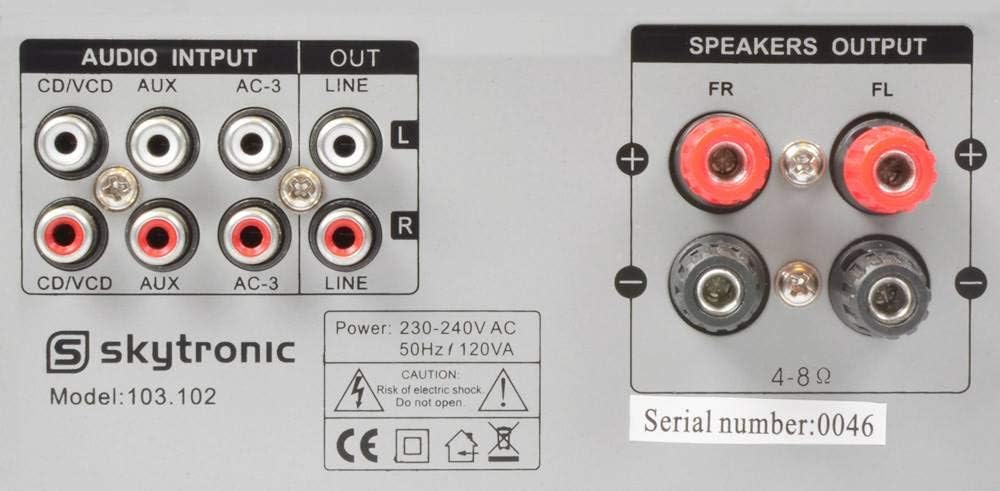
Figure 2: Rear Panel Connections. This image illustrates the various audio input and output ports, including RCA inputs, line output, and speaker terminals.
- AUDIO INPUTS (CD/VCD, AUX, AC-3): RCA stereo inputs for connecting external audio sources like CD/DVD players, media players, or other audio devices.
- LINE OUT: RCA stereo output for connecting to another ampzvedací nebo záznamové zařízení.
- SPEAKERS OUTPUT (FR, FL): Screw terminals for connecting passive speakers. Ensure correct polarity (+ to + and - to -).
- Příkon: For connecting the 230V, 50Hz power supply cable.
2. Pokyny k nastavení
Follow these steps to properly set up your Skytronic ampživější.
2.1 Připojení reproduktorů
- Zajistěte ampje zářič vypnutý a odpojený od elektrické zásuvky.
- Connect your passive speakers to the "SPEAKERS OUTPUT" terminals on the rear panel.
- Přizpůsobte kladný (+) pól na ampnapáječ ke kladnému (+) pólu reproduktoru a zápornému (-) pólu ampnapáječ k zápornému (-) pólu reproduktoru.
- Ensure all speaker wire connections are secure and there are no loose strands that could short circuit.
- The ampLiferier podporuje reproduktory s impedancí 4-8 ohmů.
2.2 Připojení zdrojů zvuku
- Connect your audio sources (e.g., CD player, DVD player, media streamer) to the appropriate RCA "AUDIO INPUTS" (CD/VCD, AUX, AC-3) on the rear panel using RCA cables.
- For devices with a 3.5mm output (e.g., smartphone, MP3 player), use a 3.5mm to 3.5mm audio cable to connect to the "AUX" input on the front panel.
- If connecting to another amplifier or recording device, use RCA cables from the "LINE OUT" on the rear panel of this amplifier to the input of the other device.
2.3 Připojení mikrofonů
- Insert 6.3mm jack microphones into the "MIC1" or "MIC2" inputs on the front panel.
2.4 Připojení napájení
- Jakmile jsou všechna audio a reproduktorová připojení provedena, zapojte amplifier's power cable into a standard 230V, 50Hz AC power outlet.
3. Návod k obsluze
This section details how to operate your Skytronic ampzvlhčovač pro optimální výkon.
3.1 Základní obsluha
- Stiskněte tlačítko MOC tlačítko pro zapnutí amplifier. The illuminated display will light up.
- Otočte Volič vstupu knob to choose the desired audio source (CD/VCD, AUX, AC-3).
- Start playback from your selected audio source.
- Upravte OBJEM knob to your desired listening level. Start with a low volume and gradually increase it.
3.2 Nastavení zvuku
- BAS: Turn the BASS knob clockwise to increase low frequencies (deeper sound) or counter-clockwise to decrease them.
- ZTROJNÁSOBIT: Turn the TREBLE knob clockwise to increase high frequencies (brighter sound) or counter-clockwise to decrease them.
- VÁHY: Adjust the BALANCE knob to shift the audio output between the left and right speakers. Set to the center for balanced sound.
3.3 Using Microphones for Karaoke
- Ensure microphones are connected to the MIC1 or MIC2 inputs.
- Upravte M. VOL (Microphone Volume) knob to control the microphone's output level.
- Upravte ECHO knoflík pro přidání nebo odebrání efektu ozvěny ke zvuku mikrofonu.
- Sing into the microphone while playing background music from your selected audio source.
4. Údržba
Správná údržba zajistí dlouhou životnost a optimální výkon vašeho ampživější.
- Čištění: K čištění vnějších částí používejte měkký, suchý hadřík ampNepoužívejte tekuté čisticí prostředky ani aerosoly, protože by mohly poškodit povrchovou úpravu nebo vnitřní součásti.
- Větrání: Ensure the ventilation slots on the top and sides of the ampZáchranné filtry nejsou zablokované. Dostatečné proudění vzduchu je zásadní, aby se zabránilo přehřátí.
- Skladování: Pokud uchováváte ampPokud přístroj nepoužíváte delší dobu, odpojte jej ze zásuvky a skladujte jej na chladném a suchém místě mimo dosah přímého slunečního záření a extrémních teplot.
- Napájecí kabel: Regularly inspect the power cord for any signs of damage. If damaged, do not use the amplifier and seek professional repair.
5. Řešení problémů
Pokud narazíte na problémy s vaším ampPokud se jedná o problém s ochranou proti přetížení, podívejte se na následující běžné problémy a jejich řešení.
| Problém | Možná příčina | Řešení |
|---|---|---|
| Žádná síla | Napájecí kabel není připojen; Vadná zásuvka; Amppřepálená pojistka záchranného ventilu. | Ensure power cord is securely plugged in; Test power outlet with another device; Contact qualified service personnel for fuse replacement. |
| Žádný zvukový výstup | Incorrect input selected; Volume too low; Speakers not connected or faulty; Audio source not playing. | Select correct input source; Increase VOLUME knob; Check speaker connections and ensure speakers are functional; Verify audio source is playing correctly. |
| Zkreslený zvuk | Volume too high; Incorrect impedance speakers; Loose connections. | Reduce VOLUME; Ensure speakers are 4-8 ohms; Check all audio and speaker connections. |
| Mikrofon nefunguje | Microphone not connected; M. VOL too low; Microphone faulty. | Ensure microphone is securely plugged into MIC1/MIC2; Increase M. VOL knob; Test microphone with another device if possible. |
| Hučení nebo bzučení | Ground loop issue; Interference from other electronics; Loose audio cables. | Try plugging amplifier into a different outlet; Move amplifier away from other electronic devices; Ensure all audio cables are securely connected. |
Pokud problém přetrvává i po vyzkoušení těchto řešení, kontaktujte zákaznickou podporu.
6. Specifikace
Detailed technical specifications for the Skytronic Stereo Karaoke Amplifier (Model 103.102).
| Funkce | Specifikace |
|---|---|
| Číslo modelu | 103.102 |
| Maximální výstupní výkon | 400 W (equivalent to 2 x 50 W RMS) |
| Frekvenční odezva | 20 Hz až 20 kHz |
| Odstup signálu od šumu | > 76 dB |
| Impedance | 4 8-ohm |
| Napájení | 230 V, 50 Hz |
| Rozměry produktu (D x Š x V) | 11.02 x 8.66 x 37.4 palce |
| Hmotnost položky | 5.73 libry |
| Výrobce | Skytronics |
7. Záruka a podpora
This section provides general information regarding product warranty and customer support.
7.1 Informace o záruce
Specific warranty details for the Skytronic Stereo Karaoke Amplifier (Model 103.102) are typically provided at the point of purchase or within separate warranty documentation included with the product. Please refer to your purchase receipt or the manufacturer's official website for the most accurate and up-to-date warranty terms and conditions. Standard warranties usually cover manufacturing defects for a specified period from the date of purchase.
7.2 Zákaznická podpora
For technical assistance, troubleshooting beyond this manual, or inquiries regarding parts and service, please contact Skytronic customer support. Contact information can usually be found on the manufacturer's official website or on the product packaging. When contacting support, please have your product model number (103.102) and purchase details ready.
Note: As specific contact details are not provided in this manual, please refer to the official Skytronic website or your retailer for support contact information.